

- Mark as New
- Bookmark
- Subscribe
- Permalink
- Report Inappropriate Content
Other questions
I'll make sure you'll resubscribe to your QuickBooks Online (QBO) account, Sam.
With just a few clicks and you're all set. Let me guide you how.
- Go to the Gear icon.
- Select Account and settings.
- Click the Billing & Subscription section, then click Resubscribe.
- Enter the updated billing information, and select Subscribe.
You can also utilize this article for the complete details: How to resubscribe or reactivate QuickBooks Online.
If you still wish to get in touch with our support team, you can refer to the steps outlined in this article: QuickBooks Online Support. Ensure to review their support hours to know when agents are available.
In case you need to learn some tips and tricks and in managing your QBO account, you can always visit our QuickBooks Support page for reference. There, you can browse some articles that can guide you in your future tasks.
Need more help managing and renewing your account? Please feel free to tag me in your reply. I'm always here to back you up!

- Mark as New
- Bookmark
- Subscribe
- Permalink
- Report Inappropriate Content
Other questions
Do you have QBO account or QB Desktop Plus/Enterprise?

- Mark as New
- Bookmark
- Subscribe
- Permalink
- Report Inappropriate Content
Other questions
Send details of payment of subscription

- Mark as New
- Bookmark
- Subscribe
- Permalink
- Report Inappropriate Content
Other questions
Thank you for turning to the Community about your subscription concern, ramdevbabaonline.
I can answer any questions you may have about QuickBooks including your subscription. To ensure the best solution, I just need to gather more details on what you’re experiencing.
Did you already renew your subscription and run into an error? Can you provide the specific code or message? May I know if you encounter any hurdles performing a specific task in your company?
I appreciate any additional information you can share. I’m looking forward to your response.

- Mark as New
- Bookmark
- Subscribe
- Permalink
- Report Inappropriate Content
Other questions
Dear sir,
I was unable to renewal my subscription
@VPM wrote:Dear QBO Support Team,
Please help to resolve the issue. There's following error - 'Please update your Company Address information and try again.If the issue persists, please contact support and reference this message(Error code:-81716)' - after inputting new card details for payment for Company ID [removed]Company Address is still actual and browser cache was cleared but this didn't help to resolve the issueThanks

- Mark as New
- Bookmark
- Subscribe
- Permalink
- Report Inappropriate Content
Other questions
Hi there destiny cargo,
It's vital that all your payment information is up to date so that your subscriptions can be renewed. QuickBooks software is great in order to help you manage the books of your business to see your company's finances. I can point you in the right direction for assistance with updating your payment details.
If you're using QuickBooks Desktop, you can reach out to the support team outside of the Community to be able to update the payment information. They'll be able to verify your account info in a secure setting in order to update that payment method for you. You can reach them using the methods provided in the QuickBooks Desktop software support policies.
If you're using QuickBooks Online, you can update your payment information by going to the Gear Icon, then Account and Settings. Go to the Billing and subscription section, and hit the option to edit beside your payment information. If you still aren't able to update the payment information due to error messages, you can reach out to the QuickBooks Online support team using these steps in order to have them update the payment method for you:
Schedule a Callback or start a Chat: click (?)Help in the upper right > type and enter "Contact support" into the QB Assistant > click Contact Us > explain your situation > click Let's Talk > choose Get a callback or Start a Chat.
If you have any other questions, feel free to reach out here.

- Mark as New
- Bookmark
- Subscribe
- Permalink
- Report Inappropriate Content
Other questions
My account expired 10/28/22 How can i renew my subscription?

- Mark as New
- Bookmark
- Subscribe
- Permalink
- Report Inappropriate Content
Other questions
I appreciate you for joining the thread. Now that I'm here, I'll walk you through on how you can resubscribe your account in QuickBooks.
If you're using QuickBooks Online, you can resubscribe to your account by going to the Accounts and setting. To begin, here's how:
- Log in to your QuickBooks Online company.
- Click the Gear icon in the top right corner.
- Under Your Company, choose Account and Settings.
- Select Billing & Subscription, then Resubscribe, and enter the updated billing information.
- Select Subscribe.
In case you're using QuickBooks Desktop (QBDT), I recommend reaching out to our Customer Care Support Team. This way, they'll be able to assist you so you can renew your QBDT subscription. Visit this article for further guidelines: Contact QuickBooks Desktop support.
In addition, I've got you this article to help you manage payments in QBO: Take and process payments in QuickBooks Online with QuickBooks Payments.
I'd also recommend checking this page to learn more on how you can track the money in and out inside your business: Track your cash flow in QuickBooks Online.
In case you need further assistance renewing the subscription to your QuickBooks. You can always get back to me by clicking the REPLY button below the comment section. You can also post here again if you have any additional QuickBooks-related concerns or need help performing specific tasks in QuickBooks. Rest assured, I've got your back, and It'll be my pleasure to help you again. Take care, and have a great weekend.

- Mark as New
- Bookmark
- Subscribe
- Permalink
- Report Inappropriate Content
Other questions
change credit payment

- Mark as New
- Bookmark
- Subscribe
- Permalink
- Report Inappropriate Content
Other questions
My credit card number has been changed
- Mark as New
- Bookmark
- Subscribe
- Permalink
- Report Inappropriate Content
Other questions
It says subscription alert, how do i update tax tables to do payroll

- Mark as New
- Bookmark
- Subscribe
- Permalink
- Report Inappropriate Content
Other questions
Good evening, @Serena Bowman.
Congrats on making your first post here in the Community and thanks for chiming in on this thread.
To clarify, can you provide me with the subscription alert that you're receiving?
In the meantime, you can check out this link about updating your tax tables: Get the latest tax table update in QuickBooks Desktop Payroll.
I'll be back around shortly to gather that information from you!

- Mark as New
- Bookmark
- Subscribe
- Permalink
- Report Inappropriate Content
Other questions
its not letting me pay for the renewal
- Mark as New
- Bookmark
- Subscribe
- Permalink
- Report Inappropriate Content
Other questions
Login to your CAMPS as the Primary Contact and check your billing info. Another option, purchase a new license for QBD 2023.
- Mark as New
- Bookmark
- Subscribe
- Permalink
- Report Inappropriate Content
Other questions
Welcome to the Community forum, @chuchi1717. I appreciate you for chiming in on this thread and letting us know about the issue you're encountering right now.
For me to be able to assist you properly and provide you with an appropriate answer, would you mind if I ask if you've received any error messages when trying to pay for your subscription renewal? If so, I'd like to ask what specific error did you get so I'll be able to know what actions are needed to be done to be able to sort this out. Also, I'd like To ask if you're renewing a QuickBooks Online (QBO) or a QuickBooks Desktop (QBDT) subscription. Any additional information will be much appreciated.
In the meantime, here are the things that you need to consider in renewing your subscription:
- Make sure that you're signed in as the primary admin.
- Ensure that the card is not over the limit, expired, and is reported lost or stolen.
- Make sure that the account number is valid.
Considering these pointers, let's make sure to enter the proper credit or debit card information on the payment information page. Then, ensure that there are no special characters, such as hyphens, commas, or periods, in the billing address details. You must confirm that the billing address listed in QuickBooks matches the address that appears on your credit card statement.
I'll also include this article that'll help you in case you'll find the need to update your card on file or view your billing history:
- Manage billing, payment, and subscription info in QuickBooks Online
- Change your QuickBooks Desktop payment method
I'll be putting an eye out for your reply, and as always, you can drop a reply anytime if you still have questions or concerns about renewing your QuickBooks Online subscription. I'll be here to assist you further. Take care and have a nice day ahead.

- Mark as New
- Bookmark
- Subscribe
- Permalink
- Report Inappropriate Content
Other questions
Need to update credit card

- Mark as New
- Bookmark
- Subscribe
- Permalink
- Report Inappropriate Content
Other questions
Hi there, Gary. I'm here to help you update your credit card in QuickBooks Online (QBO).
If you're referring to updating your credit card information, I can walk you through how to do it:
- Go to Settings ⚙ and select Billing and Subscription.
- Select the Billing details tab.
- Select Edit billing information and update your payment info.
- After saving your change, the payment method will bed displayed on the Billing details tab.
For further details, see this article: Update billing, payment, and subscription in QuickBooks Online.
You may also want to learn how to manage your QuickBooks plan to add more or have fewer accounting features: Upgrade or downgrade your QuickBooks Online subscription.
Keep me posted if you need additional information about managing your subscription. I'll be right here to help you. Keep safe.
- Mark as New
- Bookmark
- Subscribe
- Permalink
- Report Inappropriate Content
Other questions
I just want to give you a new credit card and exp date to renew my account
- Mark as New
- Bookmark
- Subscribe
- Permalink
- Report Inappropriate Content
Other questions
Hello there, brucenoland1958.
I understand you're looking for help with updating your billing information. However, I don't have direct access to your QuickBooks Online accounts, nor do I have the ability to update your billing information or renew your subscription. But I'll give you some information and guide you in renewing your QuickBooks Online subscription.
If you need to update the billing information, you can follow the steps provided by my colleague @Nicole_N above. Or, you can check out this article for the detailed steps in reactivating your subscription if it is already canceled: How to resubscribe to or reactivate QuickBooks Online.
Could you also tell me what's preventing you from updating your billing information and renewing your subscription? This way, I can give you relevant information and specific troubleshooting steps to address your concern.
Feel free to get back to this thread and add more info and I'll make sure to get back to you as soon as possible. Keep safe!
- Mark as New
- Bookmark
- Subscribe
- Permalink
- Report Inappropriate Content
Other questions
Are you resubscribe filled out customer address all the preferences put my new phone number and my new debit card number on there because they had gotten hacked a few weeks ago and I needed them changed but all of that has been changed. I was assured it would work today when I opened but it is not. How am I supposed to fix this now I’m open??
- Mark as New
- Bookmark
- Subscribe
- Permalink
- Report Inappropriate Content
Other questions
Thanks for joining this forum, WorkmanDentalLab. I appreciate you alerting us about your concern when updating your debit card information and other payment or billing details in your account. Let me help provide additional insights, so you can get back and accept payments seamlessly.
Updating or recovering your Intuit online account requires an efficient process to ensure requests for profile changes are applied to your company data. With this, to help you modify your old phone number to the latest one, you may use the account recovery form and submit all the requirements outlined in this article: Recover your Intuit Account if you can’t sign in.
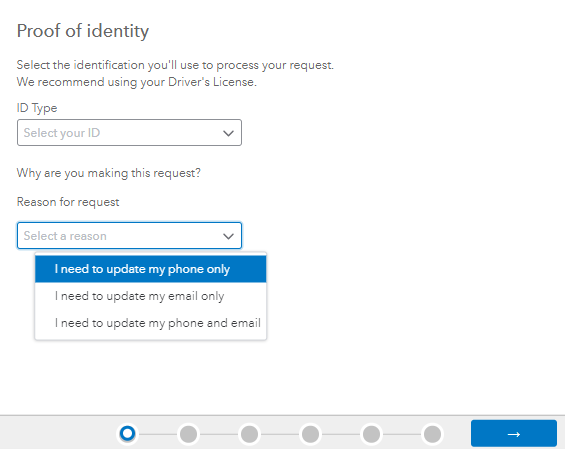
Please know that processing your request will take one business day to apply its changes.
Once your phone number information is up to date, you can now modify your payment or billing method from the Accounts & Settings to receive request codes directly to your new contact info. To do this:
- Sign in to QuickBooks Online as a primary admin.
- Go to Settings ⚙ and select Subscriptions and billing.
- Next to your payment method, click Edit ✎.
- After saving your changes, the payment method will be displayed on the Billing details tab.
In case you require additional guidance when updating your card on file or viewing billing history in your account, refer to this guide: Manage billing, payment, and subscription info in QuickBooks Online.
I'll keep an eye on this thread if there's anything you want to ask further when managing account information and other details. Feel free to swing in your reply below, and I'll be sure to provide additional assistance. Keep safe and have a good one!

- Mark as New
- Bookmark
- Subscribe
- Permalink
- Report Inappropriate Content
Other questions
Trying to renew my subscription. The prompt wants me to verify my information by verifying my first and last name from a two-column list - My name does not appear - so I am contacting you..
Please respond as my payroll is due..
Thank You
- Mark as New
- Bookmark
- Subscribe
- Permalink
- Report Inappropriate Content
Other questions
QB Online or QB Desktop?
