

- Mark as New
- Bookmark
- Subscribe
- Permalink
- Report Inappropriate Content
Other questions
Thanks for getting back to us, Jill. Let me step in and share additional information to address your concerns about migrating from Sage to QuickBooks Online (QBO).
Yes. If you want further assistance migrating your data, you can reach out to our ProAdvisor accountant or a QuickBooks Solution Provider data conversion consultant. They'll be able to help prepare and review your information during the transition and reduce the risk of data error.
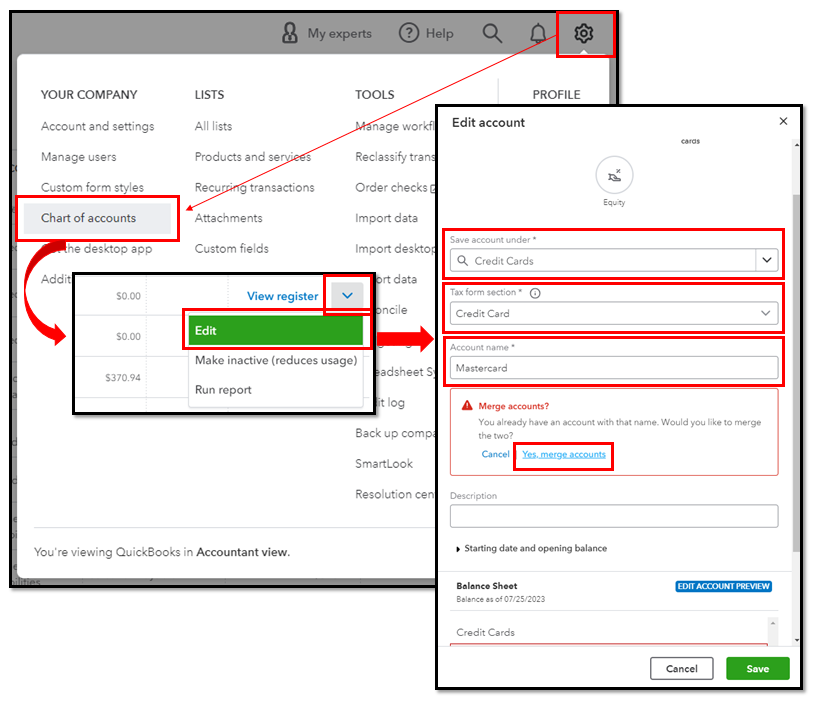
To lower your number of accounts to 250, you may merge them before downgrading to QBO Plus. Doing so transfers all the data into the one you want to retain and makes the other inactivate. To do that:
- Go to the Gear icon and select Chart of Accounts.
- Locate the account you don't want to keep. Click the dropdown icon in the Action column and select Edit.
- Edit the Save account under, Tax form section, and Account name so its account information matches the one you want to keep.
- Click Save, then Yes, merge accounts.
Additionally, you can print using your own checks, but they still need to be formatted for QuickBooks. To verify, conduct a test print using Sage checks. If they're not aligned, I recommend purchasing compatible ones from Intuit.
We appreciate you for choosing QBO as your accounting software. Here's an article as your guide in setting up your company for success and discovering how to modify our features according to your preferences: Get started and adjust settings after you sign up for QuickBooks Online.
Let me know whenever you need additional assistance with the migration. I'll be always on the lookout for your replies. Stay safe and welcome to QBO, Jill!
