

- Mark as New
- Bookmark
- Subscribe
- Permalink
- Report Inappropriate Content
Other questions
Let me clear things out for you, jeffbean.
The option to associate a billable expense to a recurring invoice isn't available. What we're going to do is manually add the billable expense to your customer's invoice.
Just a heads up, we'll have to manually send the transaction to your customer.
Let me guide you with these steps:
- From the + New button, select Bill.
- Go to the Item details section.
- Add a PRODUCT/SERVICE, RATE, and AMOUNT.
- Tick the BILLABLE column.
- Select a customer in the CUSTOMER / PROJECT field.
- Click Save and close.
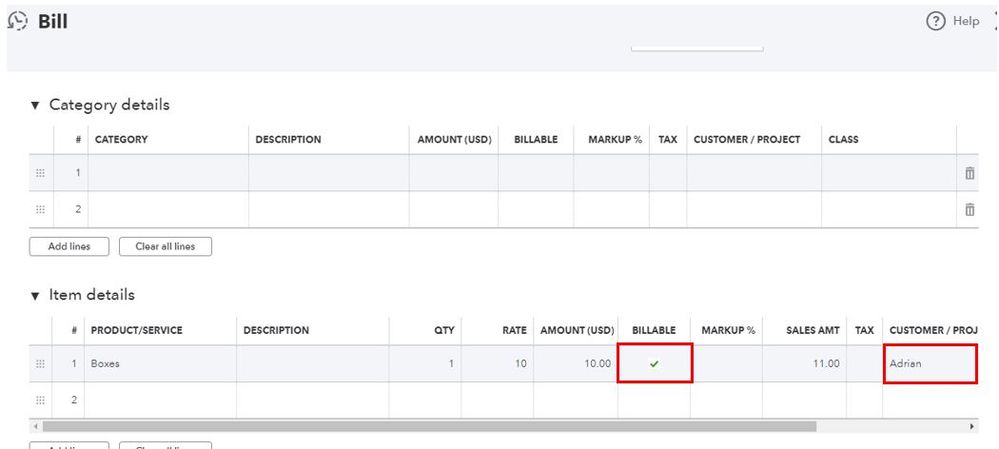
Afterward, you're good to link it to an invoice.
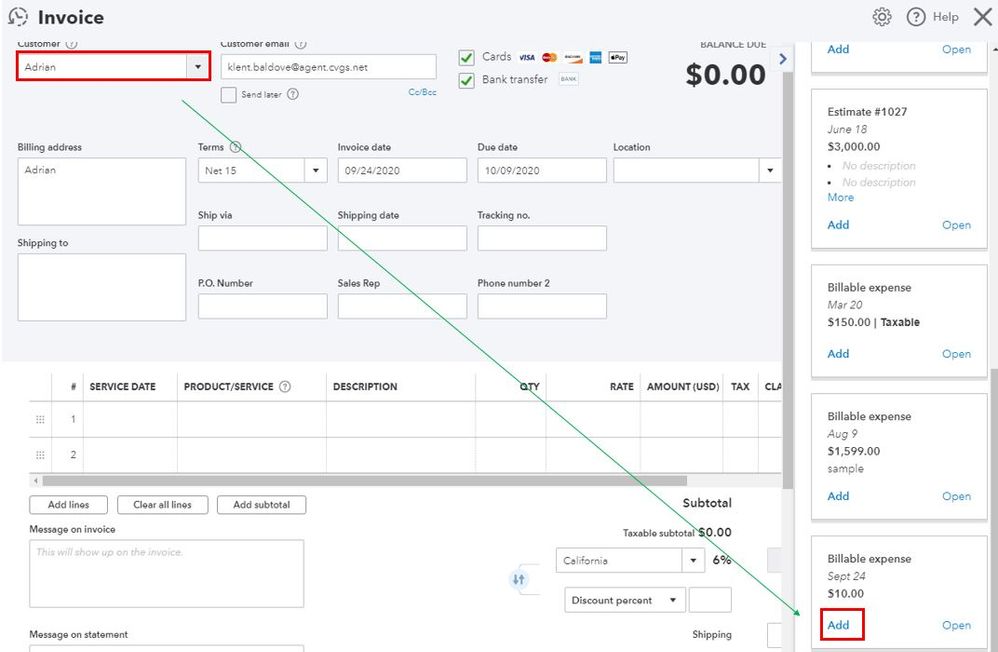
- Click Invoice from the + New button.
- Select the same customer in the Customer drop-down.
- Enter your Customer email.
- In the Add to invoice page, find the billable expense we've created earlier.
- Click Add.
- Select Save and send.
In case your customer wants to pay the invoice online, you can send an online invoice. Here's an article for more information: Take and process payments.
Feel free to get back to me if there's anything that I can help. Keep safe!
