

- Mark as New
- Bookmark
- Subscribe
- Permalink
- Report Inappropriate Content
Other questions
Allow me to chime in and give you the answers that you're looking for, @lrossi!
Yes, you can use Job Name instead of the Job Description field since QBDT can't add the latter in the invoices. You can also use and have different Account No. for each job listed. I'd be happy to show you how.
- Go to the Customers menu and select Customer Center.
- Double-click the customer's name.
- Select the Payment Settings tab.
- Enter the account number.
- Click OK.
To edit multiple customers, follow the steps bellow:
- Go to the Customers menu and select Customer Center.
- Right-click on any of the customer's name.
- Select Add/Edit Multiple List Entries.
- Click on the Customize Columns button.
- Under the Available Columns section, select Account No. and click Add.
- Click OK.
- Enter the necessary information.
- Select Save Changes.
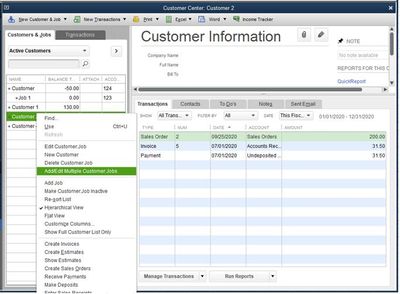
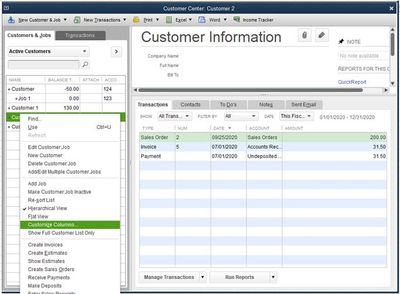
You can also the Account No. column on the Customer Center window.
- Go to the Customers menu and select Customer Center.
- Right-click on any of the customer's name.
- Select Customize column.
- Under the Available Columns section, select Account No. and click Add.
- Click OK.
Additionally, you can check out this article to help you keep track of your sales and expenses using the predefined customer, job, and sales reports: Customize Customer, Job, and Sales Reports in QuickBooks Desktop.
Let me know if you have further questions. I'm determined to help you succeed. Have a good one!
