

- Mark as New
- Bookmark
- Subscribe
- Permalink
- Report Inappropriate Content
Other questions
You've come to the right place for an answer, partsgray.
I appreciate all the steps you've taken so far to resolve the Thunderbird issue in your QuickBooks Desktop (QBDT). I'm pleased to provide troubleshooting steps to solve the dilemma of being unable to use Thunderbird as an email provider in your two workstations.
Failure to use the email provided in the two workstations occurs when the data is damaged. With this, I'd recommend running the verify and rebuild tool. This tool scans your company file for issues and fixes them right away.
Here's how:
- Go to the Window menu and select Close All.
- Choose the File menu and select Utilities.
- Click Verify Data.
- If you see a specific error, go back to the Utility section.
- Hit Rebuild data. This process will start as soon as the backup is finished.
- Tap OK.
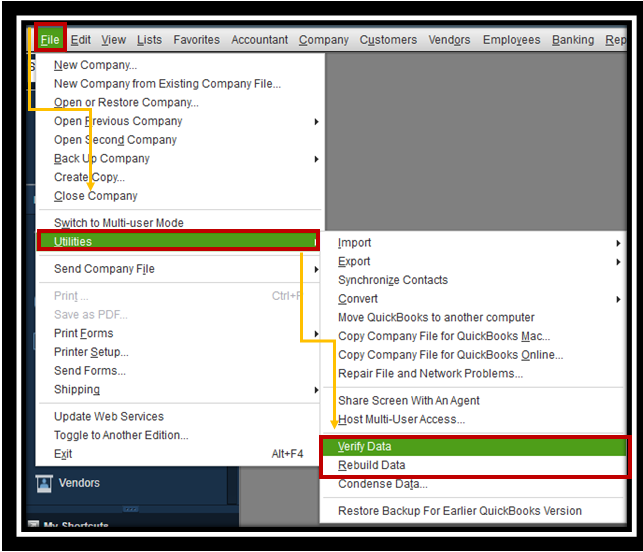
You can also check this article for more detailed steps: Verify and Rebuild Data in QuickBooks Desktop.
Once finished, send a test message using default Thunderbird to the workstation that has the problem to verify if it's performing well.
Feel free to visit these articles below on how to fix it if QuickBooks will not accept your webmail password and other related topics:
I'll be around to help if you need further assistance with dealing with Thunderbird in QuickBooks Desktop. Keep safe, partsgray.
