

- Mark as New
- Bookmark
- Subscribe
- Permalink
- Report Inappropriate Content
Payments
Hello there, @DMJ79.
Allow me to help walk you through paying your invoices using owner's draw.
Here's how:
- Create the Invoice.
- Receive Payment
- Open the Invoice.
- Choose Receive payments.
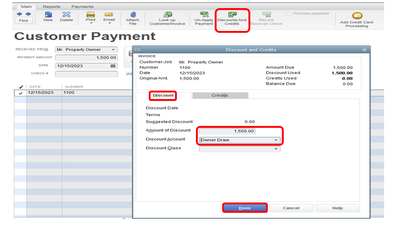
- Click on Discount and Credits.
- Select the Discount tab.
- Put in the amount of the invoice.
- The Discount Account should be the Owners Draw account.
- Click Done.
Feel free to the visit us here in the Community if you have other questions about recording y our Accounts Receivable in QuickBooks desktop.
