

- Mark as New
- Bookmark
- Subscribe
- Permalink
- Report Inappropriate Content
Payments
Hello there, Zippy33.
Right, the invoice is not visible as an open A/R record because you've marked it as deposited If you are referring to voiding the payment transaction when you mentioned voiding A/R, you can do so and directly match the open invoice to the bank transaction. Allow me to provide more information for your complete guidance.
In QuickBooks Online, issuing an invoice increases your Accounts Receivable (A/R) balance. When you receive and apply a payment to that invoice, the A/R balance decreases accordingly. This is why you didn't see the A/R record, as the payment was marked deposited, effectively closing that invoice in the system.
Voiding changes the amounts to zero but retains the original transaction details and date, and will still show in the reports. If you need it to not show up in the reports, we also have the option to delete it if it's legitimately a duplicate entry.
To correctly identify the payment transaction that needs to be voided or deleted, locate and open the invoice that triggered the duplicate deposit issue. This will allow them to trace the payment transaction and either void or delete it.
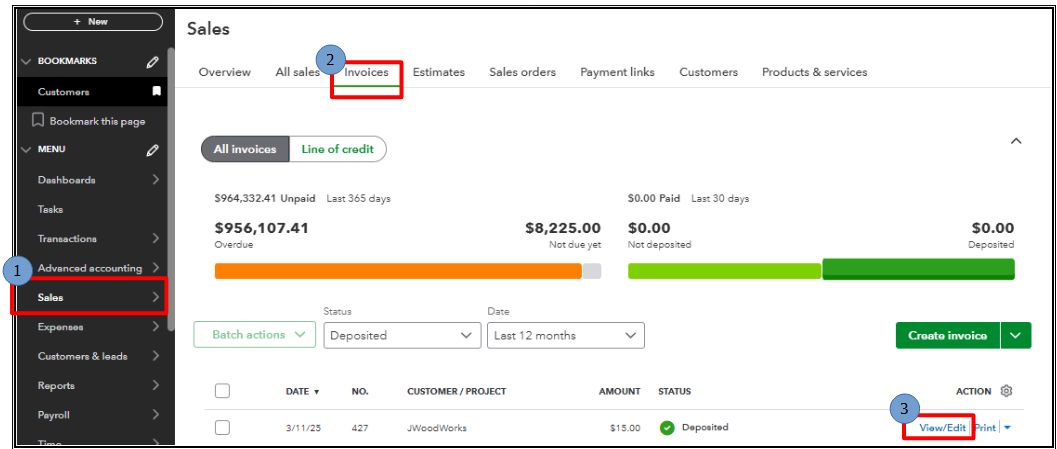
Here's how to void an invoice:
- Go to Sales.
- Choose invoices you want to void.
- In the right corner, click View/Edit.
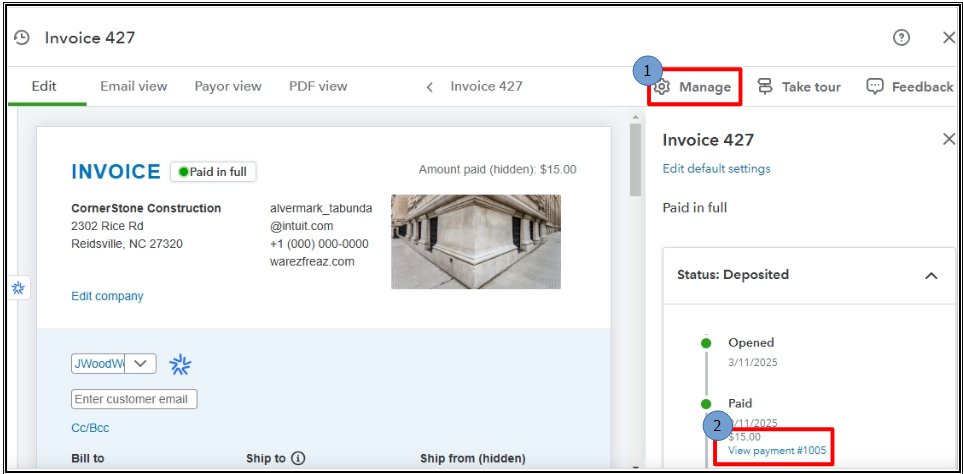
- In the upper, click on the gear icon Manage.
- In deposited status, click on View payment.
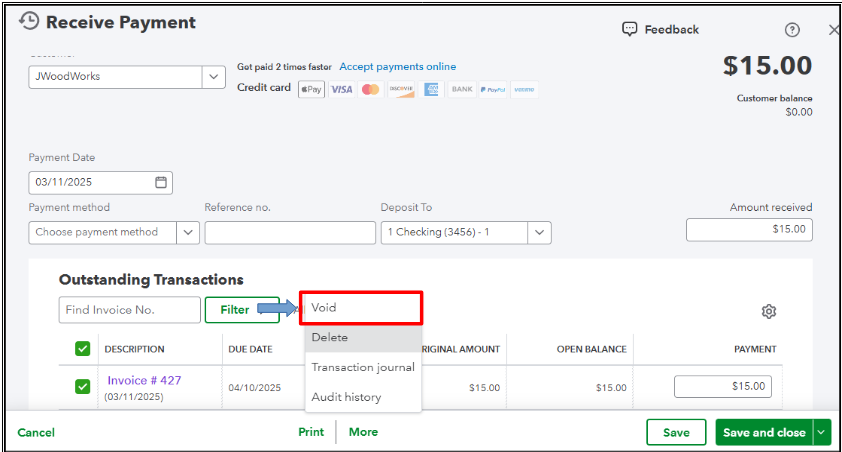
- At the button, click More and select Void.
Here's how to delete an invoice:
- Go to Sales.
- Choose invoices you want to void.
- In the right corner, click View/Edit.
- In the upper, click on the gear icon Manage.
- In deposited status, click on View payment.
- At the button, click More and select Delete.
To learn more about how Accounts Receivable works, you can read this article: What is accounts receivable?
Additionally, you can refer to this useful article to guide you through reconciling bank accounts in QBO: Reconcile an account in QuickBooks Online.
Before we wrap up, I suggest you explore QuickBooks Live Bookkeeping to streamline your accounting, maintain precise financial records, and access professional support. This could free up valuable time, allowing you to concentrate on expanding your business.
If you further questions regarding A/R management, drop a message below. We'll provide prompt assistance. Have a great one.
