
- Mark as New
- Bookmark
- Subscribe
- Permalink
- Report Inappropriate Content
How do I change the sales tax percentage It went down to 6.625% in New Jersey
Solved! Go to Solution.

- Mark as New
- Bookmark
- Subscribe
- Permalink
- Report Inappropriate Content
Taxes
To change it in the Item List section:
- Click the Lists menu, then click Item List.
- Locate your Sales Tax item that you need to edit.
- Right click the Sales Tax item and click Edit Item.
- Change the Tax Rate.
- Click OK.

- Mark as New
- Bookmark
- Subscribe
- Permalink
- Report Inappropriate Content
Taxes
I may be wrong, but wouldn't it be better to de-activate your old rate & create (activate) a new item for your new rate. If not, all your pre-new rate invoices will not retain the old rate description.


- Mark as New
- Bookmark
- Subscribe
- Permalink
- Report Inappropriate Content
Taxes
Thank you for adding a reply and sharing you thoughts, @Anonymous.
Yes, we can change the sales tax rate by going to the item list and locate the sales tax item we wanted to edit. However, we also have the option to deactivate the old sales tax item with the old rate and create a new one.
Both deactivating and editing the sales tax rate won't affect the previous transactions/invoices created using the old rate. For the detailed process on how to edit the sales tax rate, refer to the steps given above. On the other hand, to inactivate the old sales tax item and rate:
- Go to Lists.
- Select Item Lists.
- Locate the Sales Tax Item.
- Check the box beside Item is inactive to inactivate the item.
- Click OK to save the changes.

For additional reference about sales tax set up in QuickBooks Desktop, you may check this: Set up sales tax in QuickBooks Desktop.
Our doors are always open here in the Community page. Feel free to click the Reply button if you have any other sales tax questions. Have a good day!

- Mark as New
- Bookmark
- Subscribe
- Permalink
- Report Inappropriate Content
Taxes
Can the sales tax rate be changed before the effective date? Is there a field to enter the effective date?

- Mark as New
- Bookmark
- Subscribe
- Permalink
- Report Inappropriate Content
Taxes
Welcome to the thread, @Tamac.
You can change the sales tax rate whenever you'd want. Since when creating a transaction and apply the sales tax, that would be the effective date.
Moreover, you can add a Memo to the transaction to manually track the effective date of the Sales tax.
To edit the sales tax rate, follow the below steps:
- Go to List menu at the top, then pick Item list on the drop-down.
- Locate your Sales Tax item, then right-click and select Edit item.
- Enter the new rate on the Tax Rate (%) section, then hit OK.
For future reference, you can also check out this article and click the Sales tax item drop-down on step 4 for more information: Set up sales tax in QuickBooks Desktop.
I'd be glad to answer should you have any additional questions about the process, just leave a comment below. Have a wonderful day ahead and take care.

- Mark as New
- Bookmark
- Subscribe
- Permalink
- Report Inappropriate Content
Taxes
Good Evening
We bought a plug in and all the orders that we have in the web page in quick books are invoices but I have a situation that I cannot change the tax rate, also the invoice did not have the tax rate. Could you please help me to add this tax rate?

- Mark as New
- Bookmark
- Subscribe
- Permalink
- Report Inappropriate Content
Taxes
Welcome to the Community, RonaS.
Let me share with you the steps on how to add the tax rate to your invoices.
Here's how:
- From the Lists menu, select Item List.
- In the Item List window, right-select anywhere and select New.
- Select Sales Tax for the item type.
- Enter the Sales Tax Name, Description, Tax Rate (%), and Tax Agency information.
- Select OK.
You can also edit the tax rate. Please check the steps provided by one of my peers above, MirriamM.
Also, you can check on how to set up sales tax in QuickBooks Desktop.
Feel free to reach back out to me if I can be of more help with adding the tax rates. I'll make sure to get back to you as soon as I can.


- Mark as New
- Bookmark
- Subscribe
- Permalink
- Report Inappropriate Content
Taxes
I have updated the sales tax rate, however, I needed to update an old estimate, and when I created a duplicate estimate to make the changes I needed, the old sales tax appeared, and was not updated to the new one.
How can i do that, without having to redo the whole estimate again?

- Mark as New
- Bookmark
- Subscribe
- Permalink
- Report Inappropriate Content
Taxes
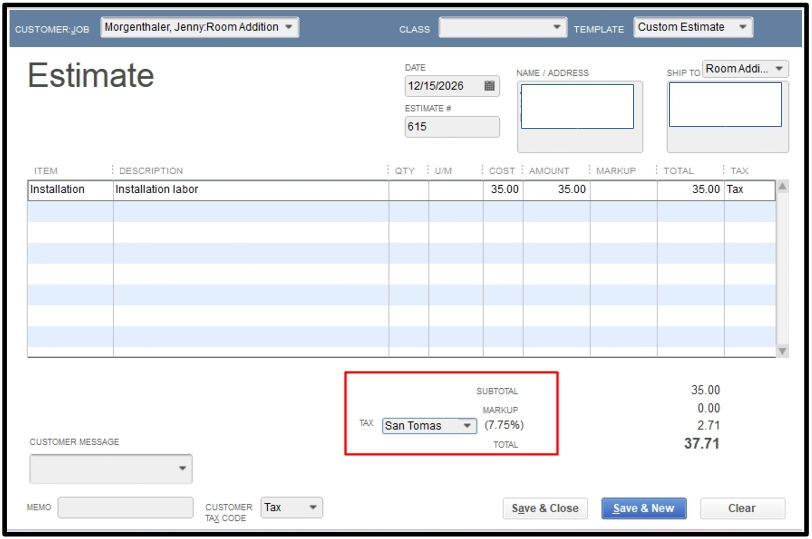
I appreciate your efforts in updating the sales tax rate, Odjud. You can create a new sales tax item with the updated rate without redoing the entire estimate. I will further discuss this matter and point out why the old sales tax appeared on the duplicate estimate.
When you create a copy of an estimate in QuickBooks Desktop (QBDT), all details from the original estimate are copied, including the sales tax rate that was in effect when the estimate was first created. This occurs because QuickBooks preserves the integrity of the original estimate, along with its specific tax rate.
On the other hand, to ensure that the duplicated estimate reflects the updated sales tax rate, we will need to create a new sales tax item with the updated rate.
Here's how:
- Sign in to your QuickBooks Desktop company file.
- From the Lists menu, select Item List.
- In the Item List window click the Item button and choose New.
- Select Sales Tax for the item type.
- Enter the Sales Tax Name, Description, Tax Rate (%), and Tax Agency information.
- Once done, click on OK.
The next step is to duplicate the estimate again. You can open it, select Create a Copy, and then manually choose the newly created sales tax rate.
For more detailed information, please refer to this article: Set up sales tax in QuickBooks Desktop.
Furthermore, you can run reports that will help you review your sales tax payable, ensuring that everything is accurate before submitting your tax payments.
I'm still available if you have further questions about setting up taxes. Simply click on the Reply button and I'll make sure to answer your queries promptly.
