

- Mark as New
- Bookmark
- Subscribe
- Permalink
- Report Inappropriate Content
Taxes
Hey there, Bren65.
To populate your scheduled liabilities again on the Pay Liabilities tab, you'll need to void the rejected payment check and reschedule them.
Here's the step-by-step process:
- Click Employees at the top menu bar and choose Payroll Center.
- Go to the Pay Liabilities tab.
- Under Payment History, click the E-Payments tab.
- Open the rejected payment by clicking on the Agency Rejected link.
- Click Void Rejected E-payment.
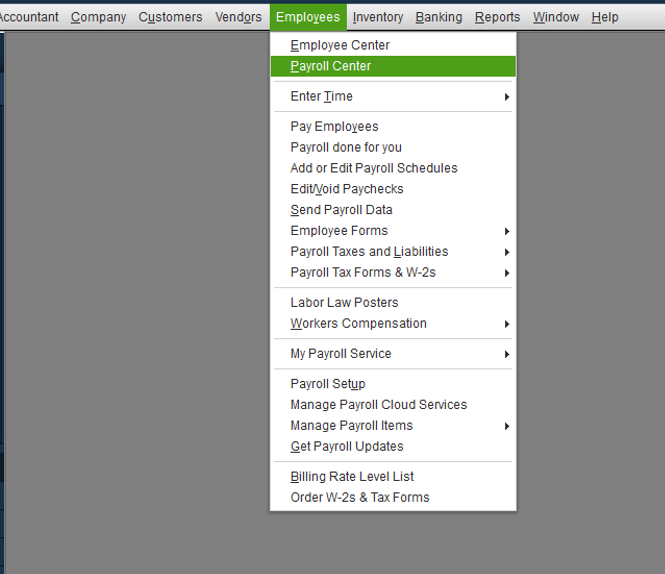
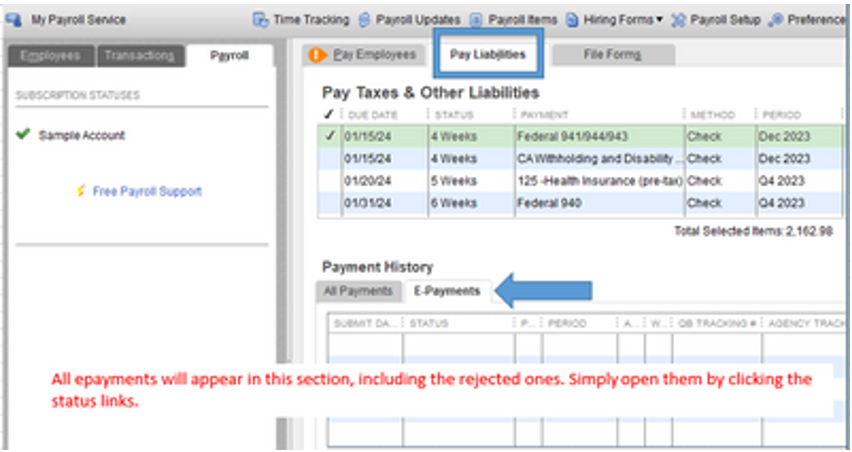
Once voided, you'll see the liability on the Pay Liabilities tab ready to resend. I'd suggest checking the messages and the corresponding solutions for the rejection before voiding to ensure your payments are submitted on time.
Our articles also offer a bunch of guides regarding payroll and tax details, compliance and employee management. Give them a shot if you need help: QuickBooks Desktop Payroll general help articles page.
Let me know the result of this troubleshooting in the comment below. I need to make sure this is resolved and you're back to running your normal business processing. Happy Holidays!
