Space for pervasive banner when authenticated

Learn about Affirm payments


QuickBooks Online offers Affirm as a payment method, allowing your customers to pay over time while you get paid up front through QuickBooks Payments. When a customer pays with Affirm, your business receives the full invoice amount up front - minus standard processing fees - and your customer pays Affirm in monthly installments.
Table of contents
How Affirm works for your business
Affirm is built for invoices and estimates where upfront cost might cause customers to hesitate, such as plumbing and HVAC repairs, home improvement projects, auto repairs, or professional retainers.
Note: Affirm doesn't support subscriptions at this time.
Once Affirm is turned on for your account, it appears as a payment option on your invoices through QuickBooks Payments. Your standard invoicing, refunds, reconciliation, and dispute workflows stay the same.
You pay 2.99% per transaction with Affirm - the same rate you pay for a card payment. There’s no extra fee stacked on top.
Upfront Payouts: You receive the full invoice amount up front.
Zero Repayment Risk: Affirm handles customer collections and assumes all repayment risk. If a customer misses a payment, your payout is not affected.
Automatic Reconciliation: Affirm transactions automatically settle and reconcile within QuickBooks just like card or ACH payments. Affirm settles funds via Intuit directly to your bank account typically the next business day after the transaction.
Eligible Amounts: Available for transactions between $50 and $30,000, depending on the customer’s credit eligibility.
The Affirm buy now, pay later option allows your customers to choose a payment plan over time while you collect the full invoice amount upfront. This video goes over how to set up the payment option at the company level, how to set it up for individual invoices, and what it looks like for your customers.
Video transcript
[0:00] QuickBooks allows you to offer customers the option to use Affirm "Buy Now, Pay Later" for installment payments. This allows you to get paid the full amount of your invoices upfront while giving your customers the flexibility to pay over time. Let's go over how to set up Affirm at the company level. Enable it for specific invoices and what your customers see.
[0:22] If Affirm isn't already enabled, you can enable it at the company level so it appears on all your invoices. To start, go to Settings, then select Account and settings. Select the Sales tab and look for the Invoice payments section. Click anywhere within that section to adjust specific settings. Find the Buy now, Pay later option and check the box. Then select Save.
[0:47] Once enabled, Affirm will automatically appear as a payment option on your invoices. You can also manage Affirm for individual invoices. When creating or opening an invoice, select Manage to open the settings panel. Select the Payment options section and toggle the Buy now, Pay later switch on or off as needed for this specific customer invoice.
[1:09] Note the transaction fee, which will be deducted from the full invoice amount you receive. This is a one-time fee — not charged per installment. If your customer chooses the Affirm payment option, they'll complete Affirm's application process for a payment plan with no impact on their credit score. They'll receive a decision in real time.
[1:30] If approved, they can choose to spread their payments over 3 to 36 months. Their APR is based on their credit. Regardless of the payoff timeframe your customer chooses, you'll receive the full invoice amount upfront, minus standard transaction fees, and Affirm will assume all repayment risk.
[1:50] When your customer repays Affirm, you won't be charged any additional fees, regardless of the payment method they choose. These transactions automatically reconcile to your records just like other payment methods. That's it! Now you're ready to offer your customers more purchasing power with Affirm "Buy Now, Pay Later" in QuickBooks.
When you get paid
You get paid as quickly as the next business day, the same turnaround time as credit card, PayPal, and Venmo payments. You do not have to wait for your customer to finish their installment plan with Affirm. Whether your customer repays Affirm over 3 months or 36 months, your payout timeline remains unchanged.
What it costs you
2.99% per transaction: Billed at the standard rate alongside your digital wallet and card transactions.
No hidden fees: No sign-up fees, monthly subscription fees, or extra charges to enable Affirm.
Consistent rate: Your fee remains 2.99% regardless of whether your customer selects a 0% APR promotional plan or a longer interest-bearing plan.
How Affirm works for your customers
When your customer chooses Affirm at checkout:
Instant Application: They complete a quick application with real-time approval decisions.
No Credit Score Impact to Check: Checking eligibility performs a soft credit check that does not affect their credit score. (If they proceed with a payment plan, repayment history is reported to credit bureaus).
Flexible Installment Plans: Approved customers choose monthly installment options (typically 3 to 36 months). Depending on credit eligibility, plans may be 0% APR or include interest.
No Late Fees: Affirm does not charge late or service fees.
If a customer isn’t approved, they can immediately choose another payment method on the invoice. If your customer needs help, they can visit the Affirm Help Center.
Use Affirm on estimates
When Affirm is turned on in your payment settings, your estimates display a financing preview directly beneath the estimate total (for example: "Starting at $42/mo with Affirm"). This gives customers visibility into payment options before committing to the plan.
Closing the Deal: Financing previews appear automatically on your estimates once turned on.
Payment Occurs on Invoices: Customers cannot pay directly from an estimate. Once the customer approves the estimate, convert it to an invoice to allow them to complete payment with Affirm.
If you’d like Affirm to appear on invoices but not on estimates, you can turn that off in Account and settings. See “Manage Affirm settings” below.
Use Affirm on recurring invoices and batch payments
Recurring Invoices: You can offer Affirm on recurring invoice schedules. Because Affirm requires an instant customer authorization for each loan, your customer must pay each invoice manually. Affirm can't be used with Autopay. Autopay charges a saved payment method automatically, which doesn’t allow for the Affirm approval process.
Batch Payments: Customers paying multiple invoices together can use Affirm when paying eligible invoices through their shared payment link or batch summary screen.
Manage Affirm settings in QuickBooks Online
You can control Affirm availability for your entire company or on individual transactions.
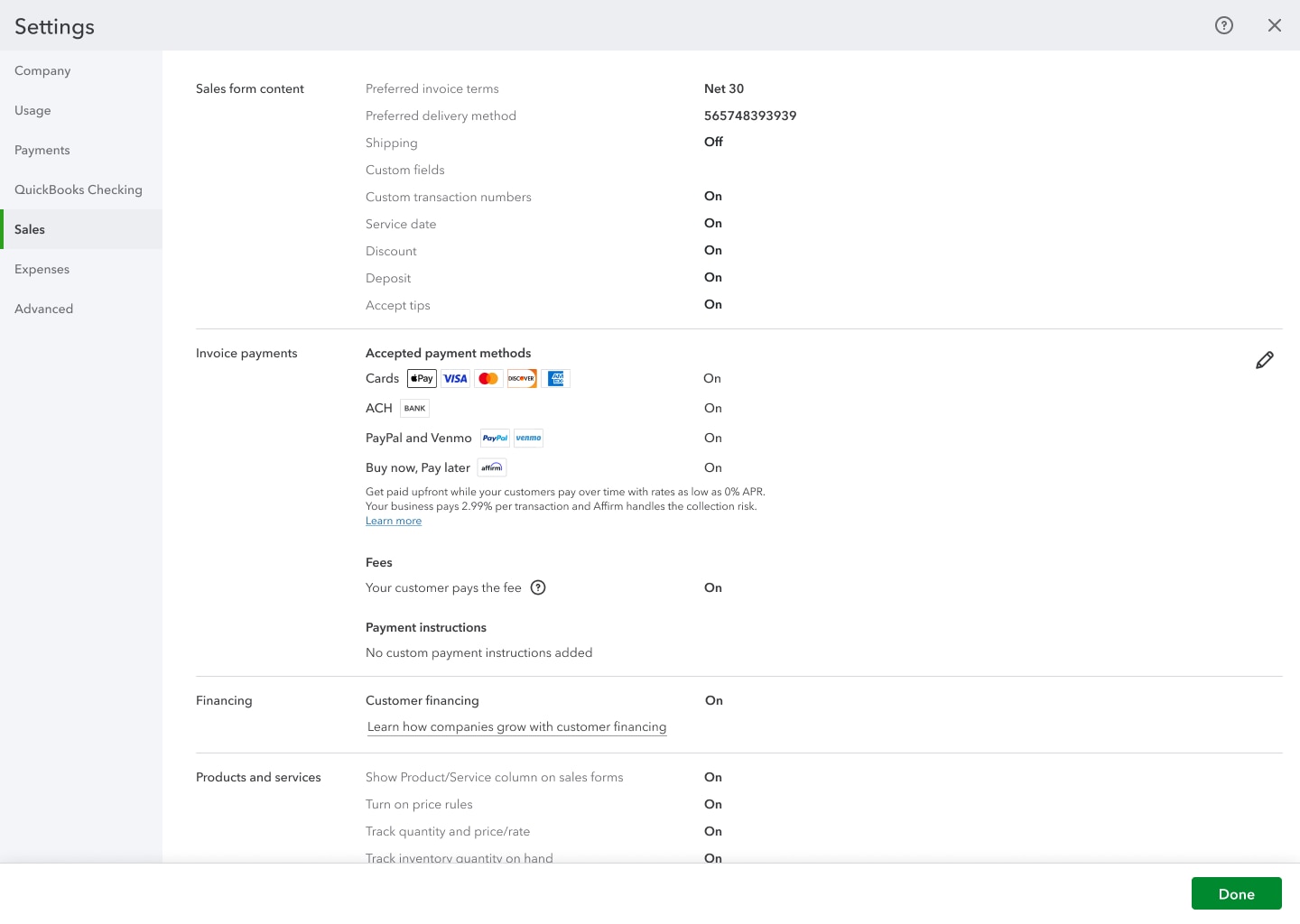
Turn Affirm on or off at the company level
Go to Settings (gear icon), then select Account and settings.
Select Sales.
For the Invoice payments section, select Edit (pencil icon).
Turn the Buy now, pay later checkbox on or off.
Select Save.
Turn Affirm financing on or off for estimates
Go to Settings (gear icon), then select Account and settings.
Select Sales.
For the Invoice payments section, select Edit (pencil icon).
Turn the Show Affirm financing on estimates checkbox on or off.
Select Save.
Turn Affirm on or off for a single invoice
Create a new invoice or open an existing one.
Select Manage (gear icon) to open the invoice settings panel.
In the invoice editor, open the Payment options panel.
Turn the Buy now, pay later switch on or off for that specific invoice.
Finish and send your invoice.
Turning Affirm off for an individual invoice removes it as a payment option for that invoice only. You can turn it back on at any time from the invoice settings panel.
Manage Affirm settings in Intuit Accountant Suite
\If you use Intuit Accountant Suite, you can manage the Affirm settings for a client from within their books.
Frequently asked questions
Does Affirm automatically take payments?
No. Affirm requires your customer to apply and get approved at the moment of payment, so it can’t be used with autopay. If your customer is on a recurring invoice, here’s how Affirm works:
Paying manually each time: Affirm appears as a payment option, just like on any other invoice.
On autopay: Affirm isn’t available. Autopay charges a saved payment method automatically, which doesn’t allow for the Affirm approval process.
What happens if my customer isn’t approved?
If a customer isn’t approved for Affirm, they’ll need to choose another payment method on the invoice.
What if a customer misses a payment?
It doesn’t affect you. Affirm takes on all repayment risk. If a customer misses a payment, your upfront payout isn’t impacted.
When do I get paid?
Affirm settles funds via Intuit to your bank account typically the next business day after the transaction, the same way other QuickBooks Payments methods work.
Can I turn Affirm off for a specific invoice?
Yes. You can turn Affirm on or off at the company level in Account and settings, or for individual invoices in the invoice settings panel.
Does applying for Affirm affect my customer’s credit?
Checking eligibility is a soft inquiry and doesn’t impact your customer’s credit score. If they choose to pay with Affirm, their payment plan and repayment activity will be reported to credit bureaus.
What is the transaction fee?
You pay 2.99% per transaction — the same rate you already pay for cards and digital wallets. Affirm charges your standard rate, right alongside your other payment methods, so nothing gets added on top. Learn more about fees (quickbooks.intuit.com/payments/payment-rates/).
What transaction amounts does Affirm support?
Affirm is available for transactions between $50 and $30,000. The amount approved depends on your customer’s individual credit profile.
Can I offer Affirm on estimates?
Yes. When Affirm is turned on in your payment settings, your estimates automatically show a financing preview under the total — something like “0% or $42/mo with Affirm.” Customers can’t pay with Affirm directly from an estimate, but seeing the option upfront can help them commit to the job. They’ll be able to pay with Affirm once you send the invoice.
Need additional help?
Sign in to QuickBooks Online. Select the Question mark icon, search for "contact support", and select Contact Us to start a chat or request a callback from a QuickBooks expert.
Disclosure: Payment options through Affirm are subject to an eligibility check, may not be available everywhere, and are provided by these lending partners: affirm.com/lenders. For example, a shopper’s $1,000 purchase might cost $90.26/mo over 12 months at 15% APR. Options depend on your purchase amount, and a down payment may be required. For licenses and disclosures, see affirm.com/licenses.
Money movement services are provided by Intuit Payments Inc., licensed as a Money Transmitter by the New York State Department of Financial Services. For details about our money transmission licenses, or for Texas customers with complaints about our service, please visit https://www.intuit.com/legal/licenses/payment-licenses/.
*QuickBooks Payments: QuickBooks Payments account subject to eligibility criteria, credit, and approval. Subscription to QuickBooks Online required. Not available in US territories or outside the US
Sign in now for personalized help
See articles customized for your product and join our large community of QuickBooks users.
Call Sales: 1-800-365-9606




