

- Mark as New
- Bookmark
- Subscribe
- Permalink
- Report Inappropriate Content
Account management
Hello, @heather56.
I'll share some learning about changing the principal officer's name in QuickBooks Online.
You're unable to change it on your end. With this, you'll need to contact our Customer Support Team. They have tools to access your account and change the principal officer's name on your behalf.
But before doing that, make sure to gather the following pieces of information below. So the live agent will able to update the name. Please note that inaccurate or missing information will delay the verification process.
- Principal officer's name
- Date of birth
- Home address
- Social Security number
- Prepare a voided check from the new bank account if you're also changing the bank account.
Here's how:
- Go to the Help menu, then choose Contact Us.
- Type your concern on the box and hit Let's talk.
- Choose either Start a chat or Get a call.
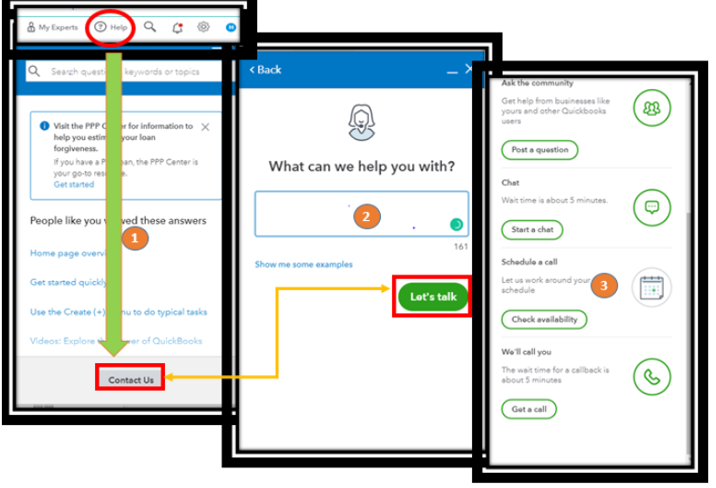
4. Complete the required information and submit the request.
Ensure to call them within business hours to address your concern promptly.
The process takes 48 business hours from the time all updates have been made, and documentation is received. For more details, check out this article: Principal officer verification for Payroll IDV holds.
I’m adding links here about modifying business data like EIN, filing address, and other topics.
- Update your business info in the online payroll
- Verify your principal officer and business identity for payroll or payments accounts
- Account Management
Please leave a comment below if you have follow-up questions. I'm happy to assist. Keep safe!
