

- Mark as New
- Bookmark
- Subscribe
- Permalink
- Report Inappropriate Content
Banking
Thanks for providing details of your concern, @Challis. I'll provide some information to help you with resolving your uncleared check in QuickBooks Online (QBO).
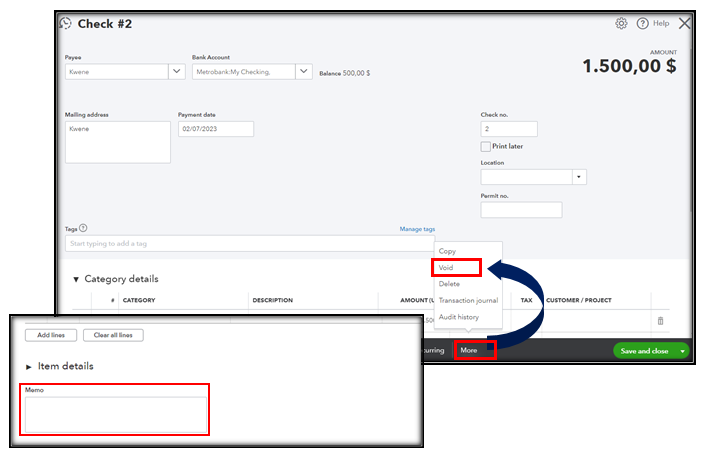
If the check isn't included in the bank statement that needs to be reconciled, we can void it so it won't affect your books. Additionally, we can utilize the Memo field to add notes about the duplicate entry. To do this, open the transaction, select More at the bottom, and then choose Void. See the screenshot below for visual reference:
Alternatively, while creating an offsetting journal entry is feasible, we may be unable to provide specific details about the affected accounts. Therefore, I suggest reaching out to your accountant to guarantee the accuracy of your books. If you're not affiliated with one, we can help you Find a ProAdvisor.
You may want to check out this article as your reference to guide you in doing and fixing reconciliation issues in QBO: Learn the reconcile workflow in QuickBooks.
Stay in touch if you have any additional questions or other reconciliation concerns. Drop your comment below, and I'll ensure that you receive the assistance you need.
