
- Mark as New
- Bookmark
- Subscribe
- Permalink
- Report Inappropriate Content
Wrong period
Hi,
I am using Quickbooks Pro 2019
My system seems to be in the incorrect period
When I do any transaction the correct date is displayed but when I try to save the transaction it says that I am working in a closed period.
When I am is bank recons the date at the service charges and interest earned is on 2034
Would you be able to assist me with this matter
Thank you


- Mark as New
- Bookmark
- Subscribe
- Permalink
- Report Inappropriate Content
Banking
I can definitely assist and help correct this period, @erika26.
The most common reason why users encounter performance issues, such as incorrect date periods, is due to data damage and an outdated program. You can run the Verify and Rebuild Utility to troubleshoot potential data issues.
Here’s how:
- Open your QuickBooks account and go to the File menu.
- Select Utilities and click on Verify Data.
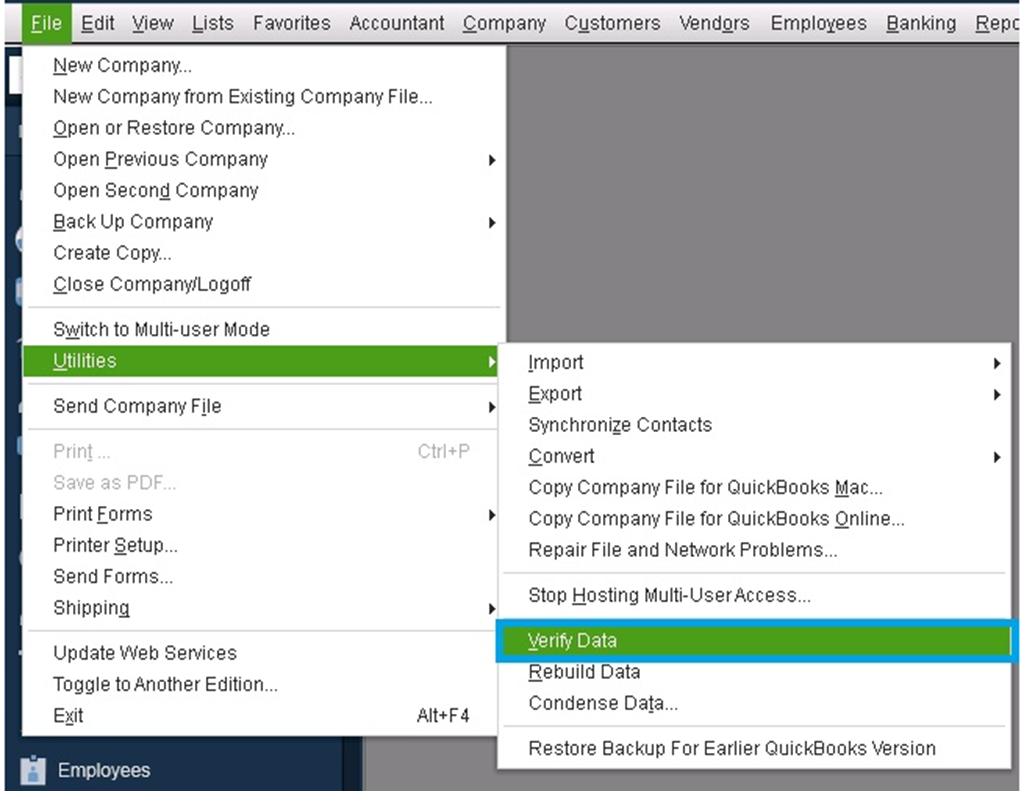
- Tap OK when you see this message "QuickBooks detected no problem with your data." Otherwise, you’ll be prompted to Rebuild Now or View Errors if you receive an error message.
- Select Rebuild Now.
- On the popup window, click OK.
- Choose the desired location where you want to save the backup of the company file, and then select OK. The process of data rebuilding will get started automatically.
- Click OK when complete.
- Run the Verify Data once more to make sure your company is repaired.
Since you’re using QuickBooks Pro 2019, please know that last May 31 this year, access to add-on services and certain features are discontinued for all QuickBooks Desktop 2019 versions. The program will no longer receive any latest security patches and updates. Based on our service discontinuation policy, unsupported QuickBooks will continue to work only for basic accounting functions.
If you want to continue having an up-to-date system and product improvements, you can upgrade to a higher version.
Once everything is good, you can create any transaction and prepare for the reconciliation. See our complete reconciliation guide if you need fixes and steps to make changes after the process.
I’ll be here if you need further assistance with managing your books. Just add them to your reply below. Have a good one!
- Mark as New
- Bookmark
- Subscribe
- Permalink
- Report Inappropriate Content
Banking
Thank you for the reply,
The bank recon is not really the problem, I can not do any transactions.
As you can see from attached file the automatic date on the system is correct, as is the calendar setting in the system
The only place I can find the difference date of 2034 is on the bank recon,
- Mark as New
- Bookmark
- Subscribe
- Permalink
- Report Inappropriate Content
Banking
I did the verify data, and rebuilt you suggested
The attached report was the result of that, it unfortunately also did not fix the problem

- Mark as New
- Bookmark
- Subscribe
- Permalink
- Report Inappropriate Content
Banking
Hi there, @erika26.
Thank you for the following information you added, including the screenshots. It helps me figure out how I can assist you with your concern about reconciling an account in QuickBooks Desktop (QBDT).
Issues such as incorrect date periods in reconciliation usually happen if you have unused QuickBooks for quite some time. In this, I want to share a workaround to get you to proceed with the reconciliation and enable you to perform your other tasks in QBDT.
Based on your initial screenshot, you can copy the date from the Statement Date, 2022-11-30, to the dates beside Service Charge and Interest Earned. Then, press Continue to finish your reconciliation. QuickBooks will then follow the correct sequence of the dates on your subsequent reconciliation.
If you still experienced the same after following the workaround. It would be best to get in touch with our Technical Support Team. This way, they can thoroughly check your company file and determine why such behavior occurs.
Here's how to reach them:
- In QuickBooks Desktop (QBDT), go to the Help menu.
- Select QuickBooks Desktop Help.
- Click Contact Us.
- Please briefly describe your issue, tick Let's talk, and then choose a way to connect.
You may also refer to this article to check our support hours: Contact QuickBooks Desktop support.
Furthermore, refer to this article to begin reconciling your account again: Reconcile an account in QuickBooks Desktop.
Let me know if you have more concerns about reconciliation. I'll be around the corner to lay a hand for help. Have a good one!


