

- Mark as New
- Bookmark
- Subscribe
- Permalink
- Report Inappropriate Content
Other questions
Yes, it's possible in QuickBooks Online (QBO), @Sam Mehmeti. I'll make sure you can import your inventories with specific categories and sub-categories.
You can edit your inventories from Excel, then ensure that they’re set up properly. The cell for Products/Services can act as a placeholder for the main categories and subcategories.
This is how to map them in Excel:
• For Category only.
Name of the category: Name of Product/Services.
• If with Sub-category.
Name of Category: Name of Subcategory: Name of Product/Service.
For example, the category is Size, sub-category is Color, and the Product is Phone. When you input it on the cell, it should look like this (Size: Color: Phone).
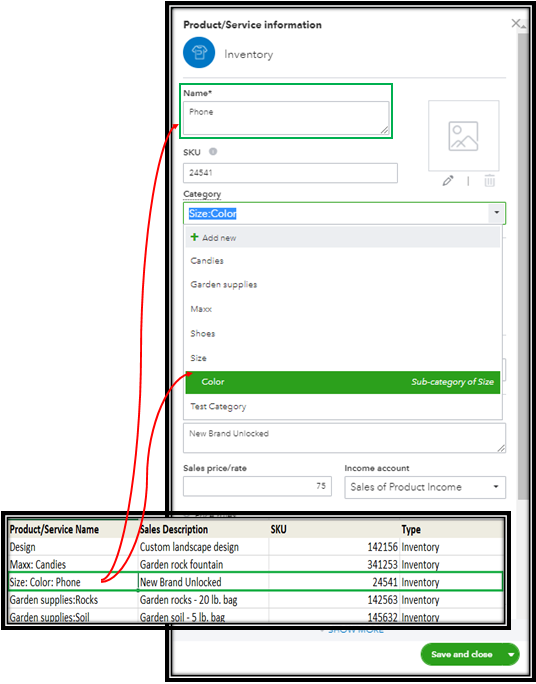
Also, the Import functionality can support up to 1,000 records at a time. Since your list is longer than that, you split it up into multiple, smaller files.
For additional details about importing products and services from Excel, please refer to this article: Import products and services into QuickBooks Online.
In case you want to manually adjust your item quantity after importing them. To be guided, you can utilize this link for reference: Adjust inventory quantity on hand in QuickBooks Online.
Additionally, I'm adding these resources that serve as your guide in flawlessly accounting your inventory:
- Set up and track your inventory in QuickBooks Online
- Use reports to see your sales and inventory status
Should you need further assistance recording tips and retained earnings in QuickBooks, please don't hesitate to comment below. I'm always here to help. Take care!
