Run and grow your business, unlock deeper insights, and work like you have a larger team behind you with the #1 accounting software for small business.1
4.3/5 ★★★★★
6700+ customer reviews on Capterra
Top 50 Accounting & Finance Products
★★★★★
4.0 (2,967 of reviews)
88% of customers
say QuickBooks helps their business be successful.1
PRICE CARD

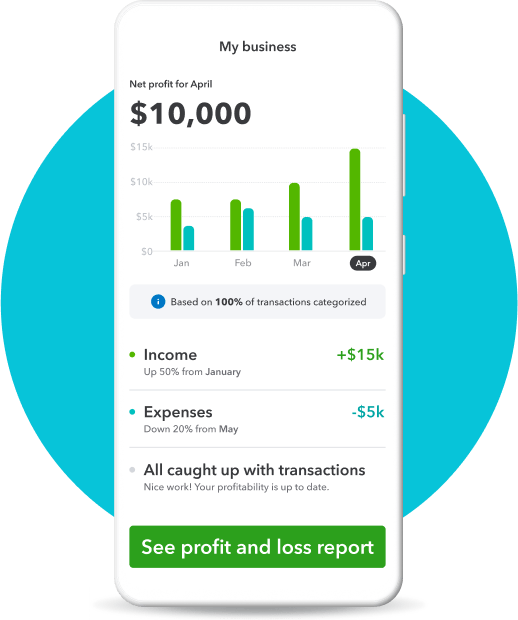
Know where your money is going
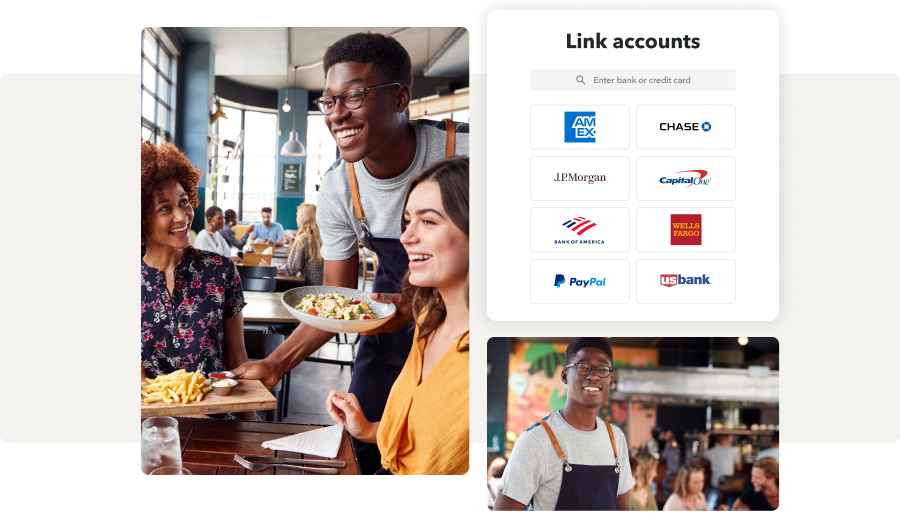
All of your bank and credit card transactions automatically sync to QuickBooks to help you seamlessly track income and expenses.
Track receipts and more for tax time
Organization made easy means less stress—and less work—at tax time. Snap and store receipts and track mileage from our mobile app to maximize deductions and stay compliant.

Bring your small business apps together
Key business management tools and third-party apps work better together when they’re under one roof. Track money in and out, run payroll, and make and accept payments—all on one integrated platform.
Frequently asked questions
Yes, invite up to 2 accounting professionals to access your data and collaborate with you for free. Once they accept your invitation, they’ll automatically get signed up for QuickBooks Online Accountant, allowing them to access your data.
Yes. You can seamlessly connect your sales channels to QuickBooks to automatically import orders and payouts. This helps you get a more accurate view of your income and expenses across platforms.
How do I import data and get set up?
Simply put, the best business bookkeeping software is one that suits your unique needs. QuickBooks offers flexible accounting plans to fit businesses, small and large, across all industries, with integrations like payroll, time-tracking, and payments to help you grow efficiently when you’re ready.
Money movement services are provided by Intuit Payments Inc., licensed as a Money Transmitter by the New York State Department of Financial Services. For more information about Intuit Payments' money transmission licenses, please visit https://www.intuit.com/legal/licenses/payment-licenses/.
*Offer terms
QuickBooks Live Expert Assisted Free 30-day Trial Offer Terms: Access an expert when you add the thirty (30) day trial of QuickBooks Live Expert Assisted services (“Expert Assisted”) to your purchase of QuickBooks Online Simple Start, Plus, or Advanced (“QBO”) subscription. You must be a new QBO customer to be eligible. To continue using Expert Assisted after your 30-day trial, you’ll be asked to present a valid credit card for authorization, and you’ll be charged on a monthly basis at the then-current fee until you cancel. Sales tax may be applied where applicable. To cancel your Expert Assisted subscription at any time go to Account & Settings in QBO and select “Cancel.” Your cancellation will become effective at the end of the monthly billing period. You will not receive a prorated refund; your access and subscription benefits will continue for the remainder of the billing period.
Expert Assisted is a monthly subscription service that requires a QBO subscription and provides expert help to answer your questions related to the books that you maintain full ownership and control. An expert can guide you through QBO setup and answer questions based on the information you provide; some bookkeeping services may not be included and determined by the expert. For more information about Expert Assisted, refer to the QuickBooks Terms of Service.
QuickBooks Online Live Expert Assisted Discount Offer Terms: Discount applied to the first 3 months of Expert Assisted, starting from the date of enrollment, followed by the then-current monthly Expert Assisted list price with your QuickBooks Online Simple Start, Plus or Advanced (“QBO”) subscription. Your account will automatically be charged on a monthly basis until you cancel. Sales tax may be applied where applicable. To be eligible for this offer you must be an active QBO customer, new to Expert Assisted and sign up for the Expert Assisted monthly plan by calling sales at 1-800-816-4611. Offer available for a limited time only. To cancel your Live Expert Assisted subscription at any time go to Account & Settings in QBO and select “Cancel.” Your cancellation will become effective at the end of the monthly billing period. You will not receive a pro-rated refund; your access and subscription benefits will continue for the remainder of the billing period. Terms, conditions, pricing, special features, and service and support options subject to change without notice
QuickBooks Online Discount Offer Terms: Discount applied to the monthly price for QuickBooks Online (“QBO”) is for the first 3 months of service, starting from the date of enrollment, followed by the then-current [monthly/annual] list price. Your account will automatically be charged on a monthly basis until you cancel. If you add or remove services, your service fees will be adjusted accordingly. Sales tax may be applied where applicable. To be eligible for this offer you must be a new QBO customer and sign up for the monthly plan using the “Buy Now” option. This offer can't be combined with any other QuickBooks offers. Offer available for a limited time only. To cancel your subscription at any time go to Account & Settings in QBO and select “Cancel.” Your cancellation will become effective at the end of the monthly billing period. You will not receive a pro-rated refund; your access and subscription benefits will continue for the remainder of the billing period. Terms, conditions, pricing, special features, and service and support options subject to change without notice.
QuickBooks Live Expert Guided Setup: The QuickBooks Live Expert Guided Setup is a one-time virtual session with a QuickBooks expert. It’s available to new QuickBooks Online monthly subscribers who are within the first 30 days of their subscription. The QuickBooks Live Expert Guided Setup service includes: providing the customer with instructions on how to set up chart of accounts; customized invoices and setup reminders; connecting bank accounts and credit cards. The QuickBooks Live Expert Guided Setup is not available for QuickBooks trial, and does not include desktop migration, Payroll setup or services. Your expert will only guide the process of setting up a QuickBooks Online account. Terms, conditions, pricing, special features, and service and support options subject to change without notice. account. Terms, conditions, pricing, special features, and service and support options subject to change without notice.
QuickBooks Online Free 30-day Trial Offer Terms: First thirty (30) days of subscription to the QuickBooks Products, starting from the date of enrollment is free. At the end of the free trial, you’ll automatically be charged and you’ll be charged on a monthly basis thereafter at the then-current price for the service(s) you’ve selected until you cancel. If you add or remove services, your service fees will be adjusted accordingly. Sales tax may be applied where applicable. To be eligible for this offer you must be a new QBO customer and sign up for the monthly plan using the "Free 30-Day Trial" option. This offer can't be combined with any other QuickBooks offers. Offer available for a limited time only. To cancel your subscription at any time go to Account & Settings in QBO and select "Cancel." Your cancellation will become effective at the end of the monthly billing period. You will not receive a pro-rated refund; your access and subscription benefits will continue for the remainder of the billing period. Terms, conditions, pricing, special features, and service and support options subject to change without notice.
**Features
QuickBooks features
Annual percentage yield: The annual percentage yield ("APY") is accurate as of December 9, 2024, and may change at our discretion at any time. The listed APY will be paid on the average daily available balances distributed across your created envelopes within your primary QuickBooks Checking account. Balances held outside an envelope will not earn interest. See Deposit Account Agreement for terms and conditions.
Envelopes: You can create up to 9 Envelopes within your primary QuickBooks Checking account. Money in Envelopes must be moved to the available balance in your primary QuickBooks Checking account before it can be used. Envelopes within your primary QuickBooks Checking account will automatically earn interest once created. At the close of each statement cycle, the interest earned on funds in your Envelopes will be credited to each Envelope in proportion to the average daily balance of each Envelope. See Deposit Account Agreement for terms and conditions.
QuickBooks Live Expert Assisted: This is a monthly subscription service offering ongoing guidance on how to manage your books that you maintain full ownership and control. When you request a session with a Live bookkeeper, they can provide guidance on topics including: bookkeeping automation, categorization, financial reports and dashboards, reconciliation, and workflow creation and management. They can also answer specific questions related to your books and your business. Some basic bookkeeping services may not be included and will be determined by your Live bookkeeper. The Live bookkeeper will provide help based on the information you provide.
QuickBooks Live Expert Full-Service Bookkeeping: This is a combination service that includes QuickBooks Live Expert Cleanup and QuickBooks Live Expert Full-Service Bookkeeping.
Receipt capture: Requires QuickBooks Online mobile (“QBM”) application. The QuickBooks Online mobile app works with iPhone, iPad, and Android phones and tablets. Devices sold separately; data plan required. Not all features are available on the mobile apps and mobile browser. QuickBooks Online mobile access is included with your QuickBooks Online subscription at no additional cost. Data access is subject to cellular/internet provider network availability and occasional downtime due to system and server maintenance and events beyond your control. Product registration required.
Collaborate with your accountant: You can connect up to the following for each product: 1 billable user and 2 accounting firms for QuickBooks Online Simple Start, 5 billable users and 2 accounting firms for QuickBooks Online Plus, 25 billable users and 3 accounting firms for QuickBooks Online Advanced. Accounting firms must connect using QuickBooks Online Accountant.
QuickBooks Payments: QuickBooks Payments account subject to eligibility criteria, credit and application approval. Subscription to QuickBooks Online is required. Money movement services are provided by Intuit Payments Inc., licensed as a Money Transmitter by the New York State Department of Financial Services.
Mileage tracking: Mileage tracking is only available to the master administrator of the QuickBooks Online account. Requires QuickBooks Online mobile (“QBM”) application. The QuickBooks Online mobile app works with iPhone, iPad, and Android phones and tablets. Devices sold separately; data plan required. Not all features are available on the mobile apps and mobile browser. QuickBooks Online mobile access is included with your QuickBooks Online subscription at no additional cost. Data access is subject to cellular/internet provider network availability and occasional downtime due to system and server maintenance and events beyond your control. Product registration required.
Mobile signatures: Requires QuickBooks Online mobile application. The QuickBooks Online mobile app works with iPhone, iPad, and Android phones and tablets. Devices sold separately; data plan required. Not all features are available on the mobile apps and mobile browser. QuickBooks Online mobile access is included with your QuickBooks Online subscription at no additional cost. Data access is subject to cellular/internet provider network availability and occasional downtime due to system and server maintenance and events beyond your control. Product registration required.
Pay-enabled invoices: Requires a separate QuickBooks Payments account which is subject to eligibility criteria, credit and application approval. Additional fees may apply. Additional terms and conditions apply.
Third party apps: Third party applications available on apps.com. Subject to additional terms, conditions, and fees.
Apple Pay: Apple Pay is a trademark of Apple Inc., registered in the U.S. and other countries.
Automated 1099 e-file & delivery: Prepare your 1099s in QuickBooks at no extra charge. If you choose the 1099 E-File Service, Intuit will e-file your Federal 1099 information with the IRS, and then print and mail a copy directly to your contractors; fees apply. As part of the paid 1099 E-File Service, we also give your contractors online access to their 1099s. State filing not included. You should check with your state agency on any state filing requirements.
1099 e-file service pricing: If you pay for your QuickBooks Online subscription directly, 1099 E-File Service costs $4.99/form for the first 3 forms. Forms 4-20 are $3.99 each. Forms 21 and up are $1.99 each.
If your accountant pays for your QuickBooks Online subscription, you can choose to purchase the 1099 E-file service directly (rather than having your accountant file for you) starting on January 23, 2023 for $4.99/form. For accountants making bulk filings, the cost for each client is the following: the first 3 forms are $4.99/form, forms 4-20 are $3.99/form, and forms 21 and up are $1.99/form.
Accelerated Invoicing: QuickBooks Online Advanced supports the upload of 1000 transaction lines for invoices at one time. 20% faster based off of internal tests comparing QuickBooks Online regular invoice workflow with QuickBooks Online Advanced multiple invoice workflow.
Account team benefits for Priority Circle: Only available with a paid subscription. Trial customers have access to QuickBooks Online Advanced product experts.
Priority Circle: Access to Priority Circle and its benefits are available only to customers located in the 50 United States, including DC, who have an active, paid subscription to QuickBooks Desktop Enterprise or QuickBooks Online Advanced. Eligibility criteria may apply to certain products. When customers no longer have an active, paid subscription, they will not be eligible to receive benefits. Phone and messaging premium support is available. Support hours exclude occasional downtime due to system and server maintenance, company events, observed U.S. holidays and events beyond our control. Intuit reserves the right to change these hours without notice. Terms, conditions, pricing, service, support options, and support team members are subject to change without notice.
Automatic data backup and recovery: QuickBooks Online uses technical and administrative security measures such as, but not limited to, firewalls, encryption techniques, and authentication procedures, among others, to work to maintain the security of your online session and information.
QuickBooks Online Advanced – Create and assign tasks from any device: Task management requires a supported internet browser and an internet connection (a high-speed connection is recommended). Feature is unavailable on QuickBooks Online mobile.
QuickBooks Time Mobile: The QuickBooks Time mobile app works with iPhone, iPad, and Android phones and tablets. Devices sold separately; data plan required. Not all features are available on the mobile apps and mobile browser. QuickBooks Time mobile access is included with your QuickBooks Online Payroll Premium and Elite subscription at no additional cost. Data access is subject to cellular/internet provider network availability and occasional downtime due to system and server maintenance and events beyond your control. Product registration required.
**Product information
QuickBooks Online and QuickBooks Self-Employed system requirements: QuickBooks Online requires a persistent internet connection (a high-speed connection is recommended) and computer with a supported Internet browser or a mobile phone with a supported operating system (see System Requirements) and an Internet connection. Network fees may apply.
QuickBooks Online usage limits: QuickBooks Online Advanced includes unlimited chart of accounts entries. QuickBooks Online Simple Start and Plus allow up to 250 chart of accounts entries. QuickBooks Online Advanced includes unlimited classes and locations. QuickBooks Plus includes up to 40 combined classes and locations. Classes and locations are not available in Simple Start.
QuickBooks Online and QuickBooks Self-Employed mobile apps: The QuickBooks Online mobile and QuickBooks Self-Employed mobile companion apps work with iPhone, iPad, and Android phones and tablets. Devices sold separately; data plan required. Not all features are available on the mobile apps and mobile browser. QuickBooks Online mobile access is included with your QuickBooks Online subscription at no additional cost. Data access is subject to cellular/internet provider network availability and occasional downtime due to system and server maintenance and events beyond your control. Product registration required.
Cancellation policy: You're free to switch plans or cancel any time.
Customer support: For hours of support and how to contact support, click here.
QuickBooks Payroll: Money movement services, such as direct deposit, are provided by Intuit Payments Inc., a subsidiary of Intuit Inc. For more information about Intuit Payments Inc.’s money transmission licenses, please visit https://www.intuit.com/legal/licenses/payment-licenses/.
QuickBooks Checking Account opening is subject to identity verification and approval by Green Dot Bank.
QuickBooks and Intuit are a technology company, not a bank. Banking services provided by our partner, Green Dot Bank.
QuickBooks Payments and QuickBooks Checking accounts: Users must apply for both QuickBooks Payments and QuickBooks Checking accounts when bundled. QuickBooks Payments’ Merchant Agreement and QuickBooks Checking account’s Deposit Account Agreement apply.
QuickBooks Checking account: Banking services provided by and the QuickBooks Visa® Debit Card is issued by Green Dot Bank, Member FDIC, pursuant to license from Visa U.S.A., Inc. Visa is a registered trademark of Visa International Service Association. Green Dot Bank operates under the following registered trade names: GoBank, GO2bank and Bonneville Bank. Registered trade names are used by, and refer to, a single FDIC-insured bank, Green Dot Bank. Deposits under any of these trade names are deposits with Green Dot Bank and are aggregated for deposit insurance coverage up to the allowable limits. Green Dot is a registered trademark of Green Dot Corporation. ©2022 Green Dot Corporation. All rights reserved. QuickBooks products and services, including Instant Deposit, QuickBooks Payments, Cash flow planning / forecasting are not provided by Green Dot Bank.
Deposit Sweep Program: Cash balances above $250,000 will be automatically swept from Green Dot Bank and equally spread across our participating financial institutions, providing you with up to $5 million in FDIC insurance coverage. Customers are responsible for monitoring their total assets at each institution. Learn more and see a list of participating institutions here
Claims
1. The #1 accounting software for small businesses: #1 accounting software for small to midsize business based on PCMag, as of December 2021.
2. 88% of customers say QuickBooks helps their business be more successful: Based on survey of existing small businesses using QuickBooks Online in U.S. conducted October 2021.





© 2025 Intuit Inc. All rights reserved.
Intuit, QuickBooks, QB, TurboTax, Credit Karma, and Mailchimp are registered trademarks of Intuit Inc.
By accessing and using this page you agree to the Website Terms of Service.
How can we help?
Talk to sales 1-877-823-3340
Mon - Fri, 5am - 6pm PST
Get product support