QuickBooks Online is accessible securely from any web browser or through the mobile app. No download of software is required.
The best accounting software for small to medium business1
Spend less time managing your books, and more time running your business.
Enjoy instant savings
Receive special offers and save on QuickBooks Online plans that grow with you.
- Easily organize income and expenses into tax categories.See more
- Manage your business on the go with the QuickBooks mobile app.See more
- Snap photos of your receipts and match them to transactions.**See more
- Track miles automatically with your phone’s GPS then categorize trips with just a swipe.**See more
- Create customized estimates with your logo, convert to invoices with ease, and send from any device.See more
- Give customers flexible ways to pay—via PayPal,** Venmo, Apple Pay®, credit, debit, or ACH payments.See more
- Track income and expenses, run reports, and get a clear view of your business performance.See more
- We track rate changes automatically and calculate sales tax whenever it’s applied.See more
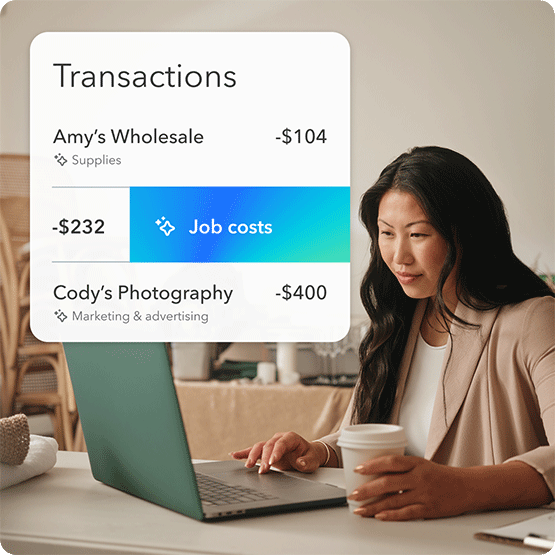
- Create rules automating transactions categorizationSee more
- Auto-categorize business and personal expenses to easily track and maximize tax deductions.See more
- QuickBooks learns how you categorize income and expenses and then automatically matches and records transactions from then on.
- Accept credit cards and bank transfers in the invoice with QuickBooks Payments, get status updates and reminders.Powered BySee more
Intuit Assist
- Connect your bank accounts directly to QuickBooks to automatically sync transactions for accurate, real-time data.
- Experts guide onboarding and migration so you're up and running fast, with no missed data or disruption.
- 5 free ACH payments/mo$0.50/standard ACH transaction over monthly allotments. Allotments may vary.**
- Record transactions in other currencies without worrying about exchange rate conversions.See more
- AI-powered insights proactively surface trends, anomalies, and what’s causing them, personalized to your business.
- Close your books in a fraction of the time with advanced AI that includes anomaly detection that automatically finds and resolves discrepancies with you in control.
- Create and manage users and pre-defined roles, assigning them specific access levels to various areas of QuickBooks.
- Build and save reports that are tailored to your business needs.
- Seamlessly send data back and forth between QuickBooks Online Advanced and Excel for more accurate business data and custom insights.See more
- Stay consistent, compliant, and credible with automated revenue recognition.See more
- Use your historical financial data to analyze trends and create projections of future outcomes, so you can make better-informed business decisions.
- Build and save reports that are tailored to your business needs.
All plans include
Free mobile apps
QuickBooks comes with free mobile apps that help you run your business on the go—anytime, anywhere.
QuickBooks support
A member of our support team is ready and available to answer your QuickBooks questions.
App integrations
Use the apps you know and love to keep your business running smoothly.
Frequently asked questions
QuickBooks Online is a subscription-based product that gives you the freedom to work on the go. You can access and sync data across all your devices – computer, tablet and smartphone. Your data is securely backed up and you have instant access to the latest product and feature updates. Additionally, you can connect QuickBooks Online to over 300 apps you already use, and save even more time. QuickBooks Desktop Enterprise has advanced inventory management, advanced reporting, pricing rules, job costing, payroll, time tracking, and more. QuickBooks Enterprise can also help you with multi-company management by using a single dashboard to track and manage intercompany transactions and view combined reporting. Availability of QuickBooks Enterprise features and functionality vary by subscription type. For details, please view the QuickBooks Desktop Enterprise Pricing Page.
You can upgrade between QuickBooks Online Simple Start, Essentials, or Plus.
Yes, you're free to switch QuickBooks Online plans or cancel at any time. QuickBooks Live customers may cancel plans at any time.
Nope! QuickBooks Online comes with a free mobile app that helps you run your business on the go—anytime, anywhere. The QuickBooks Desktop mobile app has limited functionality, allowing users to upload receipts, bills, and documents to QuickBooks. The QuickBooks Desktop mobile app requires an active Plus or Enterprise subscription. Must be installed on a camera-enabled mobile device using Android 5.0 or iOS 12 or later.
Absolutely. It only takes about five minutes to get up and running, once you sync your bank or credit card transactions to QuickBooks Online.
Phone support is free during the 30-day trial and included with your paid subscription to QuickBooks Online. Your subscription must be current. For QuickBooks Desktop Premier Plus, phone support is included with your subscription purchase.
Yes, you can invite an accountant to collaborate with you for free with QuickBooks Online. Once they accept your invitation, they can work in your account. You can delete their access anytime.
Yes! QuickBooks is tax deductible according to IRS publication 946, which states “off-the-shelf computer software is qualifying property for purposes of the section 179 deduction.”
Live Expert Full-Service Bookkeeping includes two phases: cleanup and ongoing bookkeeping
- In the cleanup/setup phase, your bookkeeper helps you set up your chart of accounts, connects your banks, and teaches you the basics of QuickBooks. If you have information in QuickBooks already, your bookkeeper will help clean it up in the first month of service.
- As part of ongoing bookkeeping, your bookkeeper categorizes your transactions and reconciles your accounts each month.
- Your bookkeeper can close your books and prepare a trial balance. They can also send PDF copies of key financial reports including your profit and loss statement and balance sheet.
© 2026 Intuit Inc. All rights reserved.
Intuit, QuickBooks, QB, TurboTax, Credit Karma, and Mailchimp are registered trademarks of Intuit Inc.
Money movement services are provided by Intuit Payments Inc., licensed as a Money Transmitter by the New York State Department of Financial Services. For details about our money transmission licenses, or for Texas customers with complaints about our service, please click here.
By accessing and using this page you agree to the Website Terms of Service.
Dedicated to your success
28 years experience
Helping small business
4.3/5
6700+ customer reviews on Capterra
Millions of customers
use QuickBooks globally2


