
- Mark as New
- Bookmark
- Subscribe
- Permalink
- Report Inappropriate Content
All sales, individual contact names are highlighted wth co name greyed, I want to display co name first
Solved! Go to Solution.


- Mark as New
- Bookmark
- Subscribe
- Permalink
- Report Inappropriate Content
Other Questions
I got you covered, @usermaoldom.
To clarify, are you referring to the Company name in your customer profile? If so, you can change the name on the Display name as field without clearing the customer's first name and surname. This way, the company name will show on the customer transactions. Here's how:
- Go to the Sales menu.
- Choose Customers.
- Look for the customer you'll need to edit.
- Click the name of the customer and select Edit.
- From the Display name as field, enter the company name.
- Once done, click Save.
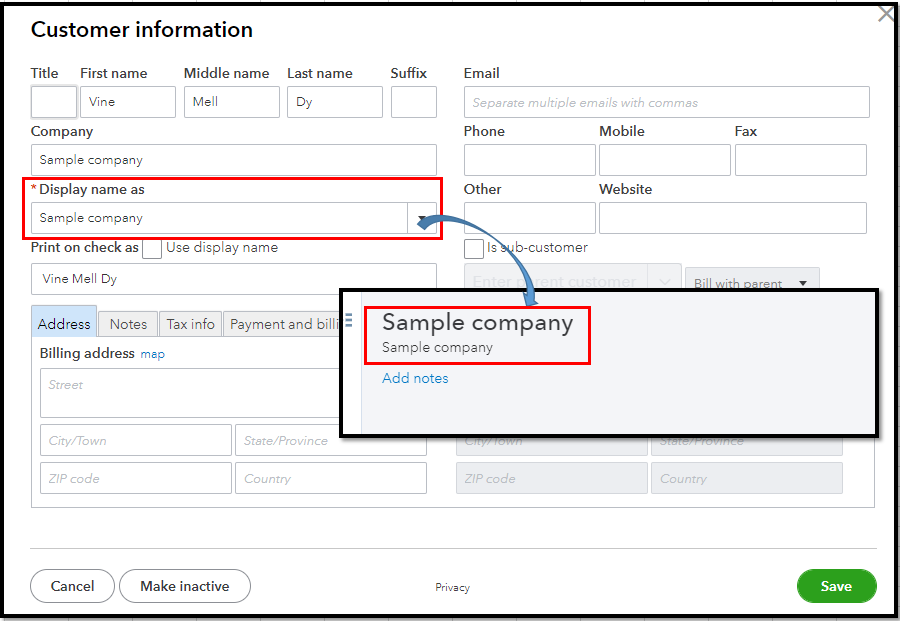
For more info about the process, please see this article: Edit customer information.
Also, QBO has several ready-made reports that you can access to view your customer information and their transactions. Just simply go to the Reports tab and type the "customer" keyword and click whichever customer report you'd like to open.
Don't hesitate to get back here if you have a further concern about managing your customer's profiles. I'll be always around to help. Keep safe.

- Mark as New
- Bookmark
- Subscribe
- Permalink
- Report Inappropriate Content
Other Questions
Does each consumer line require that change to be made? Is there a method to sort the entire list by the name of the company without updating each item separately?


- Mark as New
- Bookmark
- Subscribe
- Permalink
- Report Inappropriate Content
Other Questions
Hello there, SF27.
I'd recommend contacting our Technical support. They have available tools to investigate the main cause of your customer's name that doesn't show up.
Here's how:
- Go to the Help menu, then choose Contact Us.
- Type your concern in the box and tap Let's talk.
- Click Start a chat.
- Complete the required data and submit the request.
Please call them within business hours to ensure we can cater to your concern quickly.
Feel free to visit this article about handling customer transactions and customizing sales reports.
Don't hesitate to leave a message below if you have additional questions about your customer's invoice. I'm continuously here to help you. Be safe.
