Turn on suggestions
Auto-suggest helps you quickly narrow down your search results by suggesting possible matches as you type.
Showing results for
When I log into my Intuit account and go to delete, it asks me to cancel the subscription which I obviously dont have with QBOA
Hello, @dnu3562. I can help you find a way to declutter some of your QuickBooks Online Accountant (QBOA) accounts.
Before we proceed, please know that we cannot delete a QBOA account because they're tied to your Intuit profile and used for managing client books. It's also a free account and doesn't require a subscription. As a workaround, you can Pin those QBOA accounts you are using.
Here's how:
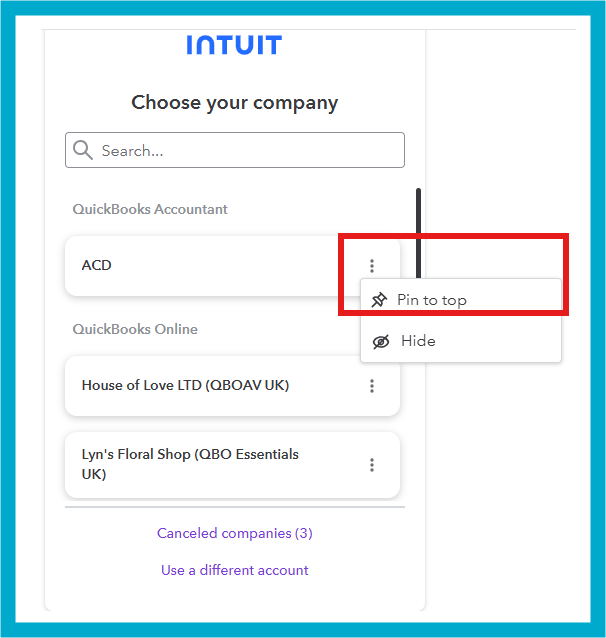
This process will allow you to see at the top your accounts that you need to use. Keeping those accounts that you no longer needed at the bottom.
On the other hand, I recommend reaching out to our Live Support team for assistance. They are well-equipped to help you manage your accounts, particularly if you're an accountant handling subscriptions for your clients or an invited accountant user in an account where the subscription is paid by your clients.
Feel free to return to this forum if you have any more questions about managing your accounts. We're always here to help you out.
You have clicked a link to a site outside of the QuickBooks or ProFile Communities. By clicking "Continue", you will leave the community and be taken to that site instead.
For more information visit our Security Center or to report suspicious websites you can contact us here


