Hi there, @Larfin Trading.
Thank you for using the QuickBooks Self-Employed (QBSE) trial account. I can guide you on how to set up your products and services.
In QBSE, you can add a product or service through the Invoice page. To get started, you'll need to enable the feature through the Settings icon.
- Sign in to QBSE.
- Go to the Gear icon, then turn on Invoicing under Tools.
Once done, follow these steps to set up your products.
- Click on Invoices from the Gear icon.
- Tap on Create invoice under Invoices.
- Select Add new from the Product or Service drop-down menu.
- Enter the product details, then Save.
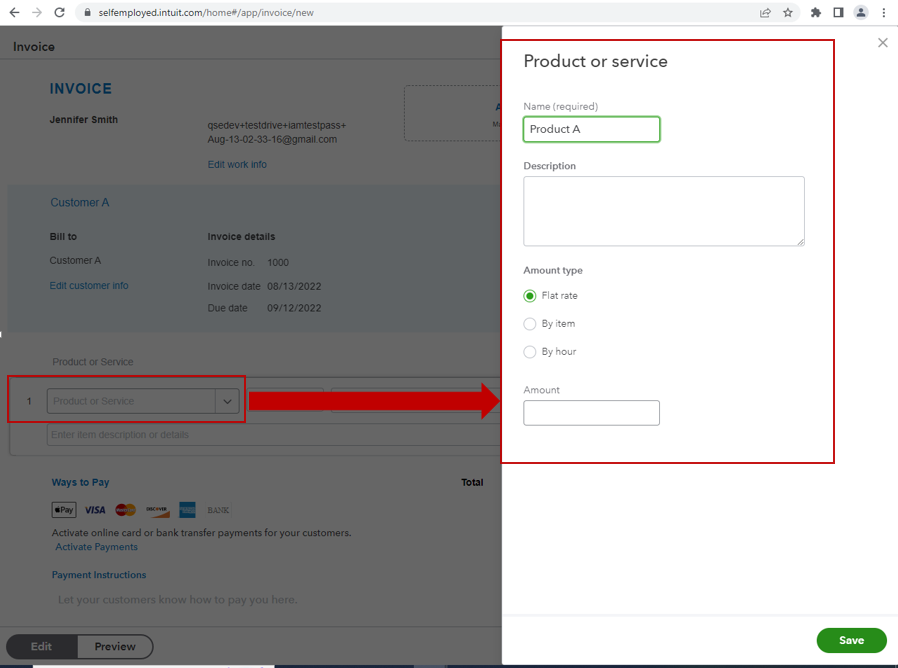
- Repeat the same steps for other products.
Once done, you're now ready to create invoices using the products added.
Let me know if you have follow-up questions about setting products in QBSE. I'm always here to provide additional assistance. Happy weekend!


