We can't directly archive old entries, Lindsey.
While this is not currently an option in QuickBooks Online (QBO), there are two effective methods for managing and hiding old quotes.
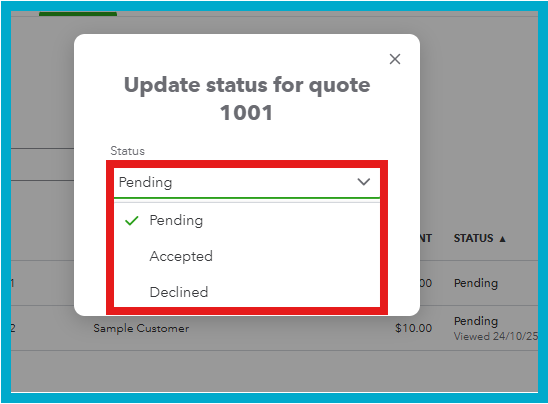
For entries that will not be invoiced, please update their status.
Here's how:
- Navigate to the Sales tab and select Quotes.
- Locate the quote you want to update and click Update status.
- Choose the appropriate new status from the pop-up menu.
We can also edit the quotes to include a descriptive memo indicating that you are archiving those entries. This will help you distinguish them from all other quotes that were declined for different reasons.
If the entry is no longer relevant, you may delete it or use a third-party application tailored for transaction archiving.
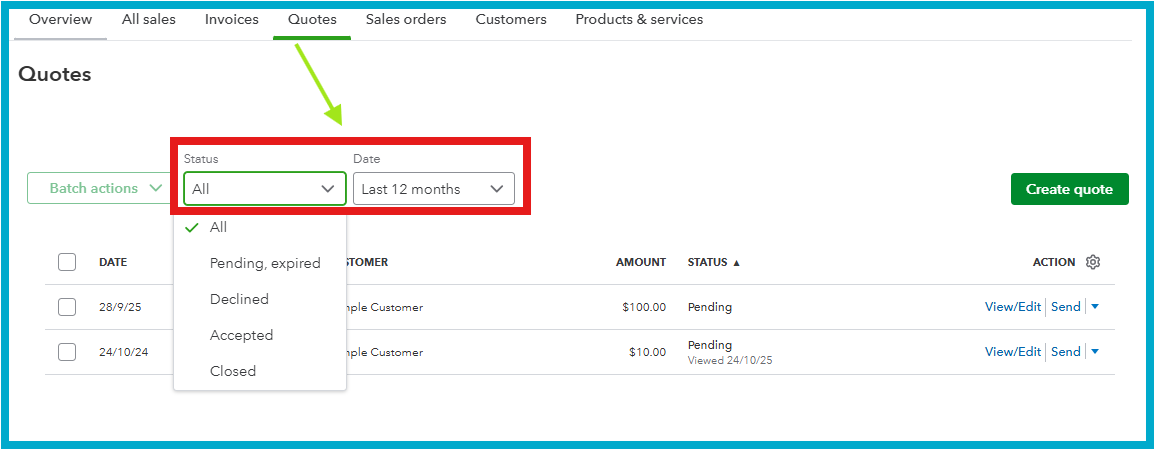
Another way to visually archive entries without deleting them is to use the filter option in the Sales tab, select Quotes and filter by Status (Open or Pending) or by Date to hide other entries.
If you need further assistance, please click the Reply button.


