Turn on suggestions
Auto-suggest helps you quickly narrow down your search results by suggesting possible matches as you type.
Showing results for
I wish to notify my customers of a business notice
Hello there, Terry.
QuickBooks can't send general messages like SMS or newsletters, but it does allow basic communication via invoicing, quotes, sales receipts, and account statements. For broader messaging, export customer data or use third-party apps for email or SMS.
The email feature for invoices, quotes, or statements can be adapted to send personalized notices. For an Invoice or Quote, here's how:
1. Hover over +Create, then click Invoice.
2. Enter the required details, including the customer’s email, then Save and send.
3. Add your message to the Body section, then Send and close.
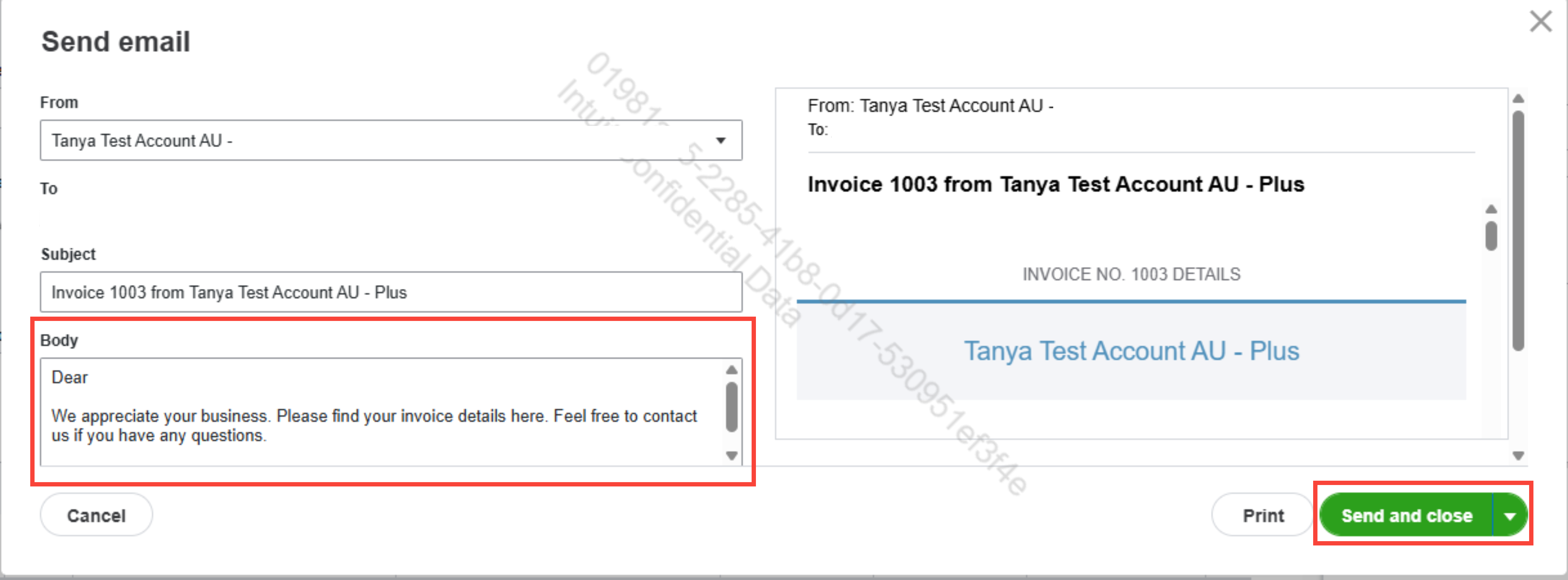
4. Repeat the steps for Quotes.
* Emails are tied to transactions and must be sent individually, not in bulk.
Also, QuickBooks integrates with third-party apps to manage customer communication, such as:
Mailchimp, lets you send bulk email newsletters or notifications, using customer data from QuickBooks.
ClickSend or Twilio, send SMS notifications by integrating with QuickBooks via Zapier.
The steps above are workarounds for messaging customers in QuickBooks.
If you have further questions, feel free to reply below.
You have clicked a link to a site outside of the QuickBooks or ProFile Communities. By clicking "Continue", you will leave the community and be taken to that site instead.
For more information visit our Security Center or to report suspicious websites you can contact us here

