Turn on suggestions
Auto-suggest helps you quickly narrow down your search results by suggesting possible matches as you type.
Showing results for
Hi there, Clydeh. Thank you for your efforts in checking for the existence of this account in your Chart of Accounts.
I understand you've completed some reviews, but I recommend a quick check that includes inactive accounts to ensure nothing is overlooked. Displaying inactive accounts is crucial because they still exist in the system and can cause conflicts with account numbers, even if they're not in the standard Chart of Accounts.
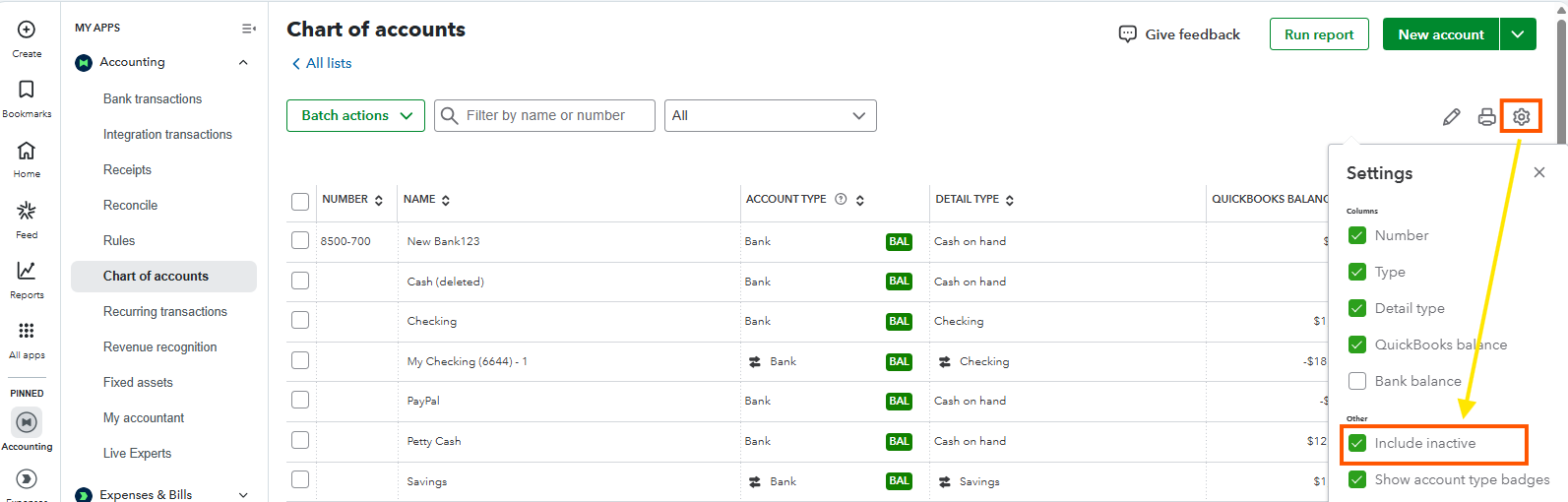
In QuickBooks Online, inactive accounts may not appear until you set them up to show. To view these accounts, click the Gear icon next to the Print symbol in the Chart of Accounts window. Make sure to check the box labeled "Include inactive."
If you confirm that this code is not in use and the issue persists, it may be due to temporary browser-related situations. Start by refreshing your browser, as this can resolve temporary issues and reload the page correctly. If the problem persists, try logging out and then back in to refresh your session and ensure proper system synchronization.
If the problem persists, try using a different browser since some may not display content correctly.
Keep us posted if you have any other concerns or additional questions.
You have clicked a link to a site outside of the QuickBooks or ProFile Communities. By clicking "Continue", you will leave the community and be taken to that site instead.
For more information visit our Security Center or to report suspicious websites you can contact us here


