
Turn on suggestions
Auto-suggest helps you quickly narrow down your search results by suggesting possible matches as you type.
Showing results for
Hello, fazid.
I'll share insights about customizing invoice templates and guide you in achieving your desired layout.
Customizing the layout of sales forms in QuickBooks Online (QBO) is an effective way to enhance your business' communications and make eye-catching invoices. Blank spaces are intended to specify certain parts of your invoices. With this, you're unable to adjust or remove them.
On the other hand, you can edit or change your template's print settings (top and bottom page margins) to create an A4 invoice. To do this, here's how:
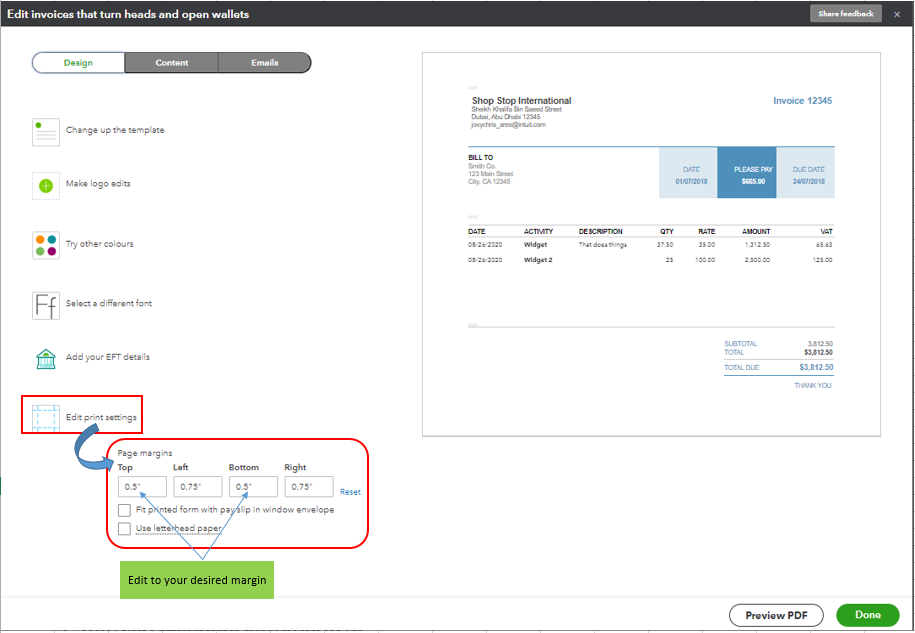
Once you're done, go to the Content tab's Footer section. From there, disable fields like the Discount and Deposit fields to remove them from your invoice's footer. Please see the screenshot below for your reference.
For the complete guide in customizing (the old and new layout) invoices, please see this article: Customize invoices, estimates, and sales receipts in QuickBooks Online.
Additionally, once your customer makes a payment on your invoices, you need to record them in QuickBooks to connect both transactions and keep your accounts balanced. For a complete guide about this process, you may want to check out this article: Record invoice payments in QuickBooks Online.
I'm ready to back you up if you need more help customizing sales forms in QBO. I'll keep the thread open so you can comment back.
You have clicked a link to a site outside of the QuickBooks or ProFile Communities. By clicking "Continue", you will leave the community and be taken to that site instead.
For more information visit our Security Center or to report suspicious websites you can contact us here


