
Turn on suggestions
Auto-suggest helps you quickly narrow down your search results by suggesting possible matches as you type.
Showing results for
Hello there, Kristy.
In QuickBooks Online, you can reset your data and start fresh if your account is less than 60 days old. For accounts older than 60 days, the only option is to cancel your existing QuickBooks Online company and set up a new one.
Before we proceed, I’d like to verify if the data is from another QuickBooks account or a different platform. Any additional details you can provide would be greatly appreciated.
If your account is less than 60 days old, let's reset your books. Follow the steps below.
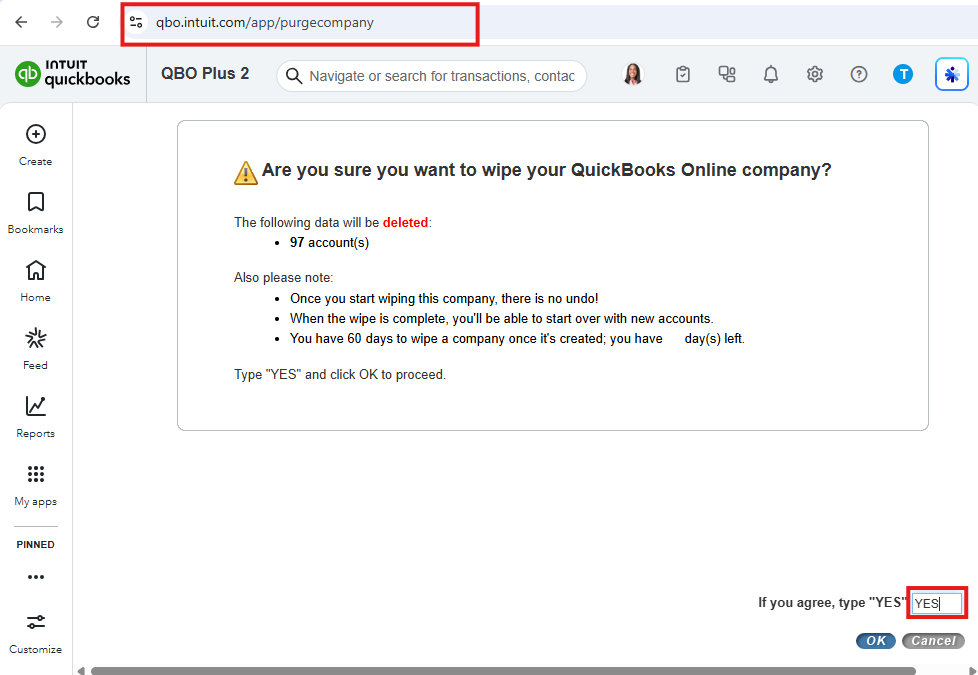
Alternatively, you can refer to this article for guidance on canceling your current subscription and starting a new one: Delete your data and start over in QuickBooks Online.
After setting up your new account, you can refer to this article for detailed instructions on importing data into QuickBooks Online: Common questions about importing data to QuickBooks Online.
I'm confident we can resolve this together, so you can move forward with ease. If you have any further questions or details to share, don't hesitate to click the Reply button below.
Who migrated your data?
You have clicked a link to a site outside of the QuickBooks or ProFile Communities. By clicking "Continue", you will leave the community and be taken to that site instead.
For more information visit our Security Center or to report suspicious websites you can contact us here


