Turn on suggestions
Auto-suggest helps you quickly narrow down your search results by suggesting possible matches as you type.
Showing results for
Hi Guys, I have tried to link my UOB Singapore Business Bank with QBO but it says that (UOB) - Business - BIBPlus - Blocks QBO Edition from connecting with them.
Let me share some information about connecting your financial institution in QuickBooks Online (QBO), Saad Rehman.
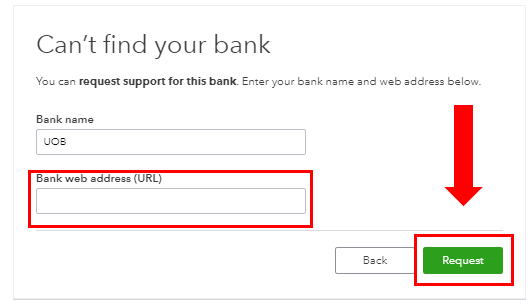
It's possible the (UOB) - Business - BIBPlus bank isn't supported and listed in QBO. You can request support from them. This way, they can help establish a one-way connection to your Online account. Let me show you how:
You can also refer to this link and proceed to Step 3: Find your bank or credit card account. In the meantime, you can upload the transactions manually to ensure the account is up-to-date. Download the data from your bank. Then, map the transactions in the following supported formats or file types:
After you download your transactions in QuickBooks, you can review them in the For Review tab. Feel free to visit our Banking page for more insights about managing your bank feeds and reconciling accounts.
Please come back if you need more help with managing your bank transactions. I'm determined to help you succeed.
You have clicked a link to a site outside of the QuickBooks or ProFile Communities. By clicking "Continue", you will leave the community and be taken to that site instead.
For more information visit our Security Center or to report suspicious websites you can contact us here