
Turn on suggestions
Auto-suggest helps you quickly narrow down your search results by suggesting possible matches as you type.
Showing results for
Hi there, Andrew. Whenever you run a Balance Sheet report, it is important to note what accounting basis you used: Cash or Accrual.
If you run it on a Cash basis, the report typically won't show accounts payable entries because it only recognizes transactions when money actually changes hands. You can see this field above the report page.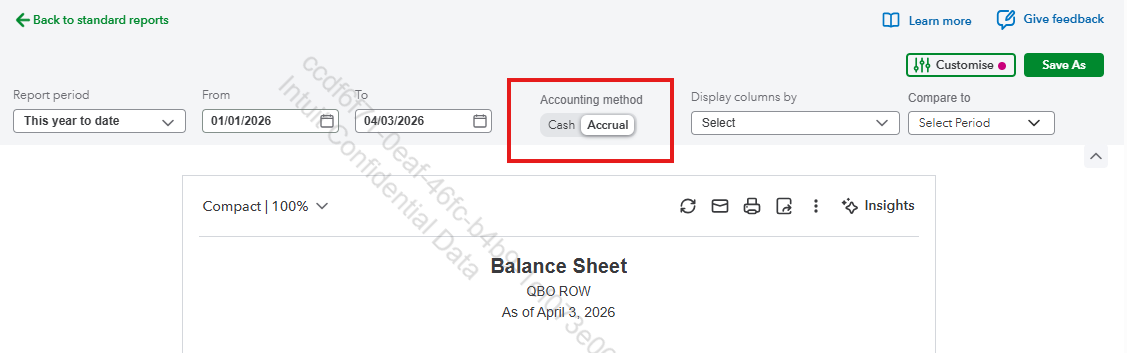
On an Accrual basis, accounts payable should appear on your Balance Sheet report. Since it's missing, there's an issue with your payable recording. You might have an unrecorded supplier transaction, or you accidentally marked a bill as paid.
To confirm this, check the Expenses tab and review the accuracy of your supplier's transaction. If you think there's something off about them or there's a sudden change, go to Gear icon > Audit Log to view all the changes you've made, including the deleted entries.
You can filter them to show specific transactions. Once you see the mistake, edit the entry. If it's a bill you accidentally marked as paid, delete the payment transaction.
After that, rerun the report and make sure the date range covers the period when you created your accounts payable transactions, so they appear.
Let me know if you have additional questions so we can assist you promptly.
You have clicked a link to a site outside of the QuickBooks or ProFile Communities. By clicking "Continue", you will leave the community and be taken to that site instead.
For more information visit our Security Center or to report suspicious websites you can contact us here


