
Turn on suggestions
Auto-suggest helps you quickly narrow down your search results by suggesting possible matches as you type.
Showing results for
Hi, @rossana-lemon-lo. In most cases, a Profit and Loss (P&L) that isn’t visible for an accountant is due to a filter or permission issue.
To provide the best solution, are you referring to a standard report or a management report?
Ideally, your accountant should be able to view the standard P&L report. If you shared a management report through email, those links can expire. You’ll need to resend it to restore their access.
Here's how:


For more details on managing these documents, refer to: Create, view, or edit a Management report.
However, if they are accessing the report within their QuickBooks Online Accountant (QBOA) account, ensure they are opening your company file from their client list and filtering the correct date:
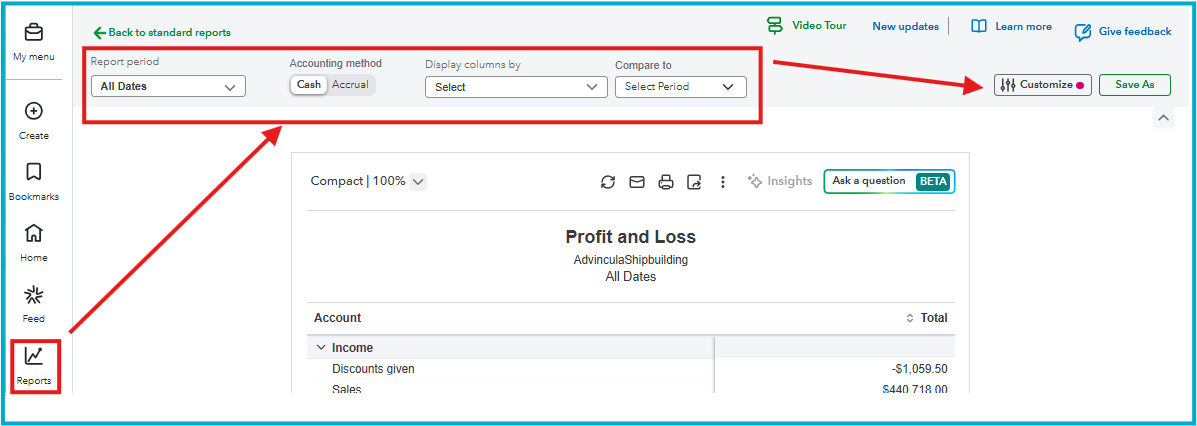
I hope this gets your accountant back on track so you can dive into those numbers together. Let me know if this resolves your issue or if you have any other QuickBooks concerns. I'd be happy to lend a hand.
You have clicked a link to a site outside of the QuickBooks or ProFile Communities. By clicking "Continue", you will leave the community and be taken to that site instead.
For more information visit our Security Center or to report suspicious websites you can contact us here


