
Turn on suggestions
Auto-suggest helps you quickly narrow down your search results by suggesting possible matches as you type.
Showing results for
Buy now and save 90% off today
xyzYou have me to help you print the General Ledger alphabetically, neeraj1.
Let me guide you how:
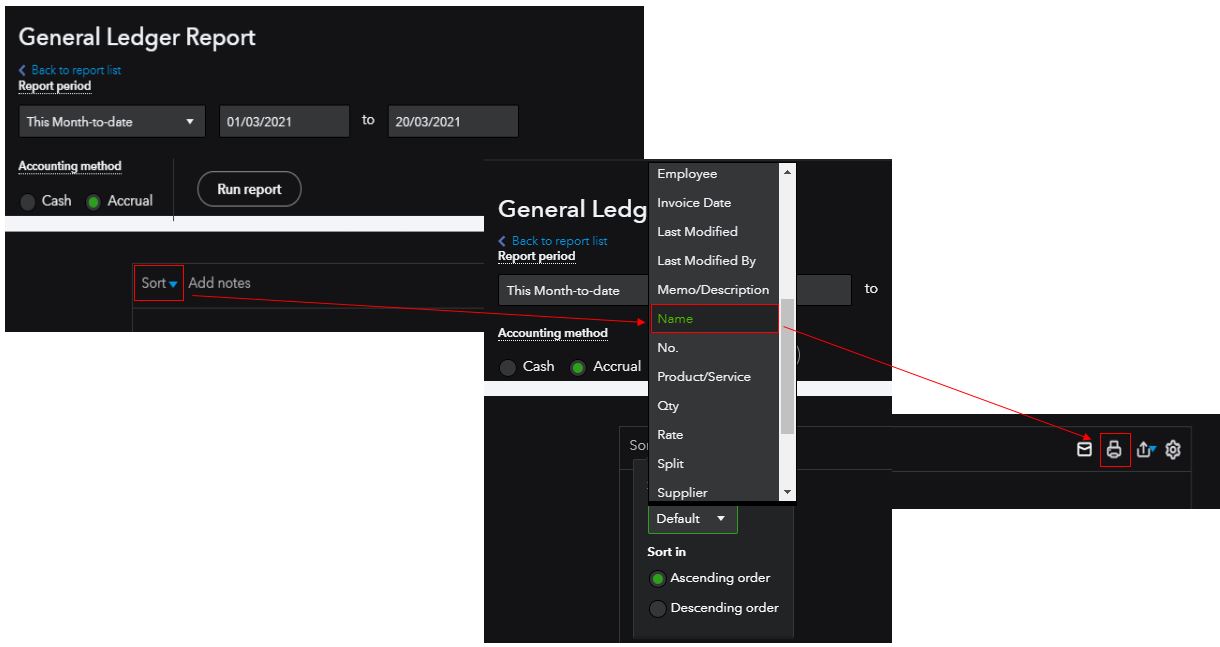
If you want to add or remove some data on the report before printing, you can check this reference: Customise reports in QuickBooks Online.
There you have it. I'll be around if you need about report customisation. Keep safe!
You have clicked a link to a site outside of the QuickBooks or ProFile Communities. By clicking "Continue", you will leave the community and be taken to that site instead.
For more information visit our Security Center or to report suspicious websites you can contact us here


