
Turn on suggestions
Auto-suggest helps you quickly narrow down your search results by suggesting possible matches as you type.
Showing results for
Hi, @Origin-s--Studio. In QuickBooks Online (QBO), there isn’t a built-in report that specifically flags missed billable expenses (transactions where the Billable box should have been checked but wasn’t). However, you can run a customized report to review your expenses and identify any that are currently marked as non-billable.
Here’s how you can do that:
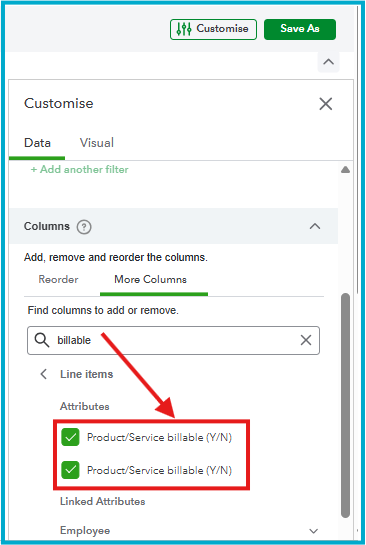
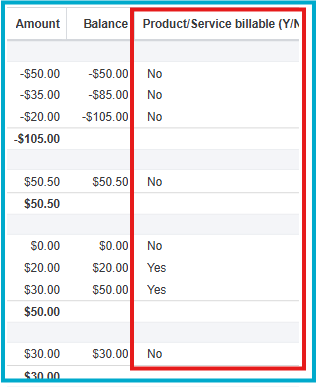
How to review the results:
From here, review the transactions marked No entries to determine whether they were intentionally non-billable or if any should have been marked as billable. If needed, open transaction, check the Billable box, and save your changes.
You can also run the Unbilled Charges report to see what is currently marked as billable and compare it with your expense report for a more complete review.
If you have any other questions about managing expenses or customizing reports in QBO, feel free to reach out. I’m here to help.
You have clicked a link to a site outside of the QuickBooks or ProFile Communities. By clicking "Continue", you will leave the community and be taken to that site instead.
For more information visit our Security Center or to report suspicious websites you can contact us here


