
Turn on suggestions
Auto-suggest helps you quickly narrow down your search results by suggesting possible matches as you type.
Showing results for
Hi there, Trang. Thank you for reaching out and providing details about the challenges you're encountering with class formatting in your exported reports. I've reviewed the issue, and I'd like to explain what's happening and how we can resolve this.
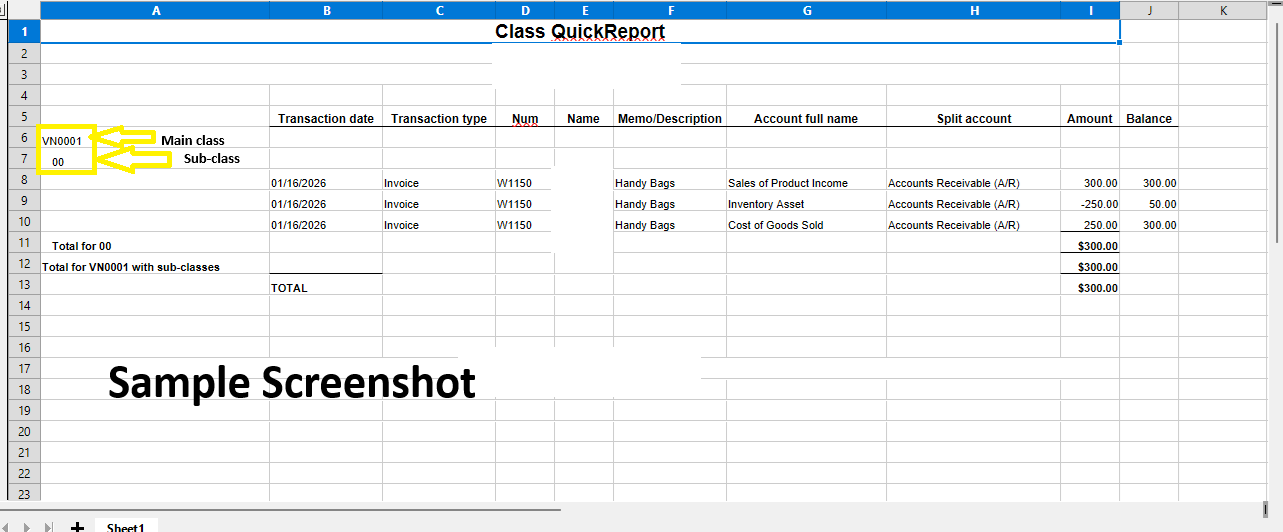
When creating a Class in QuickBooks Online and including a colon (:) in the name (e.g., VN0024:00), the system automatically interprets the segment after the colon as a sub-class of the main class. As a result, reports and exported data display the sub-class (00) separately from the parent class (VN0024).
To ensure your reports display correctly, I suggest renaming the sub-class (00) to something more descriptive, such as VN0024 Project 1 or any name that works for your needs. By renaming the sub-classes, your report will display them with clear labels, making it easier to differentiate between your categories or projects.
I've also included a screenshot for visual reference.
Please leave a response here if you have other concerns related to QuickBooks. We'll be here to help.
You have clicked a link to a site outside of the QuickBooks or ProFile Communities. By clicking "Continue", you will leave the community and be taken to that site instead.
For more information visit our Security Center or to report suspicious websites you can contact us here


