Turn on suggestions
Auto-suggest helps you quickly narrow down your search results by suggesting possible matches as you type.
Showing results for
Glad to see you here in the Community space, @prashant3.
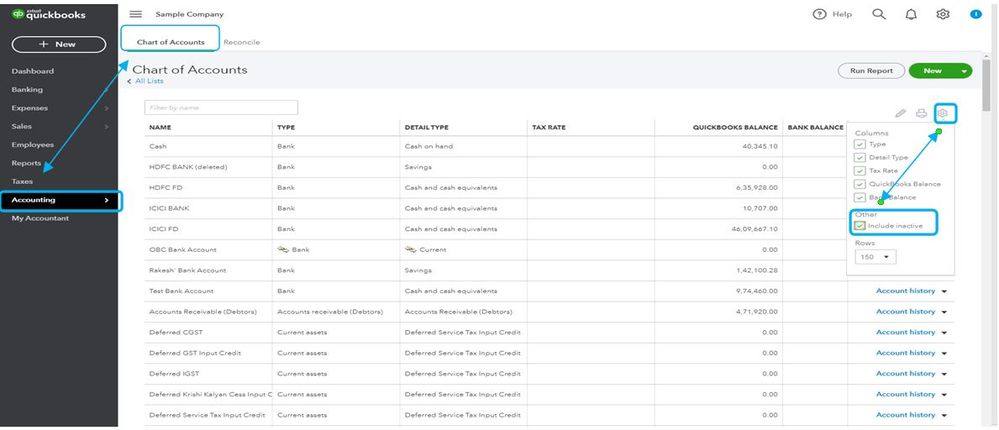
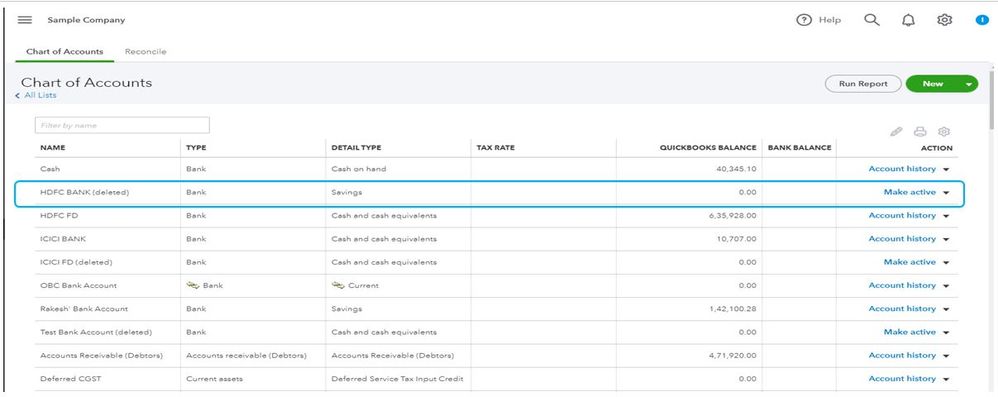
You can change the ledger to active by going to the Chart of accounts. Let me show you how:
The following article contains additional information about this process: Delete or Make an Account Inactive.
Also, the following resources are good references to learn more in managing and organizing your chart of accounts:
Please know I'm only a post away if you have any other questions about activating an account or other concerns about QuickBooks. Have a nice day ahead!
You have clicked a link to a site outside of the QuickBooks or ProFile Communities. By clicking "Continue", you will leave the community and be taken to that site instead.
For more information visit our Security Center or to report suspicious websites you can contact us here