
Turn on suggestions
Auto-suggest helps you quickly narrow down your search results by suggesting possible matches as you type.
Showing results for
In Spanish
Hola, Ana. Cuando creas un artículo de inventario en QuickBooks, el programa lo vincula automáticamente a una cuenta de Costo de Ventas (COGS). Para asegurar que el monto del costo en tu factura se refleje correctamente en tus reportes y en el diario de transacciones, revisa la cuenta de gastos utilizada.
Si el artículo está vinculado correctamente al COGS y tus reportes de valoración siguen mostrando $0, sigamos estos pasos de solución de problemas del navegador: cierra la sesión y vuelve a entrar para actualizar y reflejar cualquier cambio realizado. También puedes intentar abrir tu empresa en una ventana de incógnito o usar un navegador diferente compatible con QuickBooks para determinar si el problema es específico de tu navegador actual.
Este hilo permanece abierto por si necesitas ayuda adicional con tus artículos de inventario en QuickBooks.
In English
Hi there, Ana. When you create an inventory item in QuickBooks, the software automatically links it to a Cost of Goods Sold (COGS) account. To ensure that the cost amount on your invoice reflects correctly in your reports and the transaction journal, review the expense account used.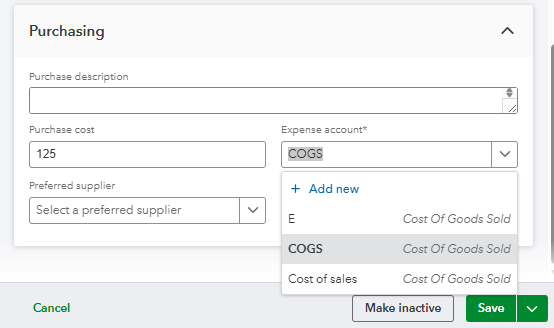
If the item is mapped correctly to COGS and your valuation reports are still displaying $0, let's go through browser troubleshooting steps by logging back in to refresh and reflect any changes made. You can also try opening your company file in an incognito window or using a different QuickBooks-supported browser to determine if the issue is specific to your current one.
This thread remains open if you need any additional assistance with your QuickBooks inventory item.
You have clicked a link to a site outside of the QuickBooks or ProFile Communities. By clicking "Continue", you will leave the community and be taken to that site instead.
For more information visit our Security Center or to report suspicious websites you can contact us here


