Turn on suggestions
Auto-suggest helps you quickly narrow down your search results by suggesting possible matches as you type.
Showing results for
Yes, we can do that by navigating to the QuickBooks settings to modify the email address where you want to receive customer replies, Vergann.
To clarify, when you mentioned "having replies to invoice reminders come back to accounts," did you mean that you would like to change the reply-to email address for customer responses to invoice reminders? If so, you can easily update this by following these steps:
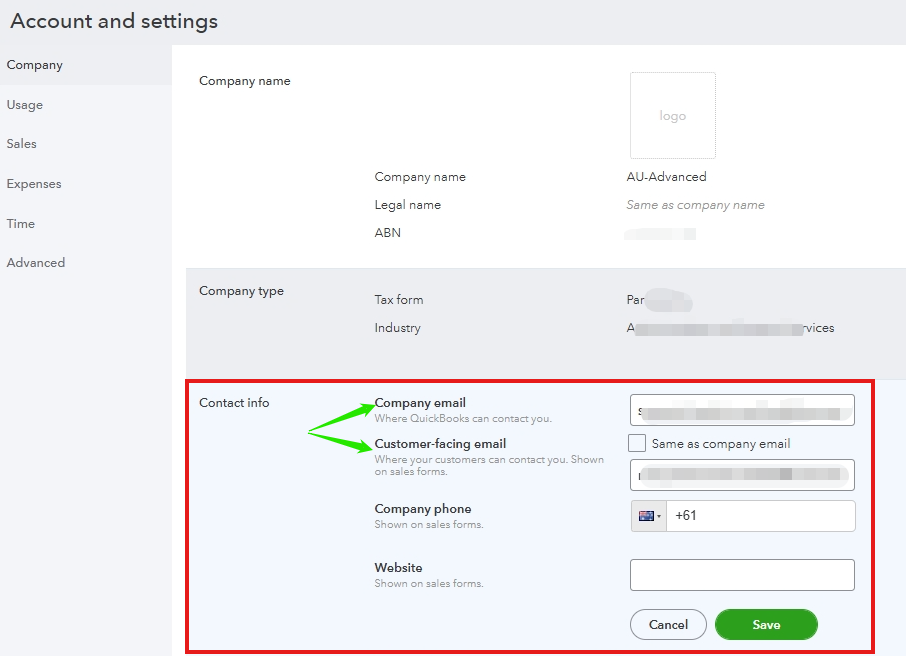
This update will ensure that any replies to invoice reminders are directed to the email address you specify, allowing you to manage them effectively.
If this is not what you were looking for, please provide further details so we can address your concern more accurately.
To learn more about invoice reminders, check out this link: Send invoice reminders automatically or manually in QuickBooks Online.
We would be happy to provide further assistance if you have additional questions or QuickBooks concerns. Please click the Reply button below so we can help you achieve your tasks.
You have clicked a link to a site outside of the QuickBooks or ProFile Communities. By clicking "Continue", you will leave the community and be taken to that site instead.
For more information visit our Security Center or to report suspicious websites you can contact us here


