Turn on suggestions
Auto-suggest helps you quickly narrow down your search results by suggesting possible matches as you type.
Showing results for
Hi there, Spruce.
It’s concerning to be charged multiple times for your QuickBooks subscription. Let’s work together to figure this out.
First, we recommend reviewing your payment history in QuickBooks and checking whether any duplicate charges are posted to your account.
Here’s how you can do it:
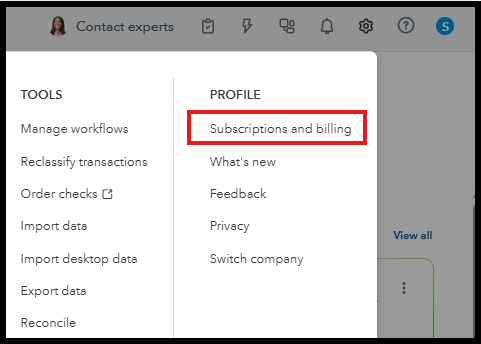

You can also utilize the lookup tool to identify and understand charges related to your product, such as Intuit charges on your credit card or bank statement. It’s a quick way to confirm where the charge came from and why: Understand Intuit charges on your credit card or bank statement.
If you’ve reviewed your payment history and used the lookup tool but still can’t identify the Intuit charges, we recommend reaching out to our Customer Support team. They have the tools and expertise to help resolve your concerns quickly.
Please let us know if you need additional clarification or have further concerns by leaving a reply below. We would be happy to provide more assistance.
You have clicked a link to a site outside of the QuickBooks or ProFile Communities. By clicking "Continue", you will leave the community and be taken to that site instead.
For more information visit our Security Center or to report suspicious websites you can contact us here


