Turn on suggestions
Auto-suggest helps you quickly narrow down your search results by suggesting possible matches as you type.
Showing results for
We're passionate about creating products that make a difference in your life. Recently, we launched our New QuickBooks Integrated Experience. Now, we’d love to hear what you think.
Why Your Feedback Matters
Customer feedback is the heartbeat of our innovation. Every comment, suggestion, and critique helps us refine our products and deliver the best possible experience. By sharing your thoughts, you play a key role in shaping the future of QuickBooks products.
How You Can Help
Have you tried the New QuickBooks Integrated Experience? Whether you loved it, liked it, or thought we could have done better, we want to hear from you.
Leave a Comment on this thread and we'll share your feedback directly with our product teams.
The new update is terrible !!!! the old was so simple to use and we were so much quicker. You have made it more diffcult to find the tabs and pages we want to use with youtr new myapps tab
Retrun the old immediately and stop trying to be fancy. we are not accountants we are simple business owner using your software. If we were accountants or book keepers we owuld use Myob or Xero
Yes I agree!! I can not add multiple service dates on my invoices now which is a requirement for NDIS criteria. It’s absolutely awful to use now and am considering another platform if it doesn’t return to the simplified version. Causing me stress as I will not be getting paid until I can figure it out
This update is horrible. It’s messy, confusing, and lags terribly. Previous version was fantastic. Please return or I will be looking at other alternatives to use. I hate this new version.
Please Revert back to the old update as I have all the sudden encountered so many new issues that I never had, this isn’t just about change it’s about keeping the UI simplistic and straight forward for normal business owners like ourselves. Potentially seeking new software if it remains. Thanks
I can’t send any invoices. The new interface is terrible. Please revert immediately. Also there was zero communication about this. Unhappy customer here.
Oh a week ago I’ve only just come across this. They haven’t fixed it yet! I need to be invoicing for NDIS clients! They have 24 hours or I’m jumping ship!
Hi there, Laar. I appreciate you reaching out to us here in the Community. I understand the importance of being able to navigate your account smoothly, especially when managing invoices. Let me assist you with your concerns.
All QuickBooks Online users now have moved to our new interface, designed to improve functionality and provide an enhanced user experience. Currently, the option to revert to the previous interface is unavailable, unless the option to Switch back is visible under the Gear icon in your QBO account.
If you'd like the option to revert back, feel free to submit your thoughts through the in-product Feedback option. Our development team actively reviews customer feedback to shape future updates.
Here's how:
Regarding the issue with sending invoices, I suggest logging out of your QBO account and then logging back in. Doing so refreshes the system and helps resolve minor display or functionality issues.
If you're still unable to send invoices after logging back in, try accessing your account through a private browser or incognito tab to bypass cached data that may be interfering. Simply open an incognito window and go to https://quickbooks.intuit.com to log in and test if you can send invoices from there.
If the issue persists after following these steps, I recommend contacting our QuickBooks Support team. They can securely access your account and help identify why you're unable to send invoices.
If you have additional questions or need further assistance, please don’t hesitate to reply here. We’re here to help.
New update is crap
I have to log in every fooling time
cant add a note with payment so I can consolidate it later
cant look back on invoices over 6 months, YES I have changed the goddam settings
The new update is attrocious! I won't want to have to learn a whole new program, layout or have any assistance from AI. This is my ACCOUNTING program. I don't need AI to tell me anything. I watched the 5 step intro and the last ballon said click settings to go back to the previous platform, yet there is noting in settings that lets me do that. Give me back my old quickbooks platform.
When you keep changing the program, it does not improve things, it actually reduces productivity becasue we have to go and re-learn something that we could use quite comfortably. STOP CHANGING THE INTERFACE! Get rid of the new platform! It is just as bad as the new ADOBE platform which is just as pittiful! It is no wonder productivity is down in this country!
horrible, terrible, absolutely deplorable..... let us choose to go to the new interface or not. You will loose so many customers to other accounting software.
recent updates have put my 'bookmarks' behind a button, can i revert it to the original state where the buttons I use are on the homescreen/menu? The only buttons I use are "Invoices", "Customers", and "Create new invoice". I do not use anything else.
Also, I am constantly being suggested to add widgets. Can I remove them?
I highly value a clean workspace with minimal fluff. The new update has added multiple elements I consider fluff and would like to revert back to the minimalist layout I was able to create previously. I've tried customising my homepage already and cannot seem to remove the elements I don't use.
Hello Gung,
Welcome to the Community! It’s great to have you here. I understand that transitioning to a new layout can be challenging, and having the option to switch back to the previous version can make it easier for your workflow.
Please know that QuickBooks Online is continually evolving. These updates reflect our commitment to enhancing the Intuit platform for a better experience.
As QBO gradually transitions to the new experience, some users still have the option to switch back to the old layout. Switching back is temporary, as you'll soon return to the new interface to access QuickBooks' latest features.
Here's how to switch back:
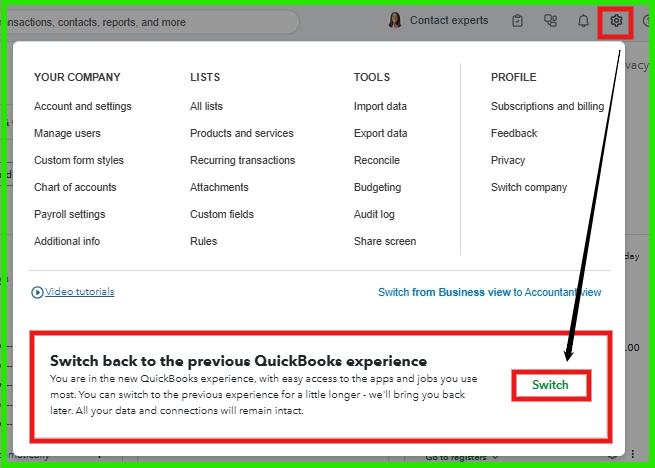
For removing widgets, you can customize the Home screen as follows:
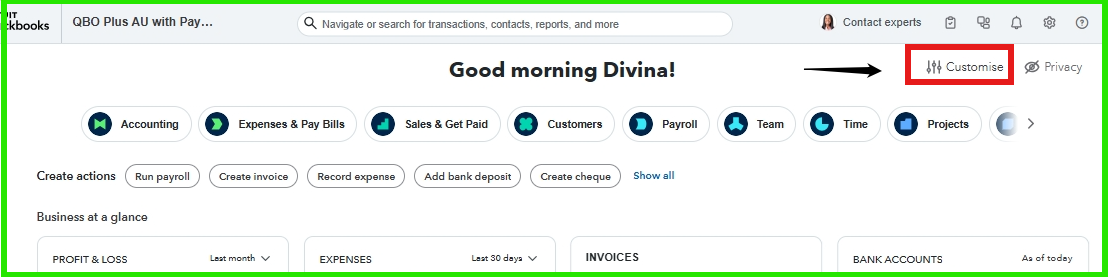
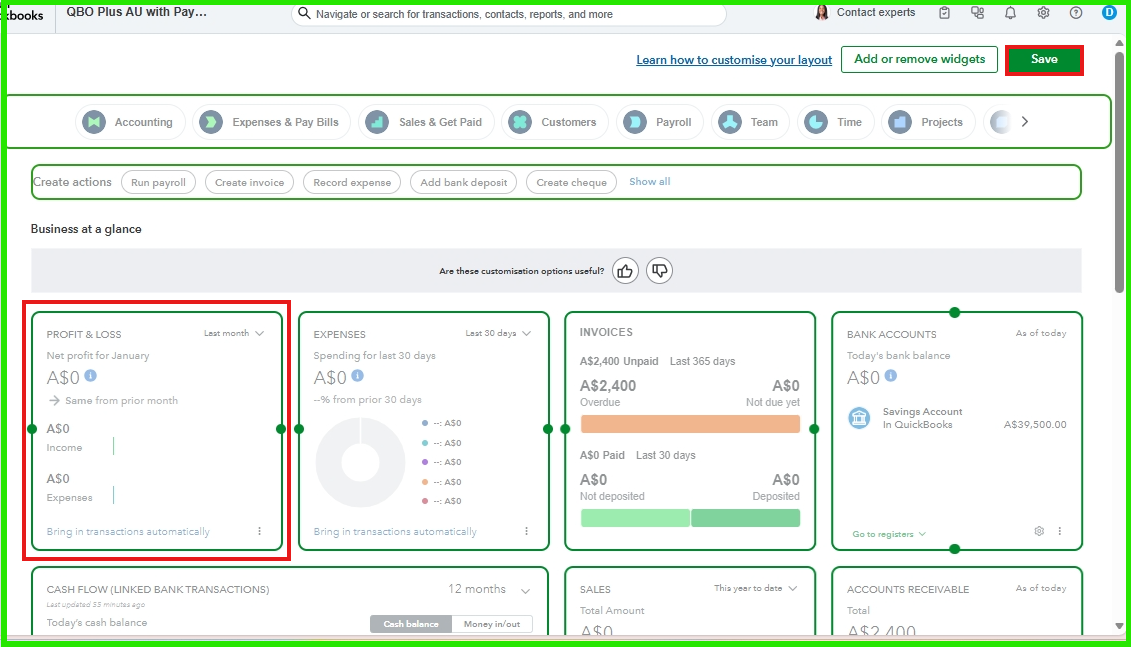
The steps above can help you go back to the old version. If you have any additional information, please don't hesitate to add it below. I'm looking forward to hearing from you. Have a great day ahead!
You have clicked a link to a site outside of the QuickBooks or ProFile Communities. By clicking "Continue", you will leave the community and be taken to that site instead.
For more information visit our Security Center or to report suspicious websites you can contact us here


