Turn on suggestions
Auto-suggest helps you quickly narrow down your search results by suggesting possible matches as you type.
Showing results for
Yes, the Community is open 24/7, Elise. When you mention "historic balances," what exactly are you looking at? Are you referring to the current balance in your register, the opening balance from when you first set up the account, or perhaps the ending balance from a previous reconciliation?
If you mean your register balance, discrepancies here usually happen when the transactions recorded don't quite match your actual bank statement. This could be due to a duplicate entry, a missed transaction, or even a simple typo in an amount.
To isolate the issue, you can compare your QuickBooks Online register entries side-by-side with your bank statement for that period. If you find one that doesn't belong or has the wrong total, click on the entry to edit the details or delete it entirely. Once the entries mirror your statement, that balance should correct itself.
If the very first balance in your account is incorrect, it will throw off every total that follows. You can fix this by going to your Chart of Accounts and open the register for that account. Then, search for transaction labeled Opening Balance Equity. If the amount is wrong, update the figures to the correct starting balance, and hit Save.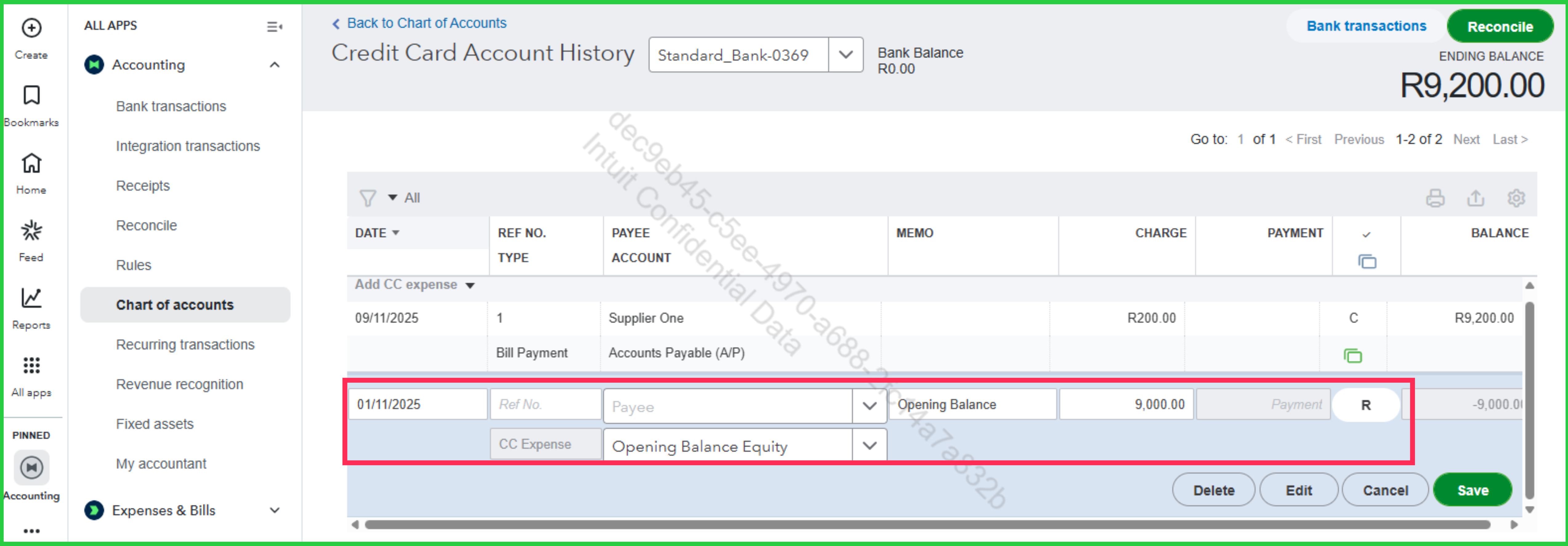
On the otherhand, if you are seeing a discrepancy in your ending balance while trying to reconcile, it typically means a previously reconciled transaction was edited, deleted, or moved. For a deep dive into fixing that specific issue, visit this guide: Fix issues with your beginning balance for accounts you've reconciled before.
For our Live Support, please check our business hours to ensure we can assist you on time.
Should you have further concerns, feel free to leave a message.
You have clicked a link to a site outside of the QuickBooks or ProFile Communities. By clicking "Continue", you will leave the community and be taken to that site instead.
For more information visit our Security Center or to report suspicious websites you can contact us here


