Turn on suggestions
Auto-suggest helps you quickly narrow down your search results by suggesting possible matches as you type.
Showing results for
Hi there, allas.
Since the system isn’t accepting the expense you’re trying to create, the associated expense accounts may be inactive. You can verify and activate these accounts, ensuring they’re properly set up for the type of expense you’re recording.
Here’s how to check if your expense accounts are active:
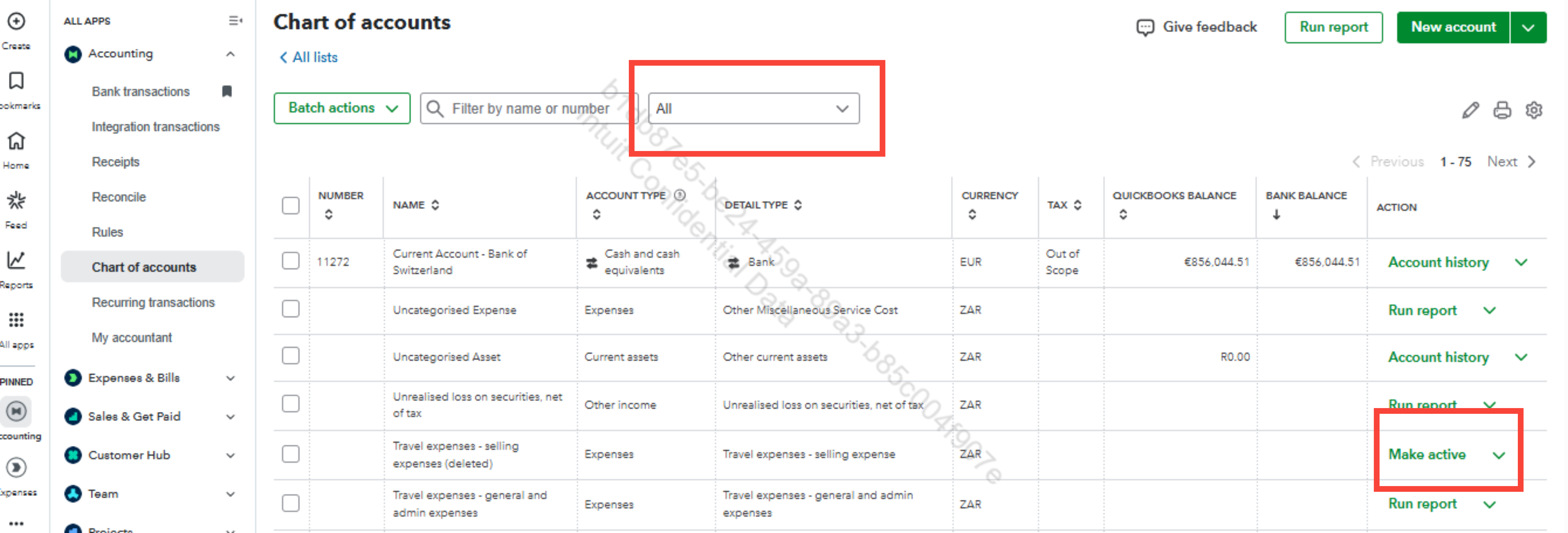
It’s also possible that the issue is related to uploading receipts. If you’re uploading receipts, make sure the date filter isn’t set to a past period that excludes your current receipts. You can find this under the For Review tab in the Receipts section.
Once you’ve completed these steps, you should be able to record your expense successfully.
Here's also a helpful resource to support you in categorising transactions in the future: Categorise online bank transactions in QuickBooks Online.
Let us know if you need further assistance. We'll provide continuous assistance.
You have clicked a link to a site outside of the QuickBooks or ProFile Communities. By clicking "Continue", you will leave the community and be taken to that site instead.
For more information visit our Security Center or to report suspicious websites you can contact us here


