Turn on suggestions
Auto-suggest helps you quickly narrow down your search results by suggesting possible matches as you type.
Showing results for
Hello, @finansies. Thank you for reaching out.
We are currently transitioning to Modern view reports in QuickBooks. This new view is designed to make reports run faster, reduce the chance of timing out, and allow for enhanced customization.
A number of users still have the option to switch back to the Classic view. If this option is available to you, you can switch it back. However, please be aware that if you don't save the report, when you open it again, it will default back to the Modern view.
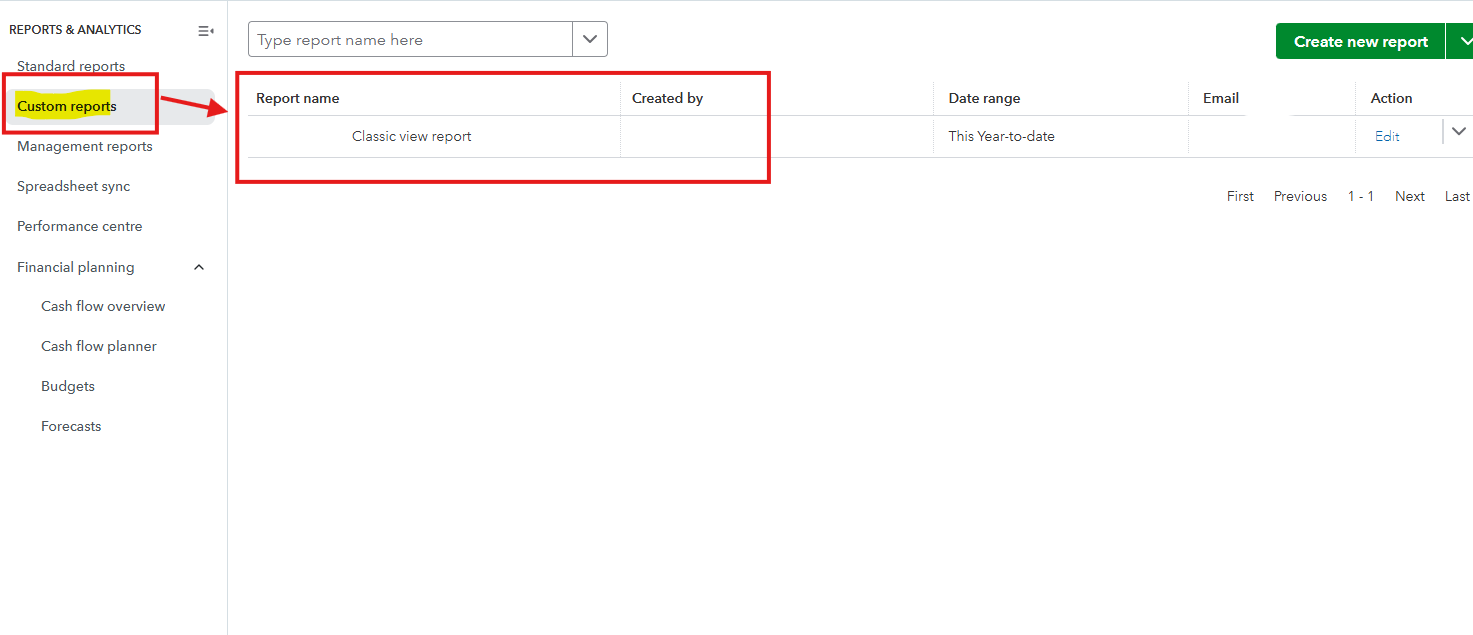
To ensure your preferred Classic view settings are maintained, you must save or memorize the report after changing the view. This saved report will then consistently open in the Classic view, bypassing the Modern view default.
Here's how to switch and save your report:


To view the saved report, head to Custom Reports.
Please let me know if you have any further questions.
You have clicked a link to a site outside of the QuickBooks or ProFile Communities. By clicking "Continue", you will leave the community and be taken to that site instead.
For more information visit our Security Center or to report suspicious websites you can contact us here


