
Turn on suggestions
Auto-suggest helps you quickly narrow down your search results by suggesting possible matches as you type.
Showing results for

It's nice to have you here today, @damienobeirne-ho. I'm delighted to assist you today in preventing duplicate invoice numbers in QuickBooks Online (QBO).
When users manually create invoices in QBO, there's a risk of accidentally entering the same number for multiple transactions. However, we can prevent this from occurring again by activating a warning message when a duplicate invoice number is detected. Here's how:
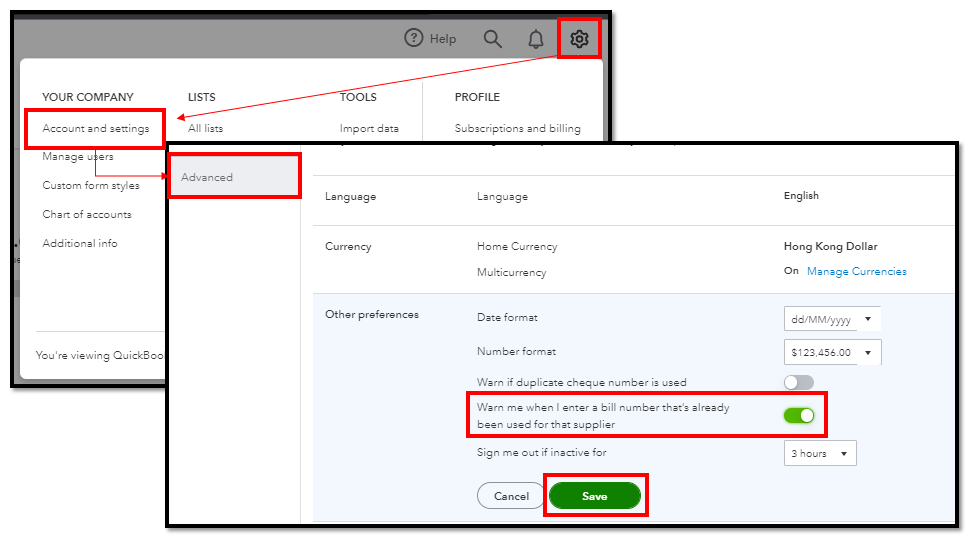
For now, you'll want to correct the duplicate ones by opening the invoice and entering the correct number in the Invoice no. field. 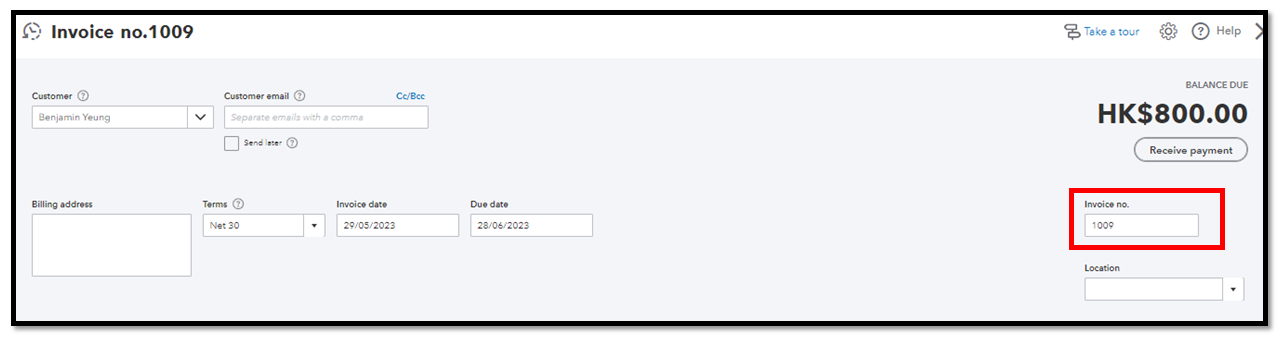
If you've followed the instructions mentioned earlier and you're still experiencing duplicate invoice numbers, we can take some troubleshooting measures to resolve the issue. Cases like this are sometimes caused by an excessive cache that is corrupted in the browser. First, log in to your account in a private window. Please refer to these keyboard shortcuts:
Once resolved, return to your original browser to clear its cache or switch to another compatible one. It could be a short-term issue with QBO or the window you're currently using.
When you receive payment from a customer, make sure to record it in QBO to mark the invoice as paid. Failure to do so will result in the invoice remaining open and unpaid in your reports.
Feel free to reach out anytime you have further inquiries regarding invoice numbers. The Community is accessible 24/7 to provide assistance. Stay safe, and have a wonderful day!
You have clicked a link to a site outside of the QuickBooks or ProFile Communities. By clicking "Continue", you will leave the community and be taken to that site instead.
For more information visit our Security Center or to report suspicious websites you can contact us here

