
Turn on suggestions
Auto-suggest helps you quickly narrow down your search results by suggesting possible matches as you type.
Showing results for
Hello there, Bilal.
To assist you effectively, could you provide more details about where exactly the navigation bar is missing? If possible, a screenshot or additional details would help us provide a more tailored solution for your concern.
In the meantime, if you mean that some of the buttons are missing from the Left Navigation menu. You can click the Customise button below to reset it to the default setting or choose which icons to pin.
Here's how:
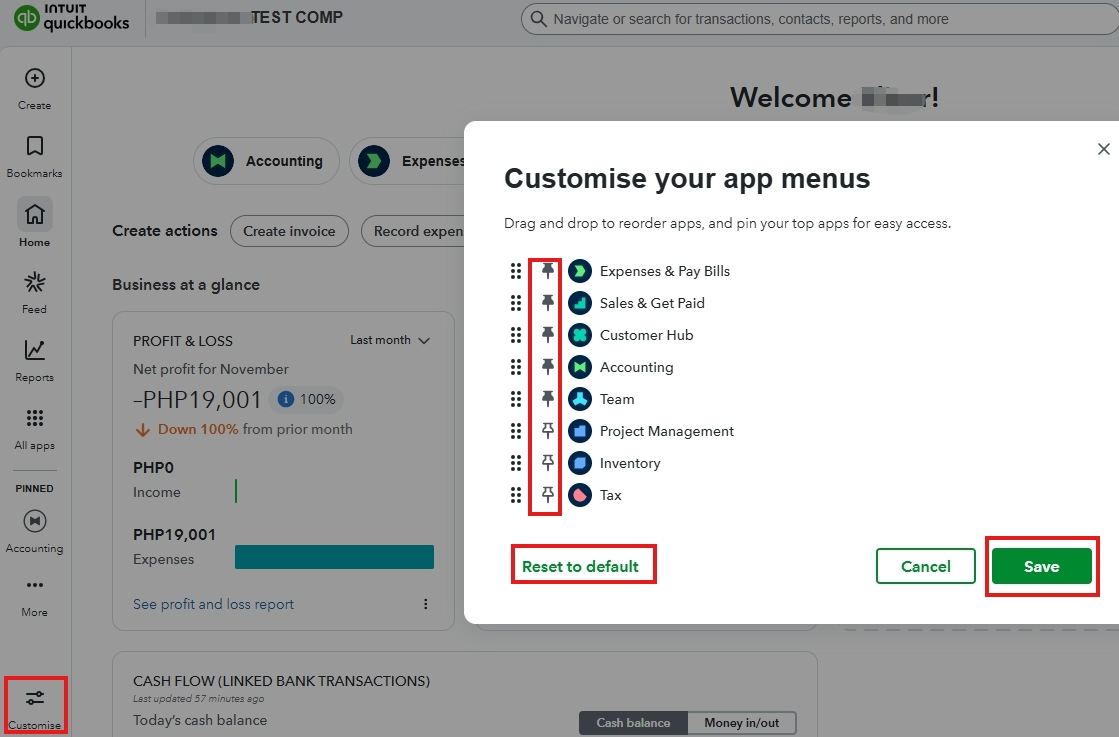
However, if the entire Left Navigation menu is missing, we recommend accessing your account using a private or incognito browser. This method is an effective way to resolve browser-related issues, as accumulated cache, cookies, or corrupted files in your browser can sometimes interfere with the program's functionality.
If you meant something else, please click the Reply button below.
You have clicked a link to a site outside of the QuickBooks or ProFile Communities. By clicking "Continue", you will leave the community and be taken to that site instead.
For more information visit our Security Center or to report suspicious websites you can contact us here


