
Turn on suggestions
Auto-suggest helps you quickly narrow down your search results by suggesting possible matches as you type.
Showing results for
What do you mean with Free?
Do you have QB Online Accountant Global version, not QB Online Global version, correct?
Hello, cutieonaninja! Thank you for reaching out to the Community.
We noticed your post seems to be a duplicate, and one of my colleagues has already provided a response. If you haven't had a chance to look at it yet, you can find their answer here.
If you have any other questions or need further assistance, please don’t hesitate to get back to us. We're here to help!
Please cancel my subscription.
We know how important this decision must be, Mylene. We're here to support you through the cancellation process.
Before doing so, we recommend downloading a copy of your data. It will help you keep your QuickBooks Online financial records for future use. You can find more details on how to export your data in this article: Export data, reports, lists, and more from QuickBooks Online.
To proceed with cancellation, follow the steps below:

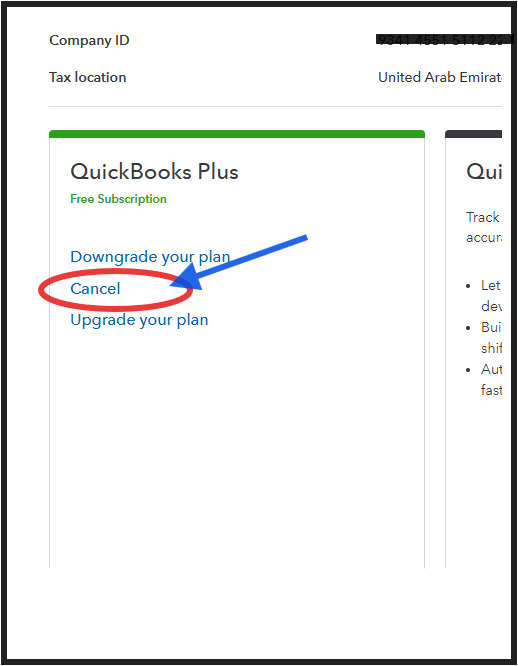
You can always come back to this thread if you have any other questions, Mylene. Take care and enjoy the rest of the day!
You have clicked a link to a site outside of the QuickBooks or ProFile Communities. By clicking "Continue", you will leave the community and be taken to that site instead.
For more information visit our Security Center or to report suspicious websites you can contact us here


