
Turn on suggestions
Auto-suggest helps you quickly narrow down your search results by suggesting possible matches as you type.
Showing results for
Hello there, bquansah-shieldi.
Allow me to share accurate information about uploading opening balances.
The ability to import the opening balances in QuickBooks Online is unavailable. Having the option to upload them directly into the program would be great. However, QuickBooks allows us to manually enter the opening balances for accounts.
Still, our program imports a few details using the Excel CSV file. Here's the sample screenshot:
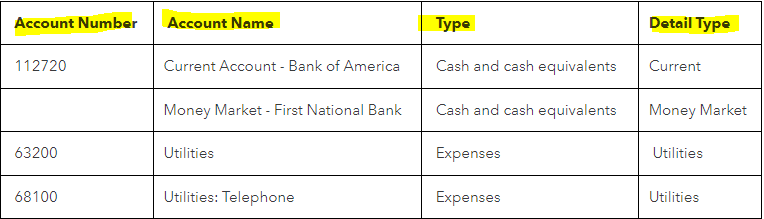
After you map your spreadsheet fields, you can now import them. For guidance, you can use this article: Import your chart of accounts to QuickBooks Online. After that, enter opening balances for each account.
If there are transactions associated to the account, we are required to record a journal entry for the opening balance.
Visit these articles for more tips and information about opening balances, comparing the Balance Sheet report to other reports, and reconciling accounts:
If you have additional questions about tracking balances in your accounts, please don't hesitate to add another post below. Take care and stay safe.
You have clicked a link to a site outside of the QuickBooks or ProFile Communities. By clicking "Continue", you will leave the community and be taken to that site instead.
For more information visit our Security Center or to report suspicious websites you can contact us here


