Hi there, uka77. Thank you for bringing this to our attention. Since you’re experiencing connection issues, I recommend first logging in to your bank’s website to check if there are any ongoing maintenance or service disruptions.
If the bank doesn’t report any maintenance issues, I suggest reaching out to our QuickBooks Support team for further assistance. They can investigate further and identify the cause of the bank connection problem.
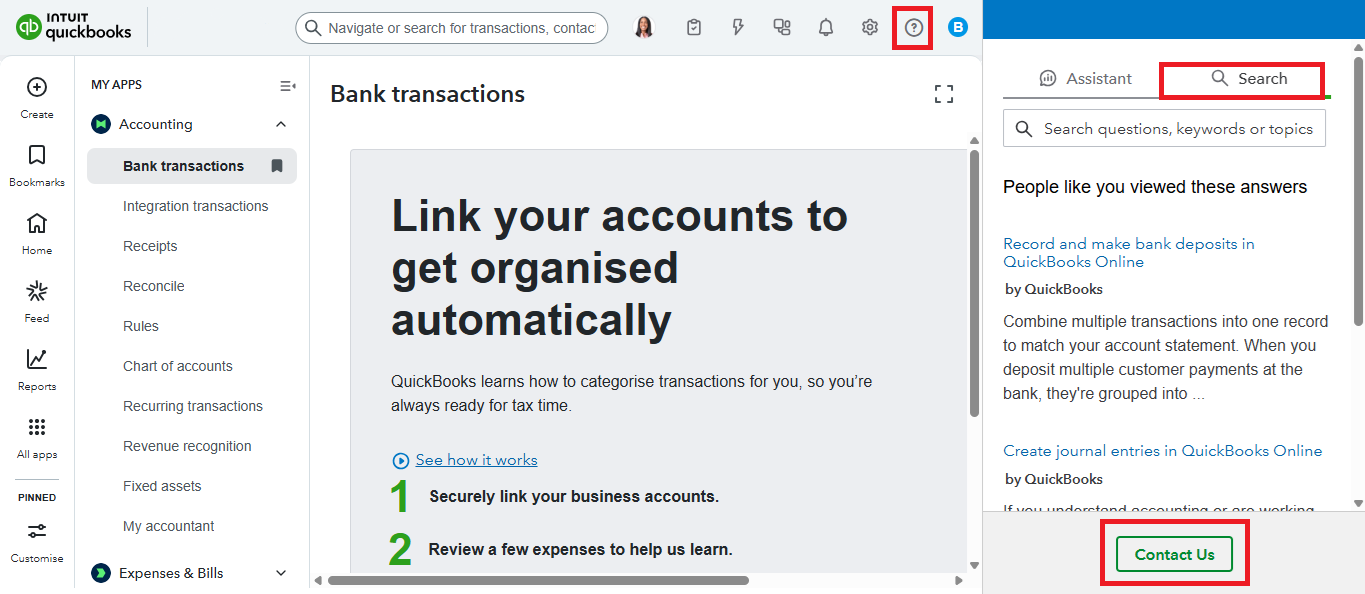
Here's how:
- Log in to your QuickBooks Account, then click the Help (?) button.
- Select the Search tab, then click Contact Us.
- Enter the issues you've encountered on the box, then click Continue.
- Select either Request a callback or start a live chat with an expert.
For additional guidance, you may refer to this article: Troubleshoot unknown bank connection issues.
In the meantime, I recommend manually uploading your bank transactions into QuickBooks so you can continue categorising them without delays.
Additionally, if you’re using a standard bank connection with Multi-factor Authentication (MFA), switching to a direct bank feed can help simplify the process by eliminating the need for MFA. Direct feeds provide a more seamless and secure connection.
For more information, refer to our article: Connect Commonwealth Bank Direct Feeds.
If you have more concerns related to QuickBooks, don't hesitate to reply here. We're here to help.


