
Turn on suggestions
Auto-suggest helps you quickly narrow down your search results by suggesting possible matches as you type.
Showing results for
Buy now and save 90% off today
xyzIf you are using QBO Simple Start or your account > 60 days old, you should open a new blank QBO account.
https://quickbooks.grsm.io/Asia-Pacific
Hi bewleysblackrock!
Fiat Lux - ASIA is right, but if your QBO is less than 60 days old, you can just purge it to remove everything you've entered.
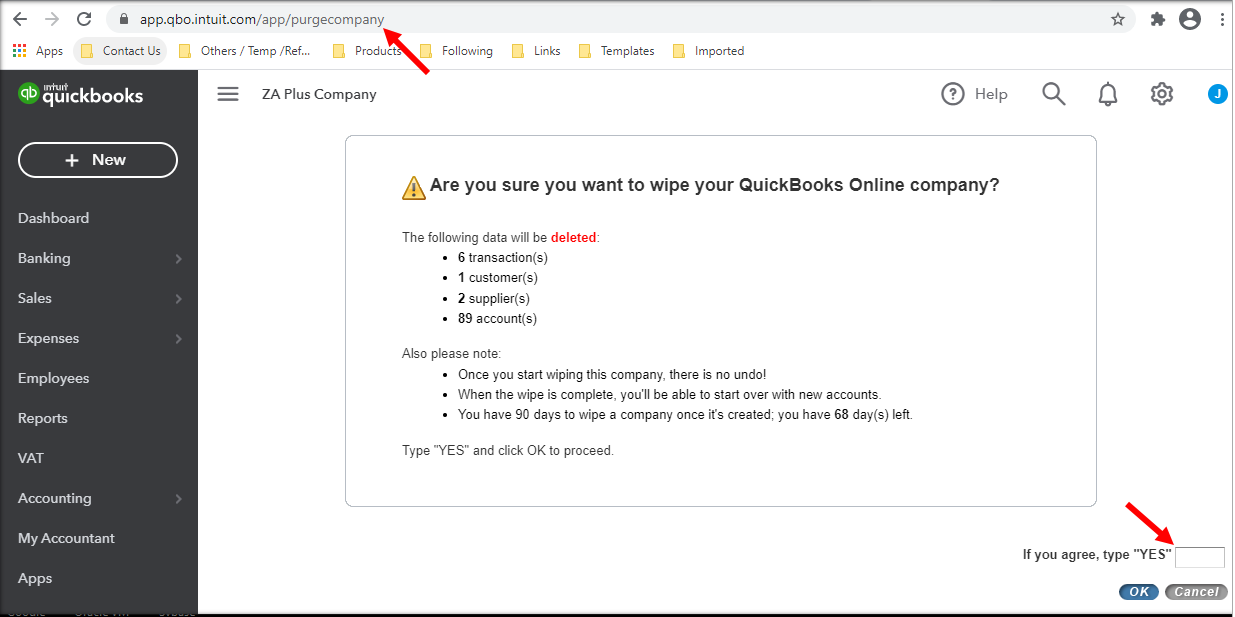
If your QBO is more than 60 days old, you can cancel it and sign up for a new one. Then, consider connecting your bank account to QBO so you can easily add your past transactions.
I'm just around if you need more help with your QBO company.
You have clicked a link to a site outside of the QuickBooks or ProFile Communities. By clicking "Continue", you will leave the community and be taken to that site instead.
For more information visit our Security Center or to report suspicious websites you can contact us here



