



SALE

Get 50% off QuickBooks for 3 months

See plans and pricing
Choose your... Country Language
How to Send an Invoice and Get Paid Faster in Singapore
Invoicing

How to Send an Invoice and Get Paid Faster in Singapore

Getting paid faster in Singapore means sending timely invoices. You have to be efficient and accurate while ensuring you comply with local regulations. But managing all of these different elements can be challenging while you’re trying to grow your business.

Professional invoicing software like QuickBooks is built to make this easier for you, and we’ll explain how it can help in this article. But first, let’s talk through the basics of invoicing and how to get paid faster in Singapore.

This guide will teach you all the important aspects of sending an invoice. We’ll show you how to navigate the Singapore business landscape and let you in on the secrets to accelerating your payments through invoicing.

The importance of sending clear and professional invoices

The Singaporean people value good communication, so clarity is important when invoicing your clients in this region. Customers can often grow frustrated at confusing formats and missing information, which can lead to payment disputes and delays.

To help, use clear and concise language in your invoice and corresponding email. Make the information as easy to understand as possible. Be accurate when listing item descriptions and prices, and remember to include up-to-date buyer and seller details.

You should also make sure your invoice reflects the Singaporean customs and regulations. For example, you must include GST registration numbers and rates to comply with tax laws.

This might sound like a lot to consider, but there is a way to simplify this process. QuickBooks can take care of your invoicing from start to finish. It automatically knows how to adhere to local regulations in Singapore and will ensure all your information is clear.

When to send an invoice

Getting paid on time is all about consistency. You want to establish a payment schedule both you and your client are comfortable with, so they’ll be expecting your email and you’ll experience faster payments.

In general, the standard time to send an invoice is 1-2 weeks after the work has been completed. But if you’re supplying a service for the next month? When that month is over, that’s when you should bill your client.

However, in some cases where projects last for much longer, progress invoices might be more applicable. This is when you and your client agree to partial payment. For example, receiving 20% upfront, another 20% halfway through, and the last 60% at the end. It’s common practice for ongoing work, ensuring you receive payment quicker and that the client can pay in more manageable installments.

Remember to keep that line of communication open with your client. This will allow you to check details with them if you’re ever unsure. It also helps with building lasting relationships, which is crucial for successful business transactions in Singapore.

Key elements every invoice should include

In Singapore, every invoice should follow the same structure. This means checking off a list of requirements to make sure you produce an accurate and compliant invoice. Here are some of the key elements to consider:

  • Invoice title: This should go at the top of your invoice.
  • Unique invoice number: Every invoice needs its own identification number. This helps with tracking your invoice and keeping an accurate financial record. If you’re creating multiple, the numbers should be sequential.
  • Invoice date: This will be used to show when the invoice was issued.
  • Due date: Outline when you expect to be paid. For example, you might specify “upon receipt” for quicker payments or “Net 30’ if you’re happy to wait 30 days.
  • Payment terms: Do you want the money to go directly to your bank or PayNow account? Make sure this is clearly outlined on your invoice to get paid quicker.
  • Buyer and seller details: Add the company name or the individual you want to bill, as well as your own information. You should also list GST registration numbers and business addresses.
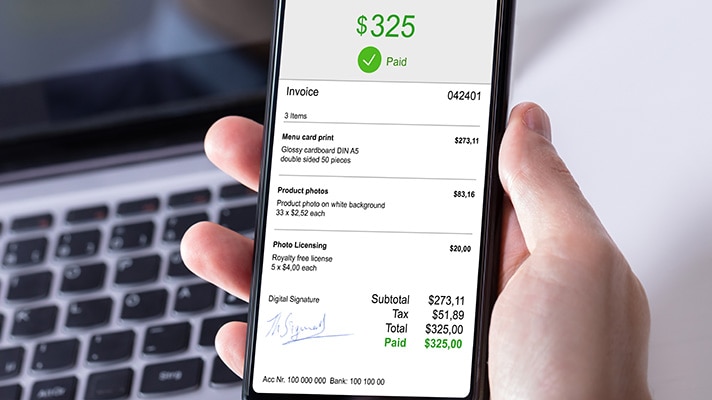
  • Itemized list of goods/services: There should be a detailed description of the goods/services provided as well as quantity, price per unit, discounts, GST rates and total amounts.

Take your time to make sure you get all the details correct. Remember to review carefully and maintain clarity. And if you’re ever overwhelmed by all these different elements, give online invoicing software a try—you might be surprised by how tools like QuickBooks can simplify invoice formatting.

How to include payment terms and due dates

Adding payment terms and due dates to your invoice will ensure you get your money faster. Plus, it helps with clarity.

Make your expectations explicit from the outset. Singaporean businesses value long-lasting and positive relationships built on honesty and trust. Communicate openly with your client about when you would like to receive payment. If you establish these requirements from the start, your client will know exactly what to expect from your invoice when it lands in their inbox.

For immediate payment, add “due upon receipt” and you should receive your funds as soon as possible. Or add “Net 30” or “Net 60” to your invoice if you’re happy to wait a little longer. Whatever you choose, make the terms clear so there’s no room for interpretation.

You should also include multiple payment methods. This will demonstrate your flexibility and can also help with getting paid faster. Show that you’re open to accepting the funds via bank transfers, ApplePay. PayNOW, or other digital wallets such as Buy Now, Pay Later and Atome.

Use online invoicing software for faster processing

Professional invoicing software like QuickBooks is designed to take care of every step of the invoicing process—from generating the invoice to chasing overdue payments and maintaining records for IRAS tax compliance.

You don’t have to worry about complicated calculations or regulatory compliance either. QuickBooks understands all the intricate details so you don’t have to. Here’s a list of some of the main benefits our solution can offer:

  • Get customized and professional invoices to match your brand.
  • Automate recurring invoices to save time in the future.
  • Track the status of your invoice with ease.
  • Set up reminders when payments are overdue instead of wasting time chasing.
  • Let software take care of all the tricky and timely calculations so you don’t have to.
  • Set up automatic progress invoicing for multiple payments.

QuickBooks also accepts various payment methods. Connect your PayNow account or ApplePay to unlock the door to faster payments.

Best practices for following up on overdue invoices

It’s no secret that businesses in Singapore like to cultivate relationships over time to create strong foundations of trust. As such, they also value punctuality, so you’re unlikely to experience overdue invoices.

However, on the rare occasions that a missed payment does disrupt your cash flow, it’s important you know how to handle the situation. Start by contacting your client, but don’t jump to conclusions, as this could damage trust.

A clear and polite email should do the trick. If you still don’t hear anything, give them a call. Talk through the issue together to find a solution. There may have been an error in the system, or your email could have gone to a junk folder. There are plenty of easily resolved avenues to go down first.

And remember, there’s every chance a mistake could have been made on your part too. In order to avoid this, we’d recommend using online software to reduce human error.

QuickBooks automatically generates accurate invoices and sends them without delay, minimizing any payment challenges. Plus, it will also send out reminders to your clients, chasing overdue invoices for you.

How to set up automated reminders in QuickBooks

Reminders are a lifesaver when payment schedules go awry, but it’s easy to forget to send these out when you’re busy working on key projects. QuickBooks will automate reminders to make sure you never miss a payment request.

If you already have an account, just follow these simple steps for setting up automated reminders:

  1. Go to the Sales tab in your settings.
  2. Select Edit in the Reminders section.
  3. Turn on Automatic Invoice Reminders and toggle on Reminder 1.
  4. Outline when you’d like your reminder to be sent.
  5. Customize the email template to your liking.
  6. Click Save and Done.

When editing the email template, remember to use polite language as this will help to maintain your professional relationship. The email will only be sent when your criteria are met—QuickBooks will detect late payments and contact your client automatically.

Grow Your Business With QuickBooks

Sending invoices as a freelancer

If you’re working solo, you’ll be very familiar with how to send an invoice. But with a wide range of projects and clients to manage, it can be a lot for one person to manage.

QuickBooks automatically creates invoices and sends them out on time, so you can spend more time concentrating on your important projects. Plus, compliance is completely taken care of too, as QuickBooks is set up to understand Singapore’s tax requirements and regulations.

How to set up recurring invoices for regular clients

There’s nothing quite like the anticipation of receiving payment at the end of each month. But if you have to manually input all the data for your invoices, it’s less exciting and more of a time-consuming administration task.

If you have a steady client or subscription-based agreement, recurring invoices are your best friend. Automatically request payment with QuickBooks, to effortlessly manage your client contracts and finances.

Want to know how it works? Here’s how to set up recurring invoices with QuickBooks:

  1. Go to Add Invoice. Select Manage in the top corner and then choose Automation.
  2. Click the Recurring invoice option to open the invoice template and then add all the relevant details. This includes naming the invoice, setting up your schedule, and including all the client information and payment methods.
  3. Save the template, and your recurring invoice should be all sorted.

No more worrying about cash flow or forgetting to send invoices. Get paid on time in the most passive and hassle-free way possible, thanks to QuickBooks.

Offering multiple payment methods to get paid faster

From ApplePay to Buy Now, Pay Later (BNPL), clients in Singapore love to have multiple payment options. It offers greater flexibility and means you get paid faster. Make sure you let your client know you’re open to bank transfers, PayNow, GrabPay and credit card payments.

Providing a variety of options shows your willingness to work alongside your client. Plus, if a bank transfer is off the cards, the customer still has multiple options to make a payment, helping you get paid faster and more reliably.

QuickBooks supports all common Singaporean payment methods, so getting set up couldn’t be easier.

How to write an email for sending an invoice?

Next, let’s talk about how to send an invoice via email.

The people of Singapore care about formal yet polite communication. This should be reflected in the email you send alongside your invoice, to help with building a rapport and getting paid on time.

Wondering what this looks like? There are some crucial elements you must include, such as:

  • A clear subject line with no filler, to show the purpose of the email.
  • A professional and friendly greeting using their formal title.
  • A short line of text that references your attached invoice.
  • Your expected due date for payment.
  • Remember to thank your client and add your personalized email signature.

All emails should be concise, and you should avoid using slang or humor. Carefully proof your content to make sure there’s no complicated jargon and that you’re being respectful.

Finally, when attaching your invoice, make sure it’s in a format that’s easy to access for your client. Find out if they prefer a PDF, a Word document, or something else entirely. This should have been established at the early stages of your partnership, but if you’re unsure, send them a message to double check.

And remember, QuickBooks generates and sends invoice emails directly—all you have to do is personalize the content to your liking.

Make invoicing a priority for faster payments

There’s one way to get faster payments in Singapore—by sending accurate and timely invoices. Make this a priority for your business or freelancing gig and it won’t take long for you to see the benefits.

If you really want to speed up the process, use professional invoicing software like QuickBooks. Have your invoices ready and sent to your client within minutes and set up reminders for long-term financial management. Instead of wasting time on administrative tasks, you can focus your efforts on your projects. And if you find it difficult to keep up with tax regulations and compliance, QuickBooks has you covered there too.

Get paid faster in Singapore. Try a 30-day free trial today.

Related Articles