What’s included in the chart of accounts?
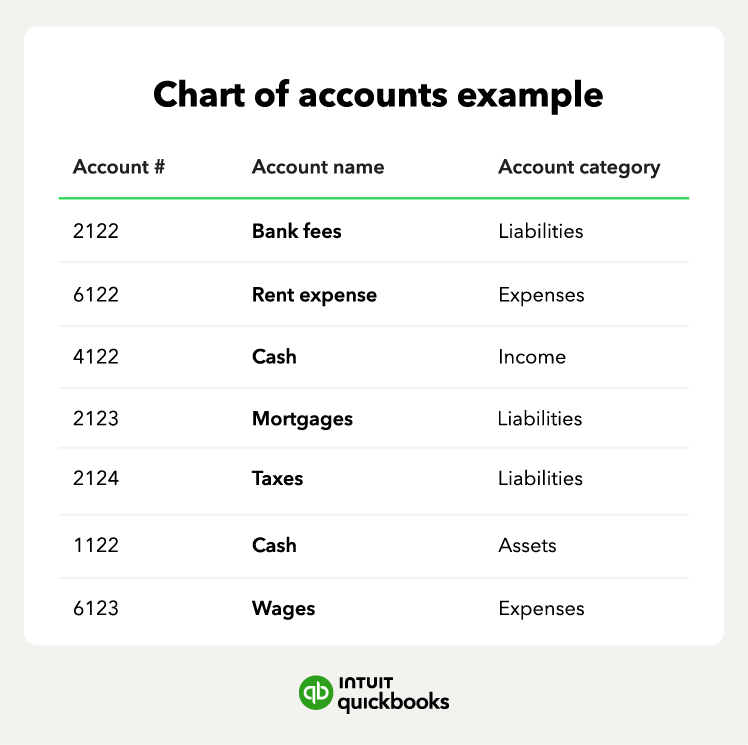
A chart of accounts groups transactions into categories such as assets, liabilities, equity, income, and expenses. These groupings help you organize financial data and prepare accurate reports. Here, we’ll break down each category and how they function within a chart of accounts structure.
Assets
Assets represent everything your business owns, controls, or uses to generate income. Within the chart of accounts, assets are usually listed first and separated into current assets (things you can convert into cash within a year) and non-current assets (long-term resources that support operations over time). Common examples include:
- Cash and bank accounts: The most liquid resources used for daily operations.
- Accounts receivable: Unpaid customer invoices that indicate future cash inflows.
- Inventory: Goods held for sale or production, essential for retail and manufacturing businesses.
- Equipment and property: Long-term physical assets like machinery, vehicles, or office space.
Tracking your business assets helps you understand your financial position, measure liquidity, and plan for future investments. It also provides a clear view of how your resources contribute to productivity, growth, and operational capacity.
Liabilities
Liabilities are the financial obligations your business owes to lenders, suppliers, employees, and government agencies. In the chart of accounts, they’re grouped into current liabilities (due within a year) and long-term liabilities (due over multiple years). These may include:
- Loans and credit facilities: Borrowed funds that require scheduled repayments.
- Accounts payable: Short-term debts owed to suppliers for goods or services.
- Taxes payable: Government obligations such as income tax, VAT, or withholding tax.
- Payroll liabilities: Employee-related obligations, including contributions and payroll taxes.
Organizing your liabilities properly helps you track payment deadlines and manage cash flow. It also makes audits and tax compliance much simpler.
Equity
Equity represents the owner’s or shareholders’ residual interest in the business after liabilities are subtracted from assets. It reflects the financial value that owners have invested or that the business has accumulated over time. Equity accounts may include:
- Owner’s capital: Initial and additional investments made by the business owner.
- Retained earnings: Profits the business keeps rather than distributing.
- Share capital: Funds raised through issuing shares to investors.
By tracking equity, businesses gain insight into long-term financial health, profitability trends, and how much value has been built over the years. Strong equity balances also support investor confidence and how much a bank may be willing to lend you.
Income
Income refers to the money your business earns from its normal operations, such as selling goods or providing services. In the chart of accounts, income accounts help you separate and analyze different revenue streams, including:
- Sales revenue: Earnings from products sold.
- Service income: Fees earned from performing services.
- Other operating income: Secondary revenue sources like commissions or rental income.
Having detailed income accounts allows you to identify which activities contribute most to your earnings and track performance fluctuations across seasons. This insight is important for pricing decisions, cash-flow forecasting, and strategic planning.
Expenses
Expenses represent the costs your business incurs to operate and generate income. In a chart of accounts, expense accounts help you monitor different types of spending, such as:
- Rent and utilities: Essential overhead costs for your business premises.
- Supplies and materials: Items used in daily operations or production.
- Payroll expenses: Wages, benefits, and related employee costs.
- Marketing and advertising: Activities that promote your products and services.
With categorized expenses, you can spot overspending, identify opportunities to cut costs, and determine whether expenses align with business goals. Clear expense tracking also improves budgeting accuracy and supports clean, reliable reporting.