We're sorry to see you go, @gammond2021. To cancel your subscription, let's navigate to the Subscriptions and billing.
The steps to cancel your QuickBooks plan depend on where you initially signed up. If you registered through a mobile app store, visit that app store to manage and cancel your account.
Before cancelling, consider switching to a different plan if your needs have changed. This way, you’ll keep your data, settings, and account history, making it a simpler alternative to starting from scratch.
If you’d prefer to proceed with cancelling, here’s how to do it for accounts purchased directly through Intuit:
- Open a web browser on your computer and sign in to your QuickBooks account as the primary admin.
- Go to Settings, then Subscriptions and billing.
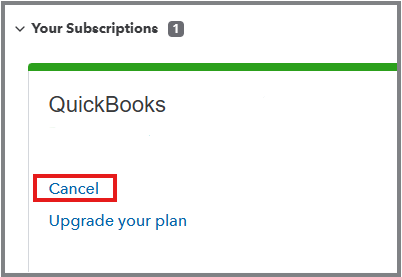
- In the Your Subscriptions section, select Cancel.
- Follow the on-screen instructions to complete the process.
After cancellation, you'll have read-only access to your data for one year. For more details, refer to this article: What happens to your data after cancellation.
I'm still open to your replies if you have further questions. I'm here to help.


