Turn on suggestions
Auto-suggest helps you quickly narrow down your search results by suggesting possible matches as you type.
Showing results for
I understand the frustration, and your feelings are valid, CaptainEon.
To begin with, may I ask for the specific changes you find terrible, whether it's from banking or reports features in QuickBooks Online (QBO)? Any information will guide us in refining our interface to better meet your needs.
Alternatively, I highly encourage you to provide feedback on the changes to our product team as they value user input and can consider them for future updates.
To send the feedback, you can follow the steps below:
You can also review our QuickBooks Online Feature Requests website for any request updates.
Here's a resource you can explore about customizing your QBO homepage to highlight the info that is most important to you: Get started and adjust settings after you sign up for QuickBooks Online.
You can always come back on this thread if you need further assistance with any QuickBooks concerns.
I like your suggestion to click the gear icon and select feedback. It would be fine if that link actually worked. Something else that has stopped working and not been fixed for quite a while now.
This is the most horrific service :( I truly can't believe how bad it's gotten. Especially after this latest update, and now a pricing increase for literally no reason... I am being forced to look for a new service.
I fill out the feedback form and NEVER get any status or feedback from my submission. I never am notified when things are fixed. I never get any admission of QB techs that it is a development bug.
They spend the first 30 minutes trying to tell me the system is supposed to work some ridiculous way.
I think your customers are QB's testers. Do you test anything you develop before you go live? do you test end to end? or just see what's on the screen and think all is well?
I have seen 3 different versions of a sales receipt and pledge in 3 days. Do you know what does to employees who only know they are to fill out the forms in specific ways?
I agree with the poster....stop MESSING with a LIVE system daily. Do 1 formal release a month or quarter and tell your customers what the changes are!
That online resource link you posted is to Classic View dashboard, not the ungawdly awful New View dashboard.
And to answer your question - Intuit has needlessly complicated menu trees, so single-click steps like running a report view by month are now 5 clicks deep. Even navigating the dashboard is 3 menu trees deep! Do the engineers even use the software? Did they speak with any actual bookkeepers!?!?! Those of us using QB Accountant, with multiple clients live and die by effiency. This has literally tripled navigation time.
The new reports are HORRENDOUS - the view window is too small, there's a bizarre gray line down the middle of it half the time (my suspicion is it's a bug in the window framework), the reports don't update automatically if any detail is updated, the detail view doesn't update if any data is changed, if you drill down then follow the crumbtrail back out, at least half of the time we lose the formatted view and end up at the reports menu. The other half of the time, you click the TINY refresh button and get an error message that the system can't do that now. Bring back the big RUN REPORT button! BRING BACK THE ORIGINAL REPORTS FORMAT.
Classic View allowed us to hide any menu items we never used. Now we can't. We can rearrange the order of items, but that's about it. The single black nav bar is now a nonsensical list of gibberish icons, THAT THEN BRING UP A SECOND AND THIRD NAV BAR. Who thinks this is helpful!?!?!
CaptainEon, I agree with your feedback. I contacted customer service today regarding the new interface. They said I can't switch back to the old interface because QuickBooks "randomly" chose a select number of customers to have that option available. I've been a loyal customer for decades, and our "feedback" to the developers goes out into thin air. They never listen to their customers. They are only concerned with their bottom line. The moderators on these community forum topics have the same tired, scripted answers. I've said before that I don't care about the "badges" I've earned for my engagement on the forums. I want my feedback to matter, along with all their other customers. I don't have an issue with change, as long as it actually makes my work more efficient. The changes actually involve more steps. There is no customization with invoicing, as many customers have also requested.
What's even more annoying is that I'm trying to update my logo, and even though I'm using the exact same *everything* (only the font is different), suddenly any new .png i upload is crappy and distorted no matter how we try to fix it on our end. I'm so fed up with this crap.
I’m finding the invoicing side of things horrible to use via the QB app with the new update.
It was so simple to use before, stop messing with it !!
Unless it’s fixed very soon I will be moving to another accounts program
I agree it is horrible. The previous interface worked so much better and quicker. This new interface does not work- searching vendor/customer names does not work. I have to scroll through a long list to find them and they don’t load all at once. When categorizing expenses or deposits, subcategories listed don’t show parent category whereas before we were always shown the link to the root category. Along with other bugs and non-intuitive interfacing. This is very frustrating,
QuickBooks is one of the worst companies I’ve ever dealt with.. I am so used to working with them that I have not switched yet, but this might be the last straw. This new mobile layout is trash. I can’t believe they continuously change their layouts on desktop and mobile without even giving an option to continue to use the same system you are used to.
it should be illegal. It is honestly so bad.
I resolved my issue. I had to clear the app cache I guess it was just not working before.. but they still should not forcefully change the layout as much as they do
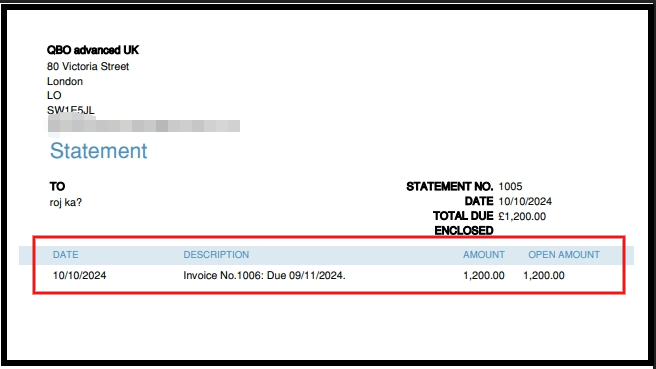
It's the statements I don't like. They used to show all outsanding invoices, regardless of age - original sum and unpaid balance. They now only show original sums and, if the invoices are older than one month, you can't see them listed individually. It's awful and really unhelpful.
We hear your sentiments, and we appreciate you taking the time to bring this to our attention, Sally.
To clarify, are you referring to the Customer Statement feature? If so, the good news is that the functionality hasn’t changed. It can still display transactions from the past 365 days as long as the statement date range is set correctly.
To view all outstanding invoices, including those older than one month, you’ll want to select the Open Item statement type. The invoices will appear once you send the statement or when clicking Print or Preview.
Let us know if you have additional questions or concerns. Our Community forum is here to help.
quickbooks is now shocking.. what have they done too it.. a once easy to use interface is now a total mess and doesn't load well.. should it not be changed back we for one will be leaving for another platform. its truly dreadful and pretty much sums up quickbooks this past 14 months.. dreadful customer service. as long there taking your companies hard earned money there happy.. customer service is a big fat zero.. they used be fantastic and for what ever reason there going to ruin there business as customers will leave in droves. its so very poor now.. hate it with a passion and makes accounting awkward and not very easy. A dreadful interface.
I completely agree. QB used to be user friendly. quick to use on the phone and all functions available within a few clicks.
it has been ruined by the latest update. invoices freezing requiring a reboot. items requiring specific search inputs in order to be found - if you search for an item in a non specific way it cannot be found.
who exactly authorised this DOG SH!T update
I will not be renewing my annual QB plan
1 step forwards and 5 steps back
I don't want to spend time learning a new UI. This tool is not a here for my enjoyment and to give me good feelings. Its sole purpose is to ensure I manage my company and taxes well. When you change things, you force me to spend time (which is money) to figure out how to do the same thing I could before in your new UI.
There is zero value in a new UI for me.
awful redesign.. nows slow. and full of double menu clicks.. its ruined it.. we are now looking to move away from this platform after many many years.. its most certainly not an improvement.. its good backwards. those idiots who think there clever in redesigning do not consult customers. they all need sacking.
I came here to say the same thing. You guys keep on charging us more. And keep messing with it, and you're making it worse. A lot of us will leave for another platform if you guys do not fix these issues.
Sincerely, I don’t know what Intuit was thinking with this release. It’s not as user friendly as the self employed version. Its smart enough to pull transactions, but too stupid to see identical duplicates so you have to manually check everything. I’d stop it from using bank records but it won’t let me manually mark an invoice as paid…records payment but keeps invoice unpaid. Regularly has errors and retry messages. Just tried to delete a $120k transaction and it can’t seem to do it. DO US ALL A FAVOR AND REVERT TO THE OLD VERSIONS UNTIL YOU HAVE ACTUALLY TESTED THIS TRASHY NEW VERSION!!! I recently sent an invoice and had to explain QuickBooks marked it paid even though no bank transactions match that dollar amount; I tried to mark it unpaid but got error messages, so just pay the “paid” invoice...also said I hate this new QuickBooks…and he said ME TOO!!! You have to do something based on ALL THE NEGATIVE feedback. What, if any, compliments have you gotten?
Quickbooks has gotten worse. We were forced to update to the latest version and it completely changed Shipping Manager. Shipping Manager is absolutely terrible now. It doesn't save account numbers like it did before and requires a phone number for every shipment. What's worse is that my Shipping Manager won't even work and QB team can't even figure out why. It's definitely a QB internal bug and glitch... This makes it really frustrating to use.
Hard agree.
The thing that's messing with me the most besides the visually disorienting landing page is how the transactions are now sorted within each Chart of Accounts register. It used to start you at the top of the page and displayed the most recent posts into those accounts descending backwards in history, continuing to descend on each subsequent page. Now it takes you to the bottom of the page displaying the most recent, with ~40 transactions ascending into the past to the top of the page and each subsequent page is the same and sorting does not help.
Additionally, we can no longer export custom dates extending beyond a few years. It's my effing data...I should be able to access and export it at will.
The last thing QBO needs to be doing is making things harder for their users.
Your concerns are valid, MKMFS. In the Chart of Accounts page, transaction dates can be sorted in descending or ascending order. Click View register for the selected bank, then click the arrow next to the DATE column to sort in descending order and view the most recent transactions.
I've included screenshots for your reference:
Upward arrow: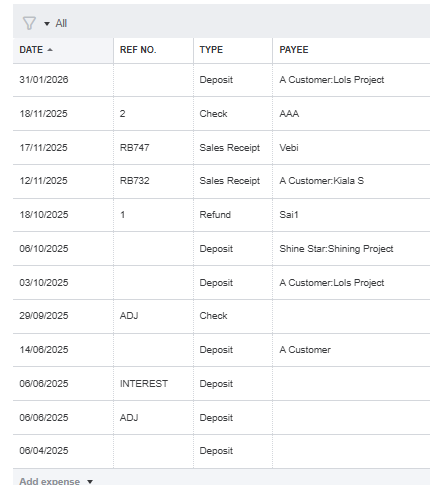
Downward arrow: 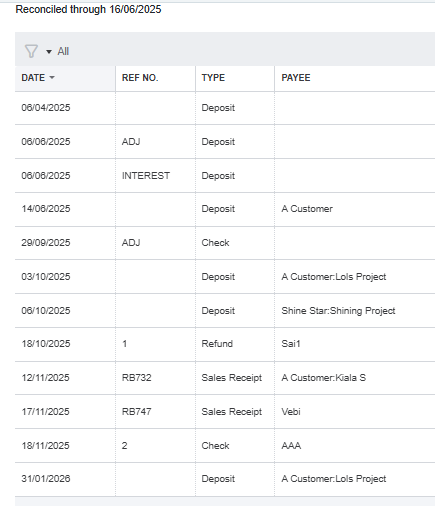
Regarding the custom date range for exports, please note that the system can only retrieve transactions from the last two years. As an alternative, you can run an Account QuickReport instead of exporting data from the View Register or Account History screen. It contains the same data, but there is no limit on the custom date range. Here's what you need to do:
Please don't hesitate to post again if you have any other QuickBooks-related concerns.
It software engineers have nothing better to do than mess around. Get the basics rights, HMRC links that are reliable, the last mistakes cost me £500 in fines due to QBO issues. Then there are the fees a 100% increase in 4 years.
Want to snap a receipt, go and make a coffee while the app loads.
Multi currency, a total scam and then you cannot downgrade.
Want to leave QBO good luck they encrypt your data
My word! ... QB are clearly trying to send their users to other software! ....
Here's an email I have just sent to them after receiving yet another email of marketing hype! They are clowns to think they are offering improvements ... we do not need this mess that is the "modern" QBO ... Did the people running QB go to the same school as the clown at the White House? ....
My email ....
Hi A
Thanks for the info … although I have no need for any direct QB support for now.
The only thing I WOULD like from QB is for them to leave an excellent product alone! … the nonsense email below is nothing more than marketing waffle, generated by people who are obsessed with AI, but appearing to have very little “Accountancy” knowledge. We (and I am sure there a lot of us accounts with similar views) love(d) QB because it was so straightforward and easy to use and clients could do all they needed in their accounting data with minimal support. These aspects are what brought us to QB … and away from Sage etc. But now … QB is looking cluttered and messy and the reporting is dreadful and the filters in reporting are so over the top and EVERY new standard report requires quite some time to adjust to how we want/need them to be). I certainly hope that we shall still be able to view reports with the layouts we Have created as “custom reports” when the new version of QB is the only option! Having to re-work all the beautiful report layouts will certainly exceed any perceived “improvements”.
And as for the over the top AI craze! … This has so far (for me) proven to be a hinderance & not a help. And no client has expressed any satisfaction from it … in fact the opposite … it simply crowds out any commonsense and easy processing of the bank data. … I wish I could turn it off! … Now THAT WOULD be a useful improvement!
If I were coming to QB new, I can guarantee that I would be less likely to taker it up instead of some other accounting app. It’s only because I now have so many clients on QB when I encouraged them to sign up to the original version. This is like another software package altogether.
Anyway … just letting you know my thoughts on QB after the past few months of marketing hype and my finding it to be a step backwards … and this is from someone who loves IT solutions to accountancy issues!
Yours … disappointedly!
A


You have clicked a link to a site outside of the QuickBooks or ProFile Communities. By clicking "Continue", you will leave the community and be taken to that site instead.


