There are different areas where we can view the account number and sort code, Tony.
If you’re referring to the bank account on the Banking page, click the pencil icon and select the Edit sign-in info icon to review your details. Enter your bank login credentials to access the account information.
From there, you can review the details of the real bank account, including the routing number and bank account number.
If you're referring to the Chart of Accounts page, you'll need to enable account numbers to add and view account numbers for the accounts you've created.
Here's how:
- Navigate to the Gear icon.
- Click Account and Settings.
- In the Advanced tab, select the Chart of Accounts section.
- Enable account numbers and tick the Show account numbers boxes.
- Hit Save.
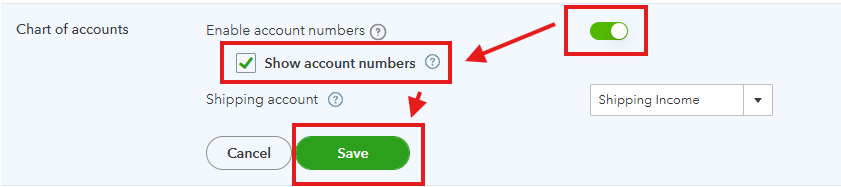
Please note after enabling the account numbers it does not automatically assign them to your accounts. You'll need to manually add account numbers and sort codes to use this feature.
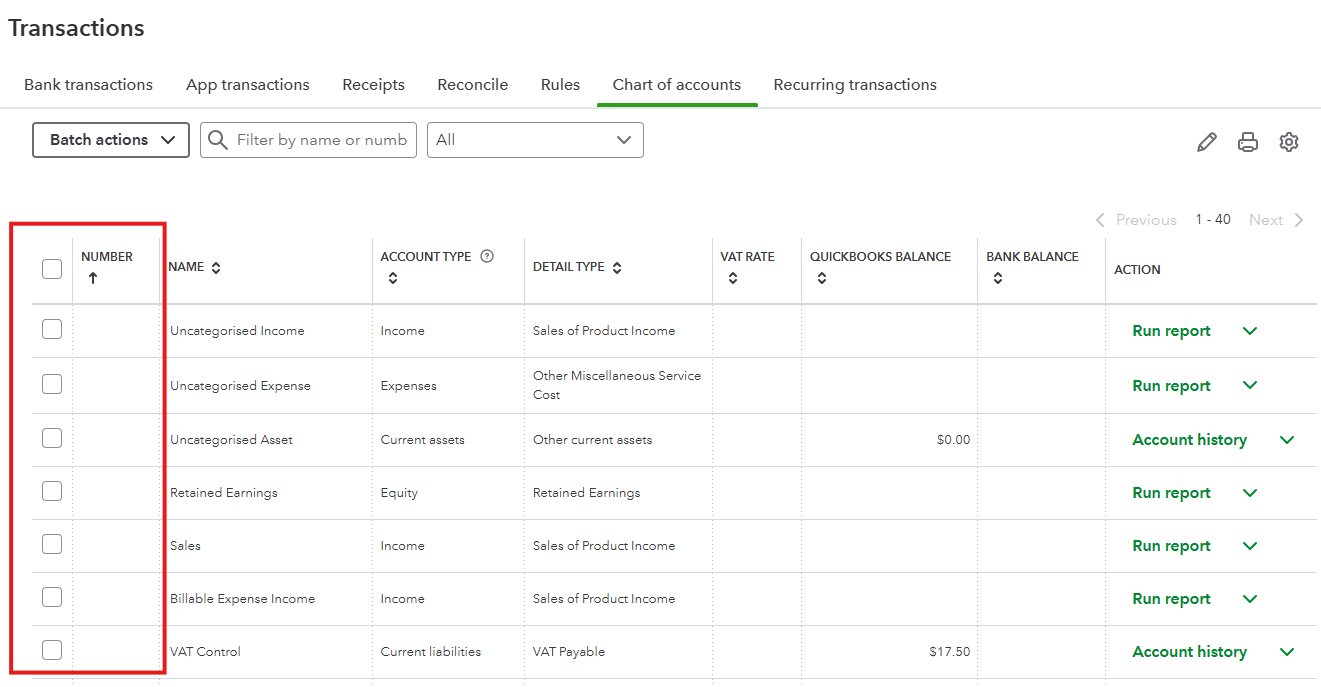
When you create an account or return to the account list, you'll see a column displaying the account number. Refer to the sample screenshot below:
Please let me know if you're referring to something else or need more assistance. I'm right here together with my colleague to help you further.


