Hi there, @accountwell.
Let's work together and import your bank file to your QuickBooks Online (QBO) account. Can you share with me the error message you received? This way, I can check here on my end if there are any related issues. Additional details are appreciated.
In the meantime, you'll want to ensure your bank file is in a CSV file format. This way, we can smoothly import your bank file in your QBO account. QBO import CSV file that uses either a 3-column or 4-column template.
The 3-column template has a column for the Date, Description, and the Amount. 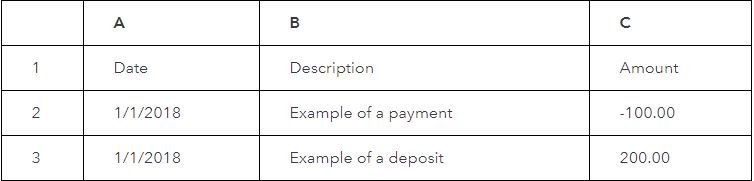
While the 4-column format has a column for the Date, Description, and both a Credit and a Debit column. 
Here's an article you can read for more details in importing your bank transactions using an Excel CSV file.
On the other hand, I got you this article for additional reference in importing your bank transactions to your QBO account: Manually upload transactions into QuickBooks Online.
Let me also add this article that can guide you in reconciling your accounts effectively: Reconcile an account in QuickBooks Online.
You can always get back to me whenever you need help with your QBO account. I'll be around to help you anytime. Have a great day and take care!


